
 614.224.6226
The web design trends of 2026 share one idea: sites are moving away from sameness. Organic layouts, expressive type, tactile textures and purposeful motion are replacing the clean, interchangeable template look. Under the surface, speed and accessibility have become measurable standards rather than nice extras. For a business owner, the question is not which trend is newest. It is which ones make your site easier to trust, easier to use and easier to find.
This guide covers the visual trends, the UI patterns behind them and the technical requirements that decide whether a redesign pays off. It also says plainly which trends fit a small business, a manufacturer or a nonprofit, and which are mostly for show.
TL;DR
- The big visual shift is toward human-centered design: organic shapes, kinetic type, soft gradients and tactile textures instead of minimalist sameness.
- AI is now a production tool, not a differentiator. The sites that stand out pair AI-assisted workflows with human-crafted brand visuals and UX decisions.
- Speed and accessibility are no longer optional. Core Web Vitals thresholds and WCAG 2.2 are the baseline, and accessibility lawsuits are rising.
- Adopt trends that serve a visitor’s goal. Skip the ones that slow the page, hide navigation or make your brand look like everyone else’s.
Table of Contents
- Why 2026 looks different from the last few years
- Visual trends worth considering
- UI patterns shaping how sites behave
- AI in web design: use it, but don’t let it be your brand
- The non-negotiables: speed and accessibility
- A quick filter: which trends fit which business
- Our perspective: trends are inputs, not a plan
- How to decide what to apply to your site
- Trends to treat with suspicion
- Working with Marcy Design
- FAQ
- Sources
Why 2026 looks different from the last few years
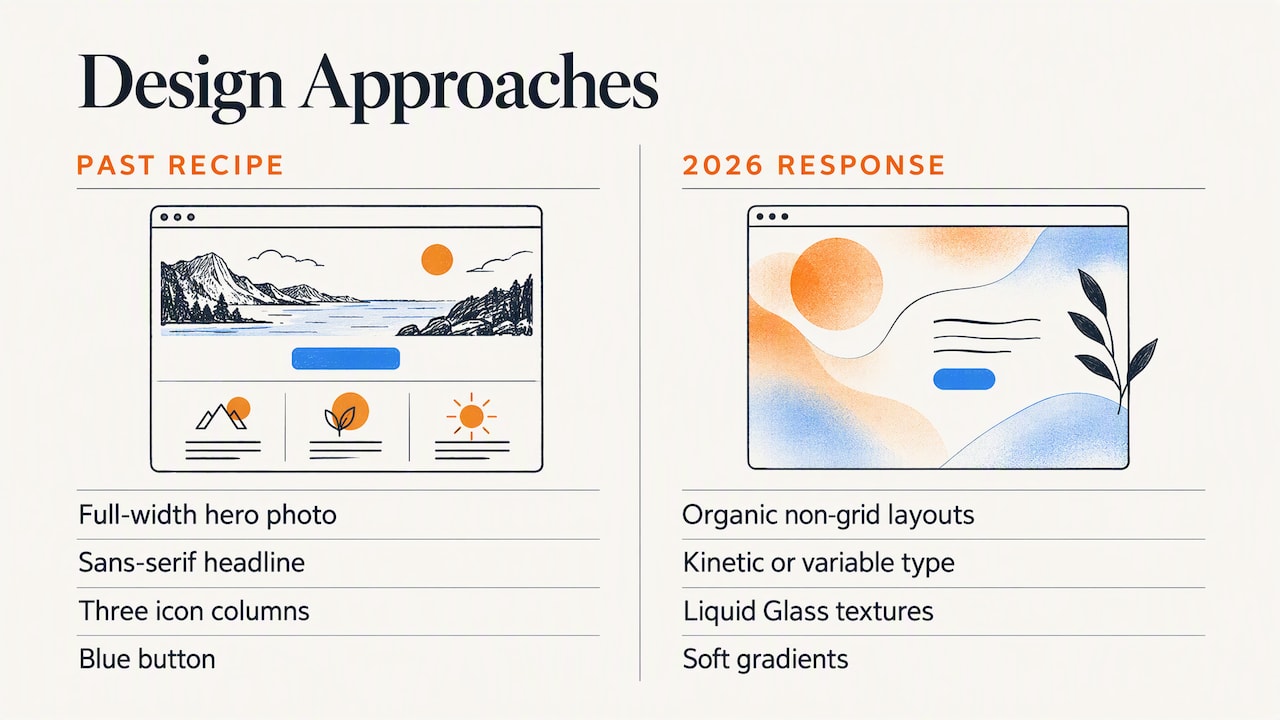
For roughly a decade, many business sites converged on the same recipe: a full-width hero photo, a sans-serif headline, three icon columns and a blue button. It was safe and fast to build. It also made companies in the same industry hard to tell apart.
The current trend cycle is a reaction. Webflow’s 2026 trend roundup frames the leading looks as a pushback against minimalist sameness, with organic, non-grid layouts, kinetic or variable typography, and tactile textures such as Liquid Glass and soft gradients.
There is a second force at work. The Nielsen Norman Group’s State of UX 2026 argues that UI is being commoditized by design systems and AI, which makes polished interfaces a weaker differentiator. What still sets a business apart, in their analysis, is curated taste, research-informed understanding of the audience and good judgment that software cannot automate.
Read together, those two points explain most of what follows. Anyone can now generate a clean layout. The value is in the decisions that make it yours.
Visual trends worth considering
Organic shapes and anti-grid layouts
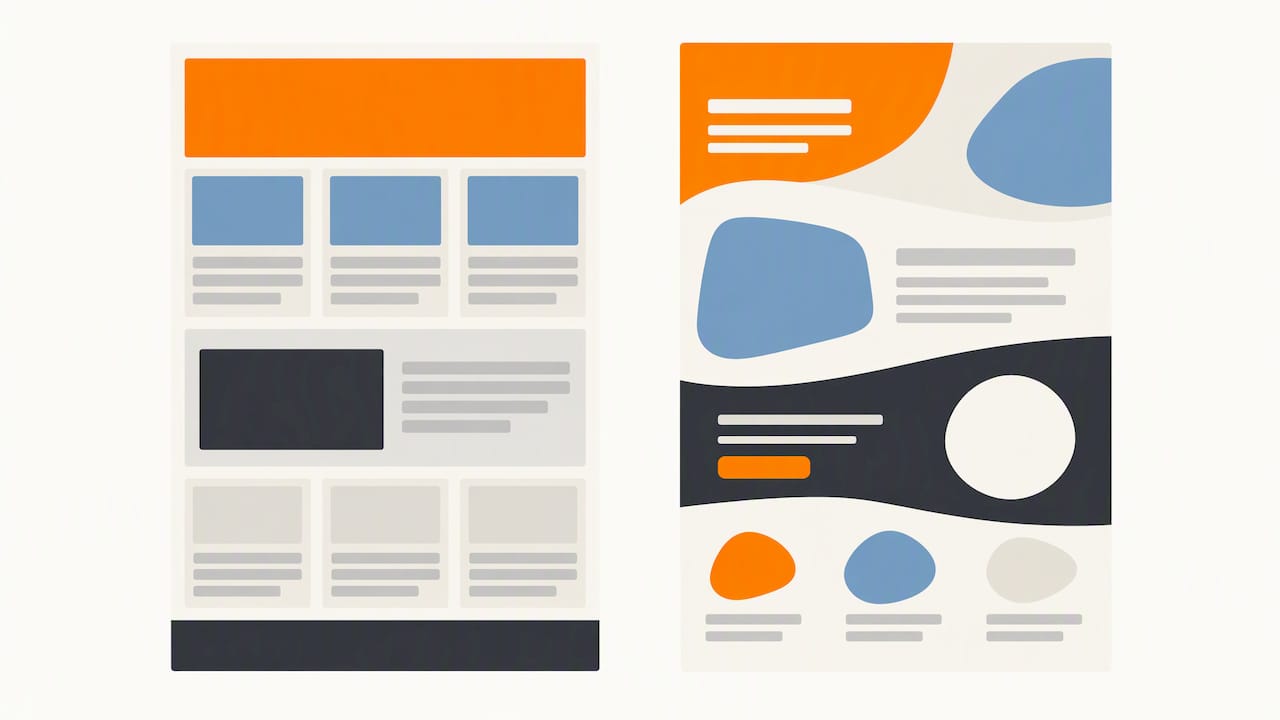
Rigid, boxed grids are giving way to overlapping sections, curved dividers, asymmetric image placement and hand-drawn or irregular shapes. Used well, this makes a page feel designed by people. Used badly, it makes content hard to scan.
Where it fits: brands with a personality to show, such as restaurants, craft producers, creative services and nonprofits telling a mission story.
Where to hold back: pages where visitors need to compare things quickly, such as product catalogs, spec sheets and pricing tables. Keep a clear underlying structure even when the surface is loose.
Expressive and kinetic typography
Type is doing more of the brand work. Oversized headlines, variable fonts that shift weight as you scroll, and distinctive typefaces replace default system fonts. A strong typeface choice is one of the cheapest ways to look unlike your competitors.
The cautions are practical. Text that animates must stay readable, motion must respect users who have reduced-motion settings turned on, and custom fonts must not delay the first paint of your page.
Tactile textures: soft gradients, glass and light skeuomorphism
After years of flat design, surfaces are regaining depth: frosted translucent panels, soft shadows, gradients and subtle grain. Webflow lists the return of tactile textures, including Liquid Glass, among its defining 2026 looks (see the trend roundup).
Translucent layers can reduce text contrast, and contrast is an accessibility requirement, not a taste. Test every glass panel with real text on top of real backgrounds, including on a phone outdoors.
Purposeful motion and microinteractions
Small animations that confirm a click, reveal a section or guide the eye to the next step help people understand a page. Big, scroll-jacked animations that take control away from the visitor do the opposite.
A useful test: if you removed the animation, would the visitor lose information? If yes, it is doing a job. If no, it is decoration, and it should be light enough that it never costs you speed.
Imperfection and a human touch
Illustrations with visible hand-work, real photos of your actual team and shop floor, and a slightly irregular layout all signal that a real company is behind the site. This is also the most budget-friendly trend, because it rewards authenticity rather than production polish.
For a manufacturer, that can mean original photography of your plant, your people and your finished work rather than stock images of handshakes.
UI patterns shaping how sites behave
Visual style gets the headlines, but interface patterns affect conversions more. Several are worth knowing.
- Conversational and assistive interfaces. Chat-style helpers and smarter site search are appearing on business sites. They help when they answer real questions (hours, service areas, order status) and hurt when they stand between a visitor and a phone number.
- Personalization with boundaries. Showing returning visitors relevant content can lift engagement, but it should never feel invasive. Personalize on what people did on your site, not on data they did not knowingly give you.
- Mobile-first, performance-focused layouts. Most visitors reach many business sites from a phone. Design the small screen first, then expand.
- Clear, honest navigation. Experimental layouts are fine, but visitors still need to find services, proof and a contact route within a few seconds.
If you are weighing how much the phone experience matters for your own site, our piece on separating truth from details in mobile web design is a good companion read.
AI in web design: use it, but don’t let it be your brand
AI has changed how sites get built. It speeds up repetitive implementation work such as turning designs into code, producing variants and drafting structure. That is real value, and it can lower the time and cost of a project.
The risk is sameness. According to the NN/g analysis summarized in the State of UX 2026, AI fatigue is real, and leaning on generic AI-generated assets can make a site indistinguishable from competitors. The approach that holds up is AI-enabled and human-crafted: let the tools handle the routine work, and keep people in charge of proprietary visuals, messaging and high-level UX strategy.
A practical rule for your own site: anything a visitor uses to decide whether to trust you should come from you. That means your photography, your case studies, your team and your voice. Let AI speed up the plumbing, not the personality.
The non-negotiables: speed and accessibility
A site can follow every visual trend and still lose business if it is slow or hard to use. Two standards matter most in 2026.
Core Web Vitals
Google measures real-user experience through three metrics, evaluated at the 75th percentile of visits. According to hafencity.dev’s quality guide, the thresholds are:
| Metric | What it measures | Target |
|---|---|---|
| Largest Contentful Paint (LCP) | How fast the main content appears | 2.5 seconds or less |
| Interaction to Next Paint (INP) | How quickly the page responds to taps and clicks | Under 200 milliseconds |
| Cumulative Layout Shift (CLS) | How much the layout jumps while loading | Under 0.1 |
The same source reports that as of late 2025 only 48% of mobile websites passed all three, so meeting them is still an advantage rather than a default.
Here is the trap for trend-chasers. Heavy animation, large textures and decorative effects can push these numbers the wrong way. But the fix is not simply a lighter page. The 2025 Web Almanac performance chapter finds that page weight barely correlates with pass rates. What matters more is architecture: server response time, lazy-loading components and prioritizing critical content. So a design with rich visuals can still pass, if it is built carefully.
Accessibility and WCAG 2.2
Accessibility has moved from good practice to business risk. Design Key’s 2026 playbook treats WCAG 2.2 as the baseline and reports that US federal accessibility filings rose 27% year over year in 2025, to 3,117. It also argues that accessibility belongs in a site’s design system from day one, rather than as an audit after launch.
This connects directly to the trends above:
- Glass and gradient effects need sufficient text contrast.
- Kinetic type and motion need a reduced-motion option.
- Anti-grid layouts still need a logical reading and keyboard order.
- Custom controls need visible focus states and proper labels.
This is general information, not legal advice. If you have received a demand letter or are unsure about your exposure, talk to an attorney who handles ADA matters, and have your site tested against WCAG 2.2 by an accessibility specialist.
A quick filter: which trends fit which business
| Business type | Strong fit | Use with care |
|---|---|---|
| Manufacturer or industrial supplier | Original plant and product photography, clear typography, fast spec and catalog pages | Heavy 3D, experimental navigation |
| Ecommerce store | Fast mobile checkout, microinteractions, tactile product presentation | Scroll-jacking, anything that delays the product page |
| Nonprofit | Human-centered imagery, illustration, story-led layouts | Effects that hurt accessibility for donors and volunteers |
| Local service business | Real team photos, simple mobile-first layout, clear calls to action | Over-designed hero animations |
| Professional services | Distinctive typography, confident copy, case-study proof | Generic AI imagery |
If you sell online, what makes an ecommerce site stand out covers the fundamentals that matter more than any trend.
Our perspective: trends are inputs, not a plan
We have been designing websites for more than 38 years, and we have watched many trends arrive with great excitement and leave quietly. Flash intros, parallax everything, carousels on every homepage. Some left behind lasting ideas. Most left behind dated websites and clients who had to pay twice.
Our view is simple. A trend is worth adopting when it helps a specific audience do a specific thing. A manufacturer’s buyer wants to confirm capability and request a quote. A donor wants to understand impact and give without friction. Neither is looking for a frosted-glass effect, though either may appreciate it if the page is fast and clear.
So we start with the business goal, the audience and the brand, then pick the trends that support them. That is what we mean by tailored solutions and user-focused design. We also care about measurable results, which is why speed, accessibility and search visibility are part of the build rather than a late add-on.
On AI, we agree with the human-crafted direction the research points to. We offer AI-powered solutions because they help, but your brand’s look, voice and proof should never be generic. If you cannot tell your site from a competitor’s with the logo covered, a new trend will not fix that.
One more thing we tell clients: a redesign is not all or nothing. Many businesses get most of the benefit from updating typography, photography, speed and accessibility without rebuilding everything. Our article on whether upgrading your business website has to be all or nothing explains how to think about it.
— Greg
How to decide what to apply to your site
Use these steps before you commit budget to anything trendy.
- Check what your site does today. Look at your top pages, your phone experience and where visitors leave. Is your website working for you offers a way to ask that question.
- Measure speed and accessibility first. Run your key pages through Core Web Vitals reports and an accessibility check. Fix failures before adding visual flourishes.
- Pick one or two trends, not ten. Typography and original photography usually give the biggest return for the least risk.
- Protect the conversion path. Whatever you change, the route to a call, a quote request or a purchase should get shorter, not longer.
- Keep the brand ahead of the style. If a trend would make you look like your competitors, skip it. Strong branding outlasts any visual fashion.
- Plan for search. Trends that hide text in images or animations can cost visibility, so connect design decisions to your SEO plan.
Trends to treat with suspicion
Not every 2026 trend is a good idea for a business site.
- Novelty navigation. Hidden menus and unusual scroll behavior look striking in a portfolio and confuse buyers.
- Retro and brutalist styling for its own sake. It works for brands whose identity is nostalgic or raw. For most B2B companies it reads as off-brand.
- Heavy 3D and immersive effects. They can be memorable, but test them against Core Web Vitals and on mid-range phones before launch.
- Auto-generated imagery everywhere. It is cheap and it shows.
Picking a design partner matters here. A team that understands your industry will know which trends fit your buyers. We explain why in why businesses need web designers with industry experience, and how to evaluate a team in the best way to judge business design portfolios.
Working with Marcy Design
If you are planning a refresh and want a straight answer on which trends belong on your site, we can help. Marcy Design is a Columbus, Ohio agency covering custom website design, development, ecommerce, accessibility, hosting and SEO, along with branding, photography and video. We also offer AI-powered solutions and specialized website services for veteran-owned businesses and nonprofits. To discuss your project, start at marcy.com.
FAQ
What are the biggest web design trends in 2026?
The most visible are human-centered visuals: organic and anti-grid layouts, expressive typography and tactile textures such as soft gradients and glass effects. Alongside them, purposeful motion, mobile-first performance and AI-assisted workflows are shaping how sites are built. Accessibility to WCAG 2.2 is the baseline underneath all of it.
Do I need to redesign my website to follow 2026 trends?
Not necessarily. If your site is fast, accessible, clear and on-brand, targeted updates to typography, photography and page speed can capture most of the benefit. A full redesign makes sense when the structure, mobile experience or messaging no longer fit the business.
Will design trends affect my Google rankings?
Indirectly. Google evaluates real-user experience through Core Web Vitals, so trends that slow loading, delay responses or shift the layout can hurt. A visually rich site can still pass if it is built with attention to server response, lazy loading and critical content, as the Web Almanac notes.
Is website accessibility really a legal issue in the US?
It can be. Design Key reports 3,117 US federal accessibility filings in 2025, up 27% from the prior year. Whether your business is affected depends on your situation, so consult an attorney who handles ADA cases and have your site tested against WCAG 2.2.
Should I use AI to design my website?
Use it for repetitive production work, not for your brand identity. NN/g’s State of UX 2026 points to an AI-enabled, human-crafted approach, because generic AI assets make sites look alike.
Sources
- 8 web design trends to watch in 2026, Webflow Blog
- State of UX 2026, Nielsen Norman Group
- Quality Is Measurable: Performance, Accessibility and SEO in 2026, hafencity.dev
- Performance, 2025 Web Almanac by HTTP Archive
- Web Design and UX for Business: 2026 Playbook, Design Key