
 614.224.6226
Ecommerce replatforming means moving your online store, with its products, customers, orders, URLs and integrations, from one commerce platform to another. Done well, it removes the ceiling your current platform puts on growth. Done badly, it costs you rankings, revenue and customer trust. This guide covers when a move makes sense, what the phases look like, and the places where stores most often get hurt: redirects, payments, accessibility and data.
TL;DR
- Replatform when your platform blocks revenue, speed, integrations or security. A redesign alone is not a reason.
- Plan in phases: discovery, platform selection, data preparation, build and testing, then launch and optimization. Expect weeks to months, longer with many integrations.
- Protect SEO by freezing URLs early, mapping every old URL one to one, and changing as little else as possible at cutover.
- Check payments, gift card balances, subscriptions and accessibility before launch, not after.
- Choose a partner who treats this as a business project, not just a data transfer.
Table of Contents
- What replatforming is, and what it is not
- Signs it is time to switch
- Choosing the new platform
- The phases of a replatforming project
- Protecting your search rankings
- Payments, PCI and accessibility
- The data details teams forget
- Perspective: what we have learned about replatforming
- Choosing a replatforming partner
- How Marcy Design can help
- FAQ
- Sources
What replatforming is, and what it is not
In common usage, migration and replatforming mean nearly the same thing. Migration usually describes moving data, content and URLs. Replatforming describes the broader program: choosing the new platform, redesigning workflows, reconnecting systems and relaunching.
It is also not a redesign. A redesign changes how the store looks. A replatform changes the engine underneath: the catalog, checkout, admin tools, hosting and the way your store talks to your ERP, inventory, shipping and marketing tools. The two often happen together, but they are separate decisions, and combining them raises risk (more on that below).
Signs it is time to switch
No single symptom justifies a move. Look for a pattern, and put a dollar figure on it where you can.
- Your team works around the platform. Staff export spreadsheets, re-key orders or maintain manual price lists because the system cannot handle your rules.
- Integrations are brittle. Inventory, accounting or shipping syncs break, or each new connection needs custom code you cannot maintain.
- Performance limits growth. Pages are slow at peak traffic and every fix costs more than the last. Our piece on improving ecommerce site speed without sacrificing the shopping experience shows what to try before concluding the platform is the cause.
- You cannot sell the way your customers buy. B2B pricing tiers, quotes, reorders, subscriptions or multiple storefronts are bolted on rather than built in.
- Security and compliance are a burden. Your platform is end-of-life, patches lag, or payment compliance takes more effort every year.
- Total cost keeps climbing. Licenses, plugins, hosting and developer hours add up to more than a modern platform would cost.
If the only complaint is that the site looks dated, start with a design refresh. If the complaints are operational, replatforming is on the table.
Choosing the new platform
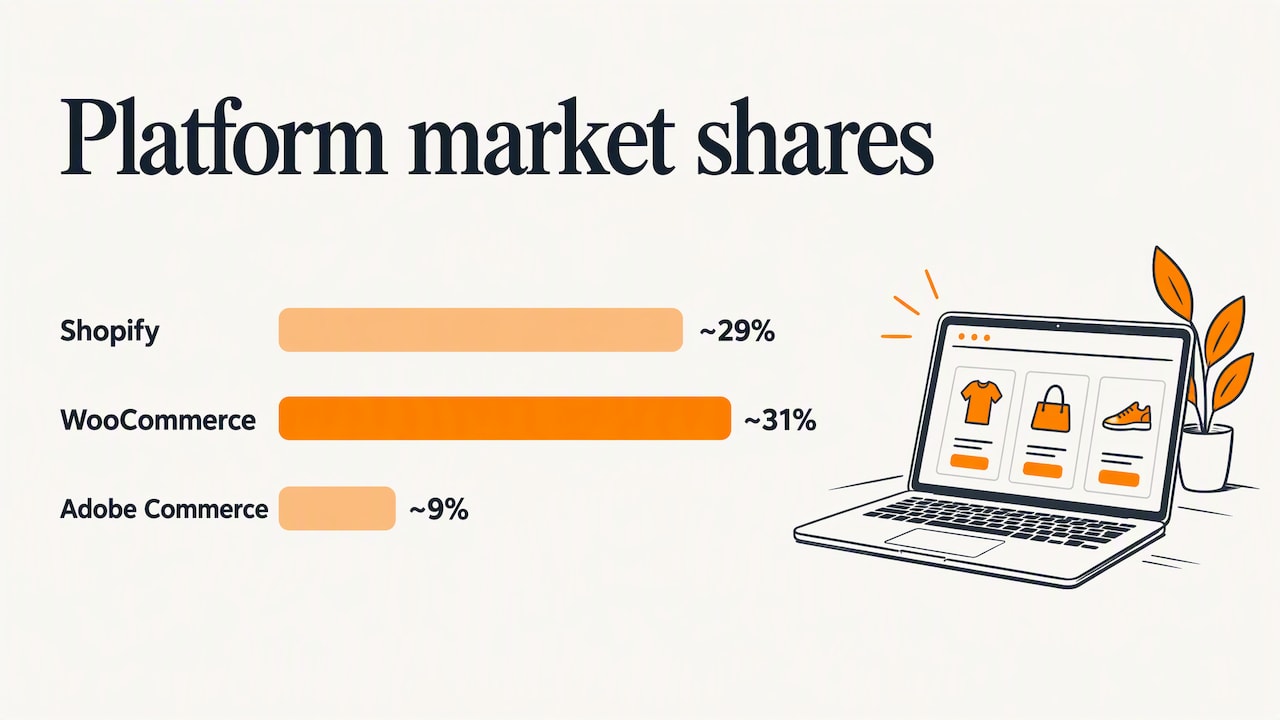
Platform choice should follow your requirements, not market share. Still, it helps to know the landscape. As of early 2025, Shopify held roughly 29% of the US ecommerce platform market, WooCommerce roughly 31% and Adobe Commerce about 9%. Popularity means a deep pool of developers, apps and documentation. It does not mean the platform fits your catalog.
Compare platforms on these criteria:
| Criterion | What to ask |
|---|---|
| Catalog and pricing | Can it handle your variants, bundles, customer-specific pricing and units of measure without custom code? |
| Integrations | Is there a supported connection to your ERP, accounting, shipping and CRM? See our practical guide to ecommerce platform integration. |
| Ownership model | Hosted software-as-a-service, self-hosted open source, or a custom build? Each trades control for upkeep. |
| Flexibility | Do you need a conventional storefront, or a headless setup where the front end is separate from commerce? |
| Checkout and payments | Does it support your processor, tax setup and the checkout pattern that keeps your PCI scope small? |
| Total cost | License, apps, hosting, development, migration and ongoing support over three years. |
| Your team | Who will run it day to day, and how technical are they? |
For local context, our guide to the best ecommerce platform for an Ohio small business walks through this decision for smaller stores. If you sell to other businesses, read B2B ecommerce web design first, since B2B requirements often decide the platform on their own.
The phases of a replatforming project
Timelines vary with catalog size and integrations. One published methodology for modern platform migrations lays out discovery in 2 to 4 weeks, platform selection in 4 to 6, data preparation in 6 to 8, and implementation and testing in 8 to 12, followed by launch and ongoing optimization. Those are indicative figures, and the source notes that complex enterprise migrations with many third-party integrations take longer. Treat them as a planning range, not a promise.
- Discovery. Document what the current store does: catalog structure, customer groups, integrations, custom code, reports, top-selling and top-ranking pages. Set the goals the project must hit, such as conversion rate, order-processing time or support tickets.
- Platform selection. Score options against the criteria above, run demos with your real data, and get a full cost picture.
- Data preparation. Clean the catalog before moving it. Remove dead products, standardize attributes, fix image names, and decide what history (orders, reviews, customer accounts) must come across.
- Build and testing. Configure the platform, build or adapt the theme, connect integrations, and test checkout, tax, shipping, email triggers and edge cases with real scenarios.
- Launch and optimization. Cut over, monitor closely, fix what surfaces, then improve. Our guide to ecommerce conversion rate optimization covers what to work on once the store is stable.
Protecting your search rankings
For many stores, organic search is the largest source of cheap traffic, and a careless migration can erase it. Google treats a URL change as a site move that needs a plan. Expect rankings to fluctuate while Google reprocesses your pages, and the longer your site, the longer that can take.
Change one thing at a time. Google’s guidance and common practice both advise isolating changes. If you replatform, keep the domain, content and metadata as they are where you can. When traffic dips afterward, you will know the platform move is the cause rather than guessing among five variables. This is the strongest argument for separating a replatform from a redesign.
Freeze URL decisions early. Settle your URL structure well before launch. Late changes to category paths or product slugs break redirect maps that have already been tested.
Map redirects one to one. Export every indexable URL from the old store: products, categories, blog posts, landing pages, and pages that earn backlinks. Map each to its closest equivalent on the new site. Permanent 301 redirects tell visitors and Google that a page has moved. Point each old URL straight to its final destination. Chains, where A goes to B and B goes to C, add latency and make crawling harder. Sending every old URL to the home page is the other classic mistake: it throws away the relevance of the original page.
Check before and after.
- Crawl the old site and save the list, with titles, descriptions, canonical tags and structured data.
- Test the redirect map on a staging site before launch.
- After launch, watch Google Search Console for crawl errors and 404s, resubmit your sitemap, and compare organic landing pages against your baseline.
If this is outside your team’s skills, our SEO solutions are built for exactly this kind of work.
Payments, PCI and accessibility
These two topics cause expensive surprises late in a project, so settle them early.
Payment security
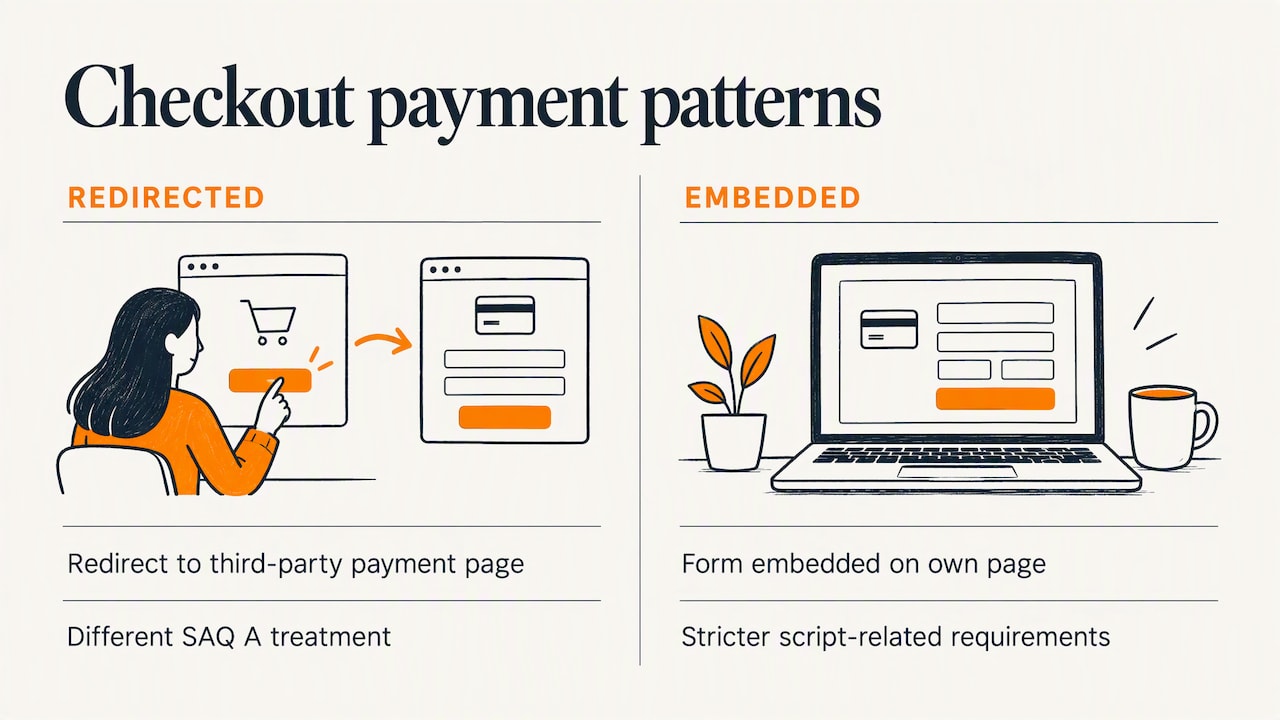
If you take card payments, the way checkout is built changes your compliance workload. Under PCI DSS v4.0.1, eligibility for the simplest self-assessment, SAQ A, depends on the checkout integration. Redirecting customers to a third-party payment page is treated differently from embedding a payment form on your own page, and the embedded approach faces stricter script-related requirements. The council has also published updates for merchants validating to SAQ A. Ask your payment processor and a qualified assessor which pattern applies to you before you commit to a checkout design.
Accessibility
The Department of Justice has published guidance on web accessibility and the ADA, including examples of barriers such as poor color contrast. A new platform is the cheapest moment to fix these, because templates are being rebuilt anyway. Build accessibility requirements into the theme brief and test checkout with a keyboard and a screen reader before launch. If you need legal advice on your obligations, talk to an attorney who handles ADA matters.
The data details teams forget
Product and customer records get all the attention. Money-related data tends to get missed.
- Gift cards and store credit. These are liabilities. Balances should be reconciled with your finance team before launch so customers do not lose value.
- Subscriptions and saved cards. Stored payment tokens usually have to move from the old processor vault to the new one, and your processor must confirm the transfer. Otherwise recurring billing fails on day one.
- Order history and customer accounts. Decide what to import, and plan how customers will log in to the new store, since password hashes often cannot be carried over.
- Reviews, wishlists and loyalty points. Customers notice when these vanish.
- Tax, shipping and email triggers. Rebuild and test each one. A missing order-confirmation email is a support-ticket generator.
Perspective: what we have learned about replatforming
We have built websites for businesses in Columbus and across Ohio for more than 38 years, and the pattern is consistent: the technology is rarely the hardest part. The hard part is deciding what the business needs the store to do, and then holding to it.
Three convictions shape how we approach these projects.
Start with the business case. A replatform should be justified by revenue, cost or risk, not by novelty. If we cannot connect the move to a measurable result, we say so, and sometimes the better answer is to fix what you have.
Treat design and engineering as one job. A platform that is technically sound but confusing at checkout still loses sales. Our work pairs user-focused design with the technical implementation, so the store that launches is one customers can actually use.
Do not skimp on the unglamorous parts. Redirects, accessibility, payment compliance and data reconciliation are where projects quietly fail. They are also the parts that clients rarely ask about until something breaks, so we raise them in discovery.
— Greg
Choosing a replatforming partner
Whether you hire an agency, a platform vendor’s services team or a freelancer, ask these questions:
- Can they show a redirect and SEO plan, not just a launch date?
- Who owns integrations with your ERP and accounting tools?
- How do they handle testing, and will you see a staging site early?
- What happens after launch: support, hosting, optimization?
- Do they price against a clear scope, with changes handled openly?
Our business buying guide for ecommerce platform migration services goes deeper on evaluating proposals, and our ecommerce website cost guide for Columbus helps with budgeting.
How Marcy Design can help
We design and build ecommerce sites and web applications, handle hosting and SEO, and support the marketing that follows launch. If you are weighing a move, we can review your current store, your goals and your integrations, and tell you plainly whether a replatform is the right step. Learn more about our ecommerce web application services, or contact us through our site to start the conversation.
FAQ
How long does ecommerce replatforming take?
It depends on catalog size, customizations and integrations. A published methodology for modern migrations puts the main phases at several weeks to a few months, with complex, integration-heavy projects taking longer. A scoped discovery phase gives you a realistic schedule for your store.
Will replatforming hurt my SEO?
It can, but the risk is manageable. Google says ranking fluctuations are normal while it reprocesses a moved site. Keep URLs stable where possible, use one-to-one 301 redirects, change as few other things as you can, and monitor Search Console after launch.
What is the difference between replatforming and migration?
In everyday use, very little. Migration usually refers to moving data, content and URLs, while replatforming covers the whole program, including platform choice, integrations and relaunch. Most agencies and vendors use the terms interchangeably.
Should I redesign my store at the same time?
Only if you have the budget and a clear reason. Doing both at once makes it harder to tell what caused any change in traffic or sales. Many stores replatform first with a close visual match, then redesign in a second phase.
Sources
- Coredna: eCommerce migration checklist
- GroPulse: Shopify statistics
- Shopify: B2B ecommerce replatforming guide
- Google Search Central: Site moves and migrations
- Google Search Central: Redirects and Google Search
- PCI Security Standards Council: FAQ on SAQ A eligibility
- PCI Security Standards Council: Updates for SAQ A merchants
- ADA.gov: Guidance on web accessibility and the ADA