
 614.224.6226
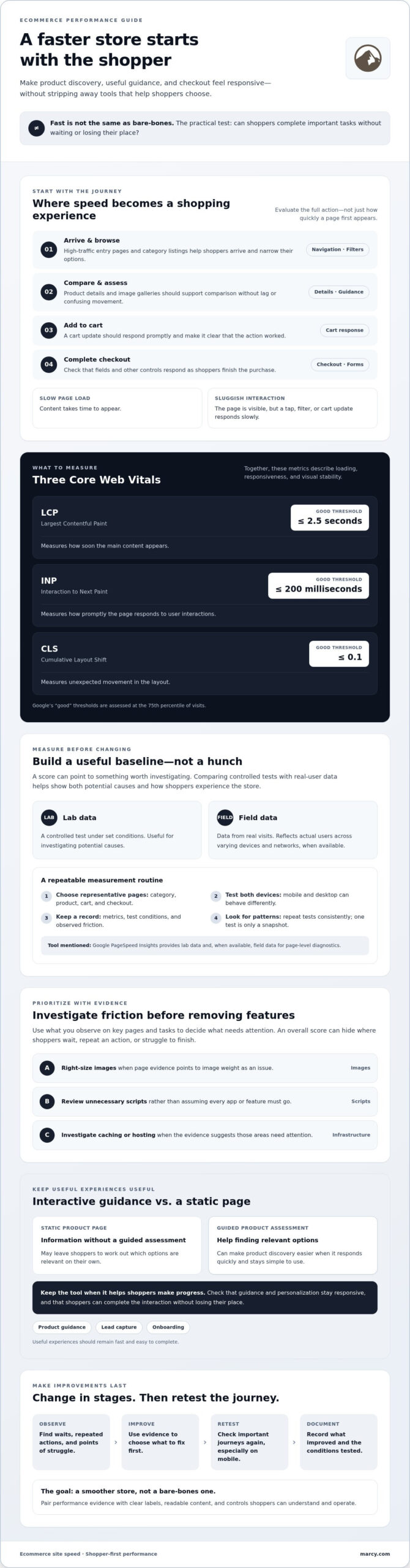
The fastest ecommerce site isn’t necessarily the one with the fewest features. Improving ecommerce site speed means making product discovery, personalization, and checkout feel responsive, not stripping away tools that help shoppers choose. The practical test is whether customers can complete important tasks without waiting or losing their place.
Slow product pages and clunky mobile interactions can disrupt the customer journey. Yet removing every third-party app or interactive feature isn’t always the right fix. A guided product assessment, for example, can help shoppers find relevant options more easily than a static page, provided it responds quickly and stays simple to use.
To decide what to fix first, start with evidence from the pages and interactions shoppers actually use. This guide explains how to measure performance, what Core Web Vitals can reveal about loading, responsiveness, and visual stability, and how to prioritize improvements without guesswork. You’ll also learn how to keep useful experiences, from product guidance to lead capture and onboarding, fast and easy to complete. The goal is a smoother store, not a bare-bones one.
Key Takeaways
- Start improving ecommerce site speed by measuring key shopping pages and tasks, not relying on one overall score.
- Compare lab tests with real-user data to understand both controlled performance and shoppers’ actual experience.
- Use evidence to prioritize fixes such as right-sizing images, reviewing unnecessary scripts, and investigating caching or hosting.
- Keep interactive tools when they help shoppers make progress, and check that personalization and guidance stay responsive.
- Make changes in stages, then retest important journeys on mobile and document what improves.
Why Improving Ecommerce Site Speed Starts With the Shopper
Ecommerce site speed isn’t just a number in a testing report. It’s how quickly and reliably a shopper can browse, compare products, open details, add an item to the cart, and complete checkout. A page may load quickly yet still feel slow if a filter takes too long to respond. A page can also show its main content promptly but shift around as other elements load, making it harder to use.
That’s why improving ecommerce site speed starts with the customer journey, not a single score. The principles of web performance optimization connect technical performance with the experience people have using a site. Speed matters, but so do clear labels, readable content, and controls shoppers can understand and operate.
Which ecommerce pages should you evaluate first?
Review the pages shoppers need to move through: high-traffic entry pages and category listings, followed by product details, the cart, and checkout. Each page has a different job: helping shoppers arrive, narrow their options, assess a product, or finish a purchase. Test each page on mobile and desktop, because the same page can behave differently on each.
As you test, note where shoppers wait, repeat an action, or struggle to finish a task. A product page may load promptly while its image gallery lags. Checkout may appear ready but respond slowly when someone updates a delivery field. These observations help pinpoint friction that an overall site score can hide.
How site speed shapes shopping decisions
Responsive navigation and filters help shoppers reach relevant products without losing their place. Clear product details then support comparison. A delay during either step can interrupt that process, while a slow cart or checkout response can make a straightforward task feel uncertain. Pay attention to the full action, not just the initial page load.
Perceived performance is how quickly a site seems to respond while a shopper tries to get something done. A slow page load means the content takes time to appear. A sluggish interaction means the page is visible, but a tap, filter, or cart update doesn’t respond promptly. Both affect the shopping journey.
A strong speed score is useful evidence, not the whole verdict. Evaluate it alongside whether shoppers can find, understand, and use what they need. The aim is a store that feels quick and remains accessible, clear, and easy to shop.
How to Measure Ecommerce Site Speed Before Changing Anything
Start with a baseline, not a hunch. A single speed score can show that something deserves attention, but it won’t tell you which part of the shopping journey is causing friction or whether shoppers experience the same issue in real use. A consistent measurement process gives you evidence to guide changes and a fair comparison afterward.
Which tools and metrics can help diagnose a slow store?
Google PageSpeed Insights is a useful starting point for page-level diagnostics. It offers lab data from a controlled test and, when available, field data gathered from real visits. Lab tests help investigate potential causes under set conditions. Field data reflects the experience of actual users across varying devices and networks.
Use Google’s guide to Core Web Vitals to explore the metrics and testing concepts. The current Core Web Vitals are Largest Contentful Paint (LCP), which measures how soon the main content appears; Interaction to Next Paint (INP), which measures how promptly the page responds to user interactions; and Cumulative Layout Shift (CLS), which measures unexpected movement in the layout. Google’s “good” thresholds are LCP at or below 2.5 seconds, INP at or below 200 milliseconds, and CLS at or below 0.1, assessed at the 75th percentile of visits.
How to create a useful performance baseline
Choose representative category, product, cart, and checkout pages. Capture results on mobile and desktop using the same testing approach each time. Record the page, device, test date, conditions, and any notable user actions. PageSpeed Insights can surface page-level issues; follow up by inspecting the page and shopping journey to understand what may be contributing to them.
One test is a snapshot, not a diagnosis, because it can’t reveal every bottleneck or represent every shopper’s conditions. Repeat tests consistently and look for patterns across pages and visits rather than reacting to an isolated score.
- Select pages: Include key shopping steps, not just the homepage.
- Test devices: Check both mobile and desktop experiences.
- Record results: Save metrics, test conditions, and observed friction.
- Inspect causes: Investigate what the results suggest before changing the site.
- Retest: Compare the same pages and journeys after a change.
Improving ecommerce site speed is a performance goal, not a guaranteed business outcome. Treat metrics as diagnostic signals, then separately review whether shoppers can complete important tasks. If your baseline points to broader site structure or usability concerns, explore Marcy Design’s website design as one part of planning the ecommerce experience.
Which Ecommerce Speed Fixes Should You Prioritize?
Start with the issue your measurements point to, then check how many important pages or shopping tasks it affects. A large product image may slow a product detail page, while an unnecessary script could affect category browsing, cart actions, and checkout. Improving ecommerce site speed means matching evidence to a potential fix, then validating the change. The right remedy depends on your ecommerce platform and technical setup, so no single fix works for every store.
Which common issues can slow product and category pages?
Check for images larger than their display size, scripts loaded repeatedly, unused apps, embeds, and page elements that add little value. Also review whether filters, search, or recommendations trigger extra requests or make the page feel slow after a shopper interacts. Options such as lazy loading, which defers offscreen images until needed, and modern image formats are worth testing, not applying automatically. Confirm that they preserve image quality and improve the pages you’re evaluating.
| Issue | Pages affected | Possible action | Validation method |
|---|---|---|---|
| Oversized images | Product and category pages | Review image dimensions and formats; test whether lazy loading suits images below the initial view. | Compare page measurements and check that images display clearly across devices. |
| Unnecessary scripts, apps, or embeds | Any page using the added feature | Identify what loads, remove what’s unused, and assess whether remaining tools justify their complexity. | Retest affected pages and interactions, such as filtering or adding to cart. |
| Caching or content delivery | Pages or assets with repeated delivery delays | Review caching and whether a content delivery network (CDN) fits the setup. A CDN serves site content through distributed servers, but won’t fix every cause. | Compare repeat tests and inspect whether the specific delay changes. |
| Server response or hosting constraints | Potentially store-wide | If page-level fixes don’t address delays, investigate server response and traffic patterns with a developer. | Compare response behavior across pages and conditions before considering infrastructure changes. |
When do hosting, caching, or a CDN need attention?
Consider a deeper infrastructure review when similar delays remain across pages after image and script checks, or when performance changes with traffic. Caching can reuse stored content instead of rebuilding or retrieving it each time. A CDN can deliver certain content from servers closer to visitors. Neither resolves every bottleneck. Before changing hosting or platform components, ask a developer to assess the evidence and possible effects on the store.
Technical choices should support the whole shopping experience. For more on the broader design context, explore ecommerce website design. For an accessible technical overview, Mozilla’s guide to making websites fast explains performance concepts in more depth.
How to Keep Interactive Shopping Experiences Fast and Useful
Speed improvements don’t require removing every interactive feature. A static form is often simpler to load and maintain, but a well-designed interactive experience can ask relevant questions, tailor what someone sees next, and make a decision feel more manageable. By guiding users through useful steps instead of presenting every field at once, it can make a task easier to navigate. Each interaction should help shoppers or prospective customers take a useful next step.
When does an interactive experience improve the shopping journey?
Guided product discovery can help shoppers narrow a broad selection by answering relevant questions, rather than scanning a long list or using a basic form with no direction. Lead capture can feel more useful when it explains what information is needed and guides people through the process. For professional consultations, onboarding, or assessments, a step-by-step flow can make complex choices easier to approach. Keep the route clear, and don’t ask questions that don’t help someone progress.
Interactivity should earn its place. Before removing a tool, check whether people use it to complete a task, and measure both its responsiveness and completion. Relevant prompts and personalized next steps may help users stay engaged and finish a guided process, while an overly long or confusing flow can create friction. A feature that adds complexity without helping people move forward may need to be simplified or reconsidered.
How can you reduce performance costs without removing useful guidance?
Start by matching each feature to a clear task and the pages where that task happens. A product assessment might belong on relevant product or category pages, rather than loading across the entire store. Ask a developer to review third-party scripts, duplicated tools, and whether a feature can load only when needed. After changes, test how quickly it responds to taps and whether shoppers can finish the flow.
Compare the interactive version with a simpler alternative, but judge more than initial load time. Does the guided version help people find relevant options and complete the task? Does it remain responsive on mobile? Those answers can show whether the feature’s value justifies its technical cost. Improving ecommerce site speed works best when performance decisions account for both efficiency and the quality of the journey.
For related context on personalization, explore Marcy Design’s AI-powered solutions and consider how they could fit into your ecommerce experience.
How to Make Ecommerce Speed Improvements Last
A speed improvement only matters if it holds up in the shopping journey. Treat performance work as a controlled cycle: prioritize a specific issue, change one area, test the affected tasks, compare results with your baseline, and document what happened. This makes it easier to see which adjustment helped and spot trade-offs before they spread across the store.
How should teams release and validate performance changes?
Retest the same pages, devices, and shopper tasks you used to establish your baseline. If an update targets product images, check product discovery and detail pages. If it changes scripts or cart behavior, test adding an item, updating the cart, and continuing through checkout. Include mobile behavior in every review. A page that works well on desktop may feel crowded, shift unexpectedly, or respond differently on a smaller screen.
Keep a simple change log. Record the issue, the adjustment, the pages and devices tested, and the observed result. Then use a consistent sequence:
- Prioritize: Choose a change tied to a measured problem.
- Change one area: Avoid bundling unrelated updates, so the results are easier to interpret.
- Test key journeys: Confirm product discovery, cart, checkout, and relevant interactive features still work as intended.
- Compare and document: Check the same measures against your baseline, note any usability trade-offs, and record the decision.
This process helps teams avoid treating a better test result as proof that the full customer journey improved. Confirm that the site remains understandable and usable, too.
When should you bring in ecommerce development support?
Bring in an ecommerce developer when delays persist across important pages or the likely cause reaches beyond an individual image or script. Platform architecture, APIs that connect different systems, and complex integrations can affect how store features communicate and load. Changes at this level may have wider effects, so a technical review can help clarify the cause and assess options before implementation.
Improving ecommerce site speed is ongoing work, especially as product catalogs, integrations, and shopper needs change. Marcy Design offers ecommerce development and website design capabilities that may support planning or development, without a guaranteed speed outcome. Discuss your ecommerce goals with Marcy Design as you plan the next step.
Build a Faster Store Around a Better Shopping Journey
Improving ecommerce site speed starts with understanding where shoppers experience friction, then measuring key pages and tasks before making changes. Use the evidence to prioritize fixes, and retest the same journeys on mobile and desktop. Keep interactive features that help customers find relevant products or complete a task, but make sure they remain responsive and easy to use.
Performance isn’t a one-time project. A steady cycle of testing, thoughtful updates, and clear documentation helps your team keep the store useful as it evolves. The right development partner can help assess how ecommerce design, mobile responsiveness, and integrations fit together, without treating a single score as the whole shopping experience.
Marcy Design is a Columbus-based agency offering ecommerce development, custom website design, mobile-responsive web solutions, and AI-powered integrations. Discuss your ecommerce website goals with Marcy Design and explore the right next steps for your store.
Frequently Asked Questions
How can I improve my ecommerce website speed?
Start by measuring representative category, product, cart, and checkout pages on mobile and desktop. Then use the results to identify likely causes, such as oversized images or scripts that don’t need to load. Make one change at a time and retest the same pages and shopping tasks. Improving ecommerce site speed is evidence-led work; a Columbus-based ecommerce development agency such as Marcy Design may be a resource when changes involve broader site planning or development.
What is a good page speed for an ecommerce website?
There isn’t one universal load-time number that describes a good ecommerce experience. Google’s Core Web Vitals provide useful experience targets: LCP, which measures when the main content appears, should be 2.5 seconds or less; INP, which measures interaction responsiveness, should be 200 milliseconds or less; and CLS, which measures unexpected layout movement, should be 0.1 or less. These “good” thresholds are assessed at the 75th percentile of real-user visits.
Can too many apps slow down an ecommerce site?
Yes. Apps may add scripts, network requests, or other work that affects page loading and interaction responsiveness. The impact depends on what each app does and which pages load it. Review the apps in use, identify duplicates or features that no longer support a clear task, and check where their code runs. Before removing a tool, confirm it isn’t needed for an important journey, then retest the affected pages and interactions.
How do I test my ecommerce website speed on mobile?
Use Google PageSpeed Insights to test important pages, selecting the mobile results for a mobile-focused view. Check representative category, product, cart, and checkout pages, rather than relying on the homepage alone. Lab data provides a controlled diagnostic, while field data, when available, reflects real visits across varied devices and conditions. Repeat tests consistently, note the date and page tested, and compare patterns instead of treating one result as definitive.
Do images make an ecommerce website slower?
They can, especially if image files are larger than needed for their display size or if a page loads more images than shoppers need at once. Review image dimensions and formats, then test whether compression or lazy loading is appropriate. Lazy loading can defer images outside the initial view, but shouldn’t delay key product imagery. After changes, check that images remain clear, appear when expected, and don’t cause the layout to shift.
Will improving ecommerce site speed improve SEO?
Improving ecommerce site speed can support a better page experience, but it doesn’t guarantee higher search rankings. Google uses Core Web Vitals as part of its page experience considerations, alongside many other signals. Treat speed measurements as diagnostic guidance, not a promise of SEO or revenue gains. Keep product information useful and accessible, and evaluate performance alongside whether shoppers can find products and complete tasks smoothly.
Should I remove interactive features to make my online store faster?
Not automatically. A static form is simpler, while a well-built interactive tool can guide shoppers toward relevant products through personalized questions. Keep a feature if it helps people make progress, and measure both its responsiveness and whether users complete the task. Review whether it needs to load on every page, check for duplicated scripts, and work with a developer to test lighter loading options before removing useful guidance.