
 614.224.6226
Email deliverability is the share of your emails that land in the inbox, not the spam folder and not a block. It rests on three things: technical authentication (SPF, DKIM, DMARC), a sender reputation built on how recipients react to your mail, and content and list practices that keep complaints low. You can pass every technical check and still land in spam if people ignore or report your messages. This guide covers what to set up, what to watch and how to fix a program that is slipping.
TL;DR
- Delivered is not the same as inboxed. A message can reach a mail server and still be filtered to spam based on your reputation, content and authentication.
- Set up SPF, DKIM and DMARC first, then keep your spam complaint rate under 0.3%, and ideally far lower. Gmail and Yahoo both enforce that ceiling.
- Add one-click unsubscribe, a visible unsubscribe link and a physical postal address. The first is a mailbox provider rule for bulk senders, the last two are U.S. law under CAN-SPAM.
- Judge your program by clicks, conversions and revenue per recipient, not open rates, which privacy features now inflate.
- Send to people who asked for your email, segment the list, and keep a steady cadence. Reputation is slow to build and slow to repair.
Table of Contents
- Delivery and deliverability are not the same thing
- The 2024 sender rules still set the baseline
- Authentication is the entry ticket, not the finish line
- Reputation: the part nobody can configure
- The law adds a second layer: CAN-SPAM
- How to avoid the spam folder
- How often should you send?
- Segment so the right people get the right message
- Measure what matters in 2026
- Plan the campaign before you send it
- Our perspective: deliverability is a brand problem
- When it makes sense to bring in help
- FAQ
- Sources
Delivery and deliverability are not the same thing
Most email platforms report a “delivery rate.” That number only tells you the receiving server accepted the message. Deliverability is about where the message ends up: the primary inbox, the spam folder, or nowhere. A campaign with a 99% delivery rate can still have most of its messages sitting in junk.
That is why deliverability problems hide so well. Your dashboard looks fine, but opens and clicks quietly fall, leads slow down, and nobody connects it to the inbox placement. If a campaign that used to bring in inquiries suddenly goes quiet, check placement before you rewrite the creative.
Inbox providers such as Gmail, Yahoo, Outlook and iCloud invest heavily in filtering, and they judge you on three broad signals: who you are (authentication), how you have behaved (reputation) and what you send (content and relevance).
The 2024 sender rules still set the baseline
Since February 2024, Gmail and Yahoo have enforced stricter sender requirements. Google’s sender guidelines call for SPF and DKIM authentication, a DMARC policy of at least p=none for bulk senders, and a spam complaint rate below 0.30%. Google defines bulk senders as those sending more than 5,000 messages a day to Gmail addresses. Bulk senders must also support one-click unsubscribe (RFC 8058) and show a clear unsubscribe link in marketing messages.
Yahoo’s sender best practices set the same ceiling: keep your spam rate below 0.3%. They also stress sending timely, relevant email to an active, engaged audience.
A small business sending a few thousand emails a month may think the 5,000 threshold does not apply. In practice, authentication and low complaints help at any volume. Twilio’s 2026 strategy guide frames the requirements as applying to every sender regardless of volume, and it is the safer way to plan.
| Requirement | What it means | Who it applies to |
|---|---|---|
| SPF and DKIM | Your sending domain proves the message is really from you | All senders |
| DMARC (at least p=none) | Tells receivers what to do when authentication fails | Bulk senders (5,000+ per day to Gmail) |
| Spam complaint rate under 0.30% | Share of recipients who click “report spam” | All senders, enforced by Gmail and Yahoo |
| One-click unsubscribe | Header-level unsubscribe plus a visible link in the body | Bulk senders |
Authentication is the entry ticket, not the finish line
Many businesses set up SPF, DKIM and DMARC once and assume the job is done. Those records only prove you are who you say you are. They do not prove anyone wants your email.
Here is the order we suggest for a small or mid-sized company:
- Send from your own domain. Use an address on your company domain, not a free webmail address, and make sure your email platform is authorized to send for that domain.
- Publish SPF and DKIM. Your email platform gives you the records. Your IT person or web host adds them to your DNS.
- Publish a DMARC record. Start at p=none so you can see reports without risking legitimate mail, then tighten the policy once you know every system that sends on your behalf (your CRM, billing tool, support desk and newsletter platform).
- Test a real message. Send to a few personal Gmail, Yahoo and Outlook accounts and check where it lands and what the headers say.
If your website forms, ecommerce store receipts and newsletter all send from the same domain, treat them as one reputation. A noisy marketing blast can drag down the order confirmations your customers actually need.
Reputation: the part nobody can configure
Deliverability is a long game. Mailbox providers do not wipe your record quickly. If poor list hygiene or heavy sending has earned you a bad name, restoring trust takes consistent good behavior over time, as Google’s guidance on monitoring and complaint rates implies. Watching complaints before they climb is far cheaper than recovering afterward.
The numbers to watch:
- Spam complaint rate. Gmail and Yahoo set the hard line at 0.3%. Cloudflare’s deliverability guidance suggests aiming for a complaint rate below 0.1%, a delivery rate above 95% and a hard bounce rate below 2%.
- Hard bounces. These are addresses that do not exist. Sending repeatedly to dead addresses tells providers you do not maintain your list.
- Engagement. Clicks, replies and conversions show that real people want the message.
Shared versus dedicated IP addresses
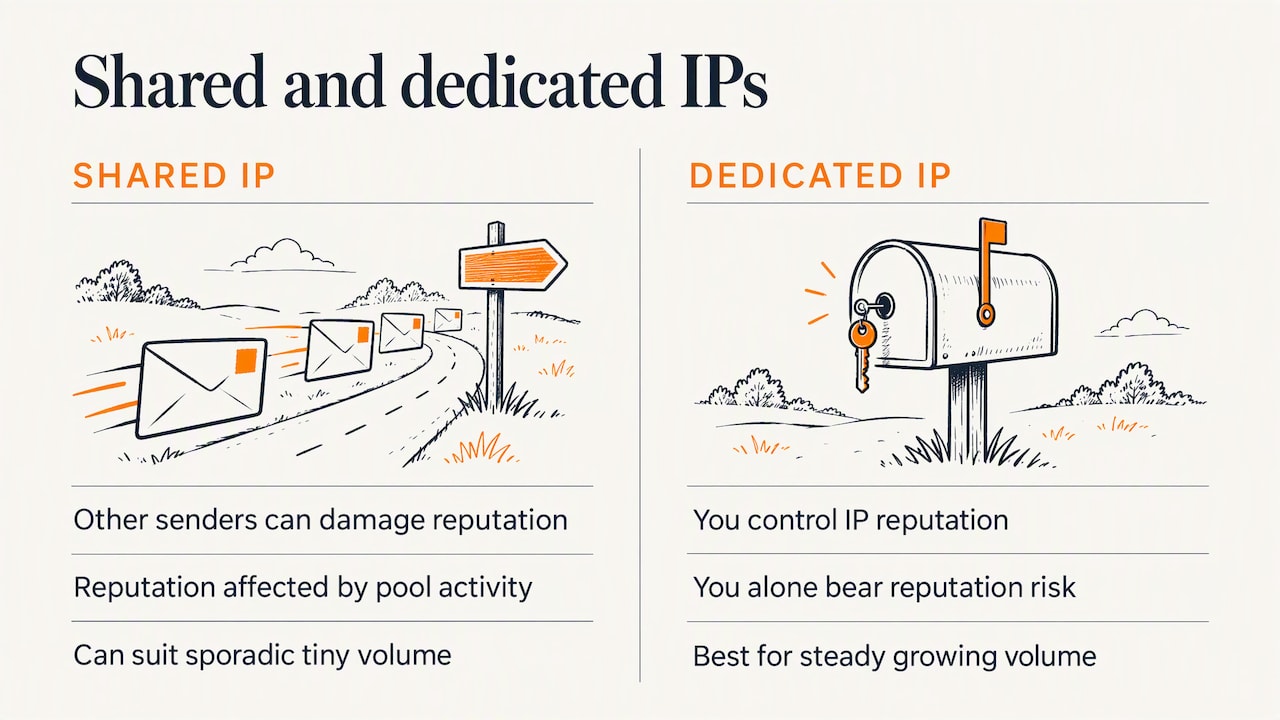
Cheaper email platforms often put many customers on the same IP address. When another sender on that IP behaves badly, your reputation can suffer even if your own practices are clean. Cloudflare’s documentation notes this risk. For a growing sender with steady volume, moving to a dedicated IP gives you control, but it also makes you solely responsible for the reputation. A dedicated IP with a sporadic, tiny volume can perform worse than a well-managed shared pool, so treat it as a milestone for consistent senders, not a first move.
The law adds a second layer: CAN-SPAM
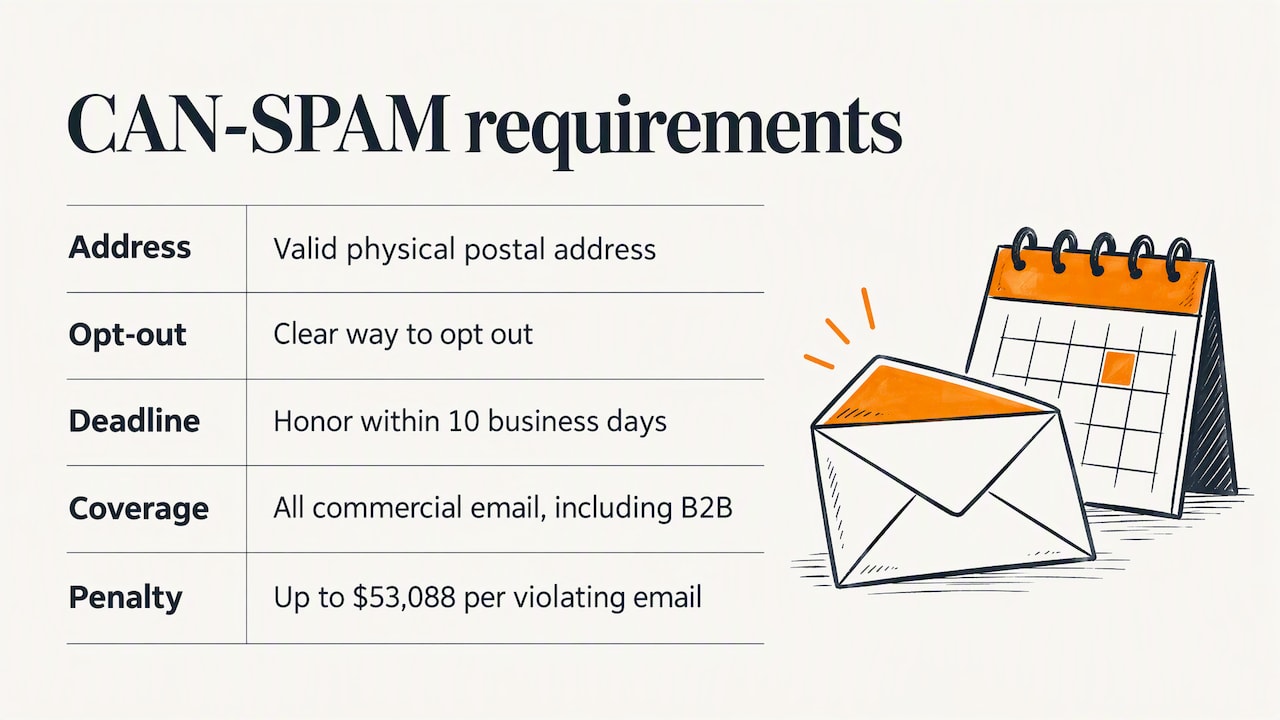
Mailbox rules are one thing. Federal law is another. Under the FTC’s CAN-SPAM compliance guide, commercial email must include your valid physical postal address and a clear way to opt out, and you must honor opt-outs within 10 business days. The Act covers all commercial messages, including B2B email, with no exemption for business-to-business senders. The FTC states that each violating email can carry penalties of up to $53,088 under the most recent adjustment.
In practice the mailbox providers are stricter than the law: Gmail and Yahoo want one-click unsubscribe for bulk senders, and a visible link is the minimum for everyone. Honor unsubscribes immediately rather than at the 10-day outer limit. If you are unsure how the law applies to a specific campaign, such as a list built from trade-show cards, ask your attorney before you send.
How to avoid the spam folder
Spam filters are less about magic words and more about patterns. G2’s guide to preventing spam placement recommends verifying your domain, authenticating with SPF, DKIM and DMARC, maintaining a clean list, keeping a consistent schedule, personalizing messages and testing them with spam checkers. These are the habits that matter most in our experience:
- Only email people who opted in. Purchased and scraped lists produce complaints and spam traps, the fastest way to damage a domain.
- Make unsubscribing easy. A frustrated reader who cannot find the link will hit “report spam” instead. An unsubscribe costs you nothing. A complaint costs you reputation.
- Clean the list. Remove hard bounces right away. Suppress or run a re-engagement sequence for subscribers who have not clicked in many months, then remove those who stay silent.
- Match the promise to the content. A subject line that oversells and a body that does not deliver generate complaints.
- Keep the design simple. Image-only emails, oversized files and a single giant link are classic filter triggers. Include real text and a plain-text version.
- Warm up gradually. If you are launching a new domain or restarting a dormant list, start with your most engaged contacts and increase volume in steps.
How often should you send?
There is no universal number. The right frequency is the one your audience tolerates without complaints, unsubscribes or falling clicks. For most small B2B companies a monthly or twice-monthly rhythm is realistic because it matches the content you can produce at a good standard. Ecommerce and retail brands with frequent promotions can usually send more often, provided they segment so that not everyone gets everything.
What matters for deliverability is consistency and relevance. A list that hears from you every two weeks and then receives six messages in a launch week is more likely to complain than one that has a steady rhythm. Pick a cadence, publish it on your signup form so expectations are set, and review it quarterly against complaint, unsubscribe and click data.
Segment so the right people get the right message
Segmentation is a deliverability tactic as much as a marketing one, because relevant email gets clicked and irrelevant email gets reported. Practical ways to segment without a large database:
- By relationship: prospects, current customers and past customers need different messages.
- By interest: which service page, product category or resource a person engaged with.
- By engagement: active clickers, occasional readers and dormant contacts. Send the dormant group less, and use them for re-engagement before you cut them.
- By industry or role: a manufacturer and a nonprofit have different problems, and a subject line that names theirs wins attention.
- By source: a contact who downloaded a guide expects different follow-up than one who requested a quote.
For a deeper look at why the channel earns its place in the mix, see our notes on email versus social media and what to know about email traffic.
Measure what matters in 2026
The old “is a 20% open rate good?” question no longer has a clean answer. Privacy features such as Apple Mail Privacy Protection can open messages automatically, so open data is polluted. Twilio’s 2026 guidance advises focusing on click-through rate and revenue per recipient as better indicators of subscriber value.
A simple scorecard to review monthly:
| Metric | Why it matters | Direction to watch |
|---|---|---|
| Spam complaint rate | Gmail and Yahoo enforce a 0.3% ceiling | Stay well under it |
| Hard bounce rate | Signals list quality | Keep low, remove bounces after each send |
| Click-through rate | Shows real interest | Stable or rising |
| Conversions and replies | Ties email to leads and sales | Rising per send |
| Revenue or pipeline per recipient | Shows the list’s real value | Rising over time |
Benchmarks vary by industry, list size and offer, so compare yourself to your own history first. If you want to connect email to business return, our digital marketing ROI guide walks through measuring performance.
Plan the campaign before you send it
Good campaign planning prevents most deliverability trouble. Before each send, answer five questions:
- Who is this for? Name the segment, not “the list.”
- What should they do? One primary action, one main link.
- Why would they want it? If you cannot say it in a sentence, rework the idea.
- Is the technical side ready? Authenticated domain, working unsubscribe, postal address in the footer, links that resolve.
- How will we judge it? Pick the click, lead or sale metric in advance.
This fits into a wider plan. If email is one of several channels, our piece on coordinating marketing activities shows how to keep channels working toward one goal.
Our perspective: deliverability is a brand problem
We have been building websites and marketing programs in Columbus for more than 38 years, and the pattern we see with email is consistent: companies treat it as a technical chore, then wonder why a list they spent months building stops producing leads. Deliverability sits where technology and brand meet. The DNS records are a one-afternoon task. The reputation behind them is the sum of every message you have ever sent and how people responded.
That is why we tie email to the rest of the marketing system. A clear brand, a website that earns signups honestly, content worth clicking and a sensible sending rhythm do more for the inbox than any trick. When a company asks us why email has gone quiet, we start with the list source, the sending domain and the last few campaigns, and only then touch the creative.
Our advice for a small business owner: send less to more of the right people, write like a person, and make leaving easy. A smaller list of engaged readers beats a large list that complains.
— Greg
When it makes sense to bring in help
If you already have a clean list, a platform you trust and a team with time to manage it, much of this is within reach in house. If you are juggling a website, an online store, lead forms and a newsletter that all send mail from the same domain, an outside team can save you from reputation damage that is slow to reverse.
At Marcy Design we handle email marketing alongside lead generation, SEO and the website itself, so your forms, landing pages and campaigns work as one system. If you want a second set of eyes on your program, contact us through our site and tell us where your email is stuck.
FAQ
What is a good email deliverability rate?
There is no single official score, but Cloudflare’s guidance points to a delivery rate above 95%, a hard bounce rate below 2% and a complaint rate below 0.1%. Remember that delivery rate only measures server acceptance, so also watch clicks and replies as signs of inbox placement.
How do I fix poor email deliverability?
Start by confirming SPF, DKIM and DMARC, then remove bounced and long-inactive addresses, and check your complaint rate against the 0.3% ceiling. Next, send only to engaged contacts for a few weeks and add volume gradually. Recovery is slow because reputation changes over time, not overnight.
Do the Gmail and Yahoo rules apply to small senders?
The extra bulk-sender requirements, including DMARC and one-click unsubscribe, apply above 5,000 messages a day to Gmail. The complaint ceiling and authentication expectations are worth following at any size. CAN-SPAM applies to every commercial email you send.
Is a 20% open rate good?
It is no longer a dependable yardstick, because privacy features can trigger automatic opens. Use click-through rate, conversions and revenue per recipient to judge performance, and compare against your own past results.
How often should I send marketing emails?
Send as often as you can provide something useful, and keep the rhythm steady. Many small B2B companies do well with monthly or twice-monthly sends. Review complaints, unsubscribes and clicks each quarter and adjust.
Sources
- Google: Email sender guidelines
- Yahoo Sender Hub: Sender best practices
- Cloudflare Email Service docs: Email deliverability
- FTC: CAN-SPAM Act compliance guide for business
- Twilio: 7 steps to build a savvy email marketing strategy in 2026
- G2: How to prevent emails from going to spam