
 614.224.6226
The right CMS is the one that fits how your business sells, who will edit the site, and where you expect to be in three years. It is not the one with the longest feature list. A CMS (content management system) is the software that lets your team create, edit and publish pages, products and posts without writing code each time. A business website is also a marketing asset, so the decision is best made together with the people who design the site, build it and make sure it gets found. We build that way at Marcy Design, and website design is where we start with every project.
TL;DR
- Pick the CMS after you define the site’s job: lead generation, online sales, a catalog, or content publishing. The platform follows the goal.
- Hosted builders such as Wix and Squarespace are quicker to set up. WordPress is more flexible but needs ongoing maintenance. Headless systems give developers the most control and need the most development.
- Ecommerce changes the question. Product management, checkout, inventory and integrations matter more than page editing.
- Count total cost: plan fees, hosting, plugins, transaction fees, developer time and a possible future migration.
- Check that you can export your content before you commit.
Table of Contents
- What a CMS actually does for your business
- Start with the job the website has to do
- The main types of CMS, in plain terms
- The features that matter for a business website
- WordPress, Squarespace and Wix compared
- Choosing a CMS for ecommerce
- What a CMS really costs
- A worked example: two businesses, two answers
- Questions to ask before you commit
- Where a design and development team helps
- Our perspective
- FAQ
- Sources
What a CMS actually does for your business
Without a CMS, every text change means a developer editing files. With one, the workflow is simple: someone drafts content, it is stored and organized, templates turn it into pages, a reviewer approves it, and it goes live. The same system handles images, scheduled posts, user permissions and, depending on the platform, the SEO settings behind every page.
For a small business, that means your office manager can update business hours, your sales lead can post a case study, and neither needs to call anyone. For a manufacturer, it may mean hundreds of product pages with specifications that stay consistent. Those are very different jobs, and they point to different platforms.
Start with the job the website has to do
Before you compare platforms, write down the answers to five questions.
- What should a visitor do? Request a quote, book a call, buy online, download a spec sheet, or read and subscribe.
- Who will edit the site? One person with no technical background, a small marketing team, or a team with an in-house developer.
- What does it connect to? A CRM, email marketing, accounting, inventory or ERP software, payment processors.
- How much content will it hold? Ten pages, or ten thousand products.
- What will it look like in three years? More locations, a customer portal, a second language, wholesale pricing.
A five-page service business whose main goal is phone calls needs something quite different from a manufacturer selling parts to repeat B2B buyers. If you write the answers down first, most of the comparison below takes care of itself. Our lead generation website design guide covers how the site’s structure supports the first question.
The main types of CMS, in plain terms
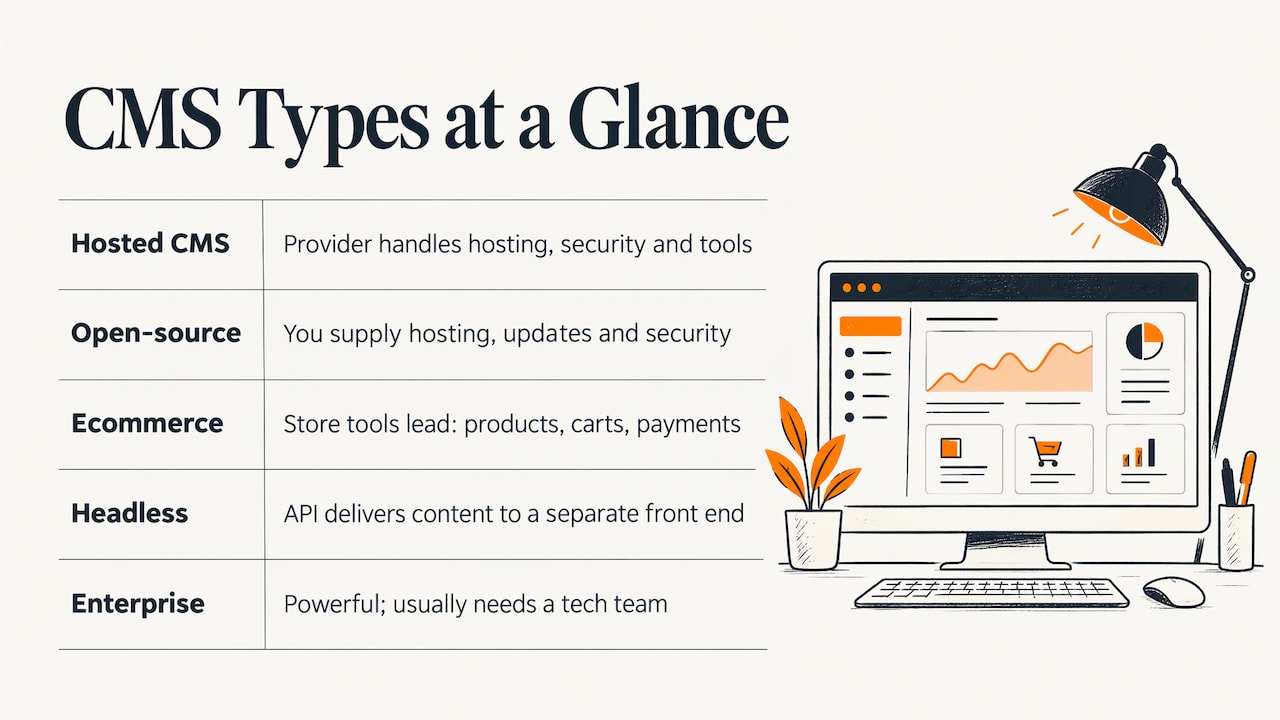
Hosted all-in-one builders. You pay a monthly fee and the provider handles hosting, security updates and the editing tools. Wix and Squarespace are the best-known examples. Setup is fast, and you work within the provider’s templates and features.
Open-source CMS. The software itself is free to use, and you or your developer supply hosting, updates, security and customization. WordPress is an open-source publishing platform with flexible design tools, themes and plugins. A WordPress.com account is a hosted version of the same idea, while self-hosted WordPress puts maintenance in your hands.
Ecommerce-focused platforms. These start from the store: products, carts, payments, shipping and inventory. Page content is secondary. Shopify is the familiar example.
Headless CMS. Content is stored in one system and delivered by an API to a separately built front end, such as a website, an app or a kiosk. Developers get complete freedom over the front end, and the business takes on more development and maintenance. If that sounds relevant, our comparison of headless and traditional CMS explains when each makes sense.
Enterprise systems. Drupal and Adobe Commerce sit here. Forbes Advisor notes that they generally aren’t feasible for a single person to manage without a tech team. They are powerful and rarely the right starting point for a small company.
The features that matter for a business website
Forbes Advisor’s 2026 review of content management software describes what a CMS should offer: a usable dashboard, brand customization, media management, an editor, staging, scheduled publishing, backups and a way to migrate content. Turn that into a short checklist for your own site.
| Feature | Why it matters to a business |
|---|---|
| Easy editor and dashboard | The people who update the site will actually do it. |
| Brand customization | Your site should look like your company, not like a template everyone recognizes. |
| Media management | Product photos, videos and PDFs stay organized and load quickly. |
| Staging and scheduling | You can test changes and time a launch or promotion. |
| Backups | A mistake or an attack does not cost you the site. |
| SEO controls | Page titles, descriptions, URLs, redirects and structured content can be set per page. |
| Responsive layouts | Pages work on phones, where many of your buyers will first see them. |
| Analytics and integrations | Leads and sales flow into the tools you already use. |
| Roles and approvals | As the team grows, not everyone should publish everything. |
Two items deserve extra attention. The first is SEO. A site that cannot be found does not generate leads, and the platform you choose sets limits on URL structure, speed and technical controls. Our overview of what SEO is and why it matters and our note on SEO as part of web design show why it belongs in the platform decision rather than after launch.
The second is accessibility. A site that works for people using screen readers or keyboard navigation reaches more customers and lowers legal risk. Ask whether the templates and editor produce accessible pages, or whether remediation will be needed.
WordPress, Squarespace and Wix compared
These three come up in most small-business searches, so here is how they differ in practice.
| WordPress | Squarespace | Wix | |
|---|---|---|---|
| Ease of use | Moderate; no drag-and-drop out of the box | Easiest of the three | Easy, with more freedom to place elements |
| Customization | Very high through themes and plugins; heavy changes need code | Polished templates, within limits | More customization than Squarespace through drag-and-drop |
| Maintenance | You or your developer handle updates, plugins and security (self-hosted) | Handled by the provider | Handled by the provider |
| Ecommerce | Added through plugins | Built-in tools on higher plans | Built-in tools on higher plans |
The ease-of-use ranking comes from Gizmodo’s comparison, which found Squarespace the easiest to use, Wix the more customizable through drag-and-drop editing, and WordPress dependent on coding for heavy customization.
The practical reading is this. A hosted builder suits a business with a simple site, a single editor and no unusual integrations. WordPress suits a business that expects to grow, wants full control of design and functionality, and has someone responsible for keeping it updated and secure. When the project involves custom features, a customer portal or a connection to internal systems, the platform is only the start and the work is in the development around it. That is the point at which web development matters more than the template.
What the entry prices look like
Gizmodo’s April 2025 comparison notes that online selling on Wix and Squarespace requires a higher plan, with a cited entry threshold of $29 per month for Wix and $23 per month for Squarespace. Plan names, billing terms and prices change, so confirm them on each provider’s pricing page before you budget. WordPress software is free, but the site needs hosting, a domain, a theme, plugins and upkeep.
Choosing a CMS for ecommerce
If you sell products online, the page editor is the least important part of the decision. Prioritize:
- Product and inventory management. Variants, bulk edits, stock levels and import from your existing data.
- Checkout and payments. Which processors work, what they charge per transaction, and whether the checkout can be tailored.
- Order and customer management. Tracking, accounts, returns and notifications.
- Integrations. Accounting, shipping, ERP and CRM connections that save re-keying data.
- Total selling cost. Monthly plan, transaction fees and paid extensions together, not just the sticker price.
Manufacturers and distributors have extra requirements that mass-market store builders rarely cover well: customer-specific pricing, quote requests, reorder lists, purchase orders and account hierarchies. We cover these in our guide to B2B ecommerce features that matter for manufacturers, and our custom ecommerce guide for small business explains how to weigh a custom build against an off-the-shelf store.
When the store has to match the way your company actually sells, an ecommerce web application designed around your products and buyers is built to fit your process instead of asking you to adapt to a template.
What a CMS really costs
Plan fees are only one line. A realistic budget includes:
- Platform or hosting fees, billed monthly or annually.
- A domain name and, on some platforms, extra for professional email.
- Themes, plugins or apps, some of which carry their own subscriptions.
- Payment processing and transaction fees if you sell online.
- Design and setup, whether done by you or by a team.
- Ongoing updates, security patches, backups and support.
- Content, photography and copywriting to fill the site.
- A future redesign or migration.
The last item is the one most often forgotten. Switching platforms later means rebuilding templates, redirecting old URLs so you keep your search rankings, and re-checking every form and integration. Forbes Advisor stresses that you should be able to back up and export your content even though the design and layout may not carry over intact. Ask how export works before you sign up for anything.
A worked example: two businesses, two answers
A home-services company with one office. The site needs a clear service list, reviews, a quote form and local search visibility. One person updates it a few times a month. The priorities are speed, clean structure, strong on-page SEO and a form that routes leads properly. A straightforward CMS with a custom design does the job, and the effort goes into content and on-page SEO.
A regional manufacturer. The catalog has hundreds of parts with technical specifications. Distributors need to log in, see their pricing and reorder. Sales wants leads from the site to land in the CRM. The CMS is one piece of a system that includes product data, accounts and integrations. Here, planning the architecture before choosing software saves a rebuild later.
The same logic applies to nonprofits that need donation and event tools, and to veteran-owned businesses that want a credible, easily managed presence. The questions are the same: what job, who edits, what connects, what grows.
Questions to ask before you commit
- Can the people who will update the site do it without help?
- Which integrations do we need now, and which will we want within two years?
- Who is responsible for updates, backups and security, and what happens if they are not done?
- What are the SEO limits, such as URL control, redirects, page speed and structured data?
- How accessible are the templates and editor output?
- What is the total monthly and annual cost, including extensions, fees and support?
- How do we export our content and move to another platform if we need to?
- Who do we call when something breaks?
The last question matters more than it appears. A site is a working part of your sales process, and downtime or a broken form costs real leads.
Where a design and development team helps
Most businesses can compare features. The harder part is matching them to a real sales process, building a design that reflects the brand, connecting the site to marketing and lead tracking, and keeping it secure and fast after launch. Marcy Design is a Columbus, Ohio-based agency with more than 38 years in business and over 230 awards, and we offer website design, web development, ecommerce, hosting, accessibility and SEO under one roof, alongside branding and marketing. That means the platform decision, the design, the build and the plan for getting found can be made together.
If you are choosing a CMS for a new site or a redesign, see our website design service, or contact us through our site to talk about what your website needs to do.
Our perspective
We have been building business websites for more than 38 years, and the platform question has changed names many times while the underlying problem has stayed the same. Businesses rarely fail because they picked the wrong brand of software. They struggle because nobody defined what the website was supposed to produce before the build began.
Our view is that a CMS should serve the business, not the other way around. We design around your brand and customers, build the technical pieces that make the site work with your marketing and sales, and plan for search visibility and accessibility from the start. We find that this order of work, goals first and platform second, avoids most of the costly surprises.
If you run a small business, a manufacturing company, a nonprofit or a veteran-owned business, the right site is one your team can manage, your customers can use, and your marketing can build on. Our work on web design, SEO and ecommerce is aimed at exactly that.
Greg
FAQ
What is the best CMS for a small business?
There is no single best one. A simple service site with one editor can run well on a hosted builder, while a business planning custom features, integrations or growth often needs a more flexible platform with a developer behind it. Define the site’s job and your team’s skills first, then pick the platform that fits.
Which CMS is best for ecommerce?
Choose on product and inventory management, checkout, payments, integrations and total selling cost. A store with ordinary products and a small catalog has different needs from a B2B seller with customer-specific pricing and reorder workflows. The more your selling process differs from the standard, the more a custom ecommerce build pays off.
Is WordPress better than Wix or Squarespace?
They solve different problems. Squarespace is the easiest to use and Wix gives more drag-and-drop control, and both handle hosting and updates for you. WordPress offers the most flexibility through themes and plugins, with maintenance that someone has to own.
Can I change my CMS later?
Yes, but it is a project: content must be exported, pages rebuilt, URLs redirected and integrations tested. Design and layout often do not transfer intact. Checking export options and planning URL redirects before you start keeps your search rankings and your leads intact.
Does the CMS affect SEO?
It does. The platform controls how easily you can set titles, descriptions, URLs and redirects, and how fast pages load. Good content and structure still do most of the work, so plan SEO alongside the CMS choice rather than after launch.
Sources
- Best Content Management Software (CMS) Systems Of 2026, Forbes Advisor
- Wix vs Squarespace vs WordPress: Which One Wins?, Gizmodo
- Meet WordPress, WordPress.org