
 614.224.6226
The B2B ecommerce features that matter most are the ones that mirror how companies actually buy: business accounts with roles and permissions, customer-specific pricing and catalogs, quote requests, purchase approvals, payment terms, fast reordering and a live link to your inventory system. Consumer-style carts and coupons are not enough. If you make or distribute products and want buyers to order online, this guide walks through each feature, why buyers expect it and how to decide what your first release needs.
TL;DR
- B2B buyers need accounts with several users, roles and approval rules, not a single consumer login.
- Pricing must follow the customer: contract prices, tiers, quotes and negotiated terms shown on login.
- Reordering, bulk entry and order history save repeat buyers the most time.
- ERP, inventory and payment integrations decide whether the site runs smoothly or creates manual work.
- Manufacturers should start with the features that remove phone and email ordering, then add the rest in phases.
Table of Contents
- What makes B2B ecommerce different
- The core B2B ecommerce features at a glance
- Accounts, permissions and approvals
- Pricing, catalogs and quotes
- Checkout and payment options
- Reordering, bulk orders and self-service
- Search and product information
- Integrations that keep the operation running
- What manufacturers need most
- How to prioritize your feature list
- Plan your B2B store with Marcy Design
- FAQ
- Sources
What makes B2B ecommerce different
B2B ecommerce is the online sale of products or services between businesses, for example between manufacturers, wholesalers and distributors. The differences from consumer retail explain almost every feature below. B2B orders tend to be larger and in bulk, involve longer sales processes and several people, and often rest on negotiable pricing. Consumer purchases are smaller, more frequent and usually fixed-price.
Buyers also lean toward self-service. One 2025 guide reports that two out of three B2B buyers prefer buying through a vendor’s own website, and that the process is structured, with multiple stakeholders, contract approvals and enterprise system integration. A site that cannot handle that structure sends buyers back to the phone.
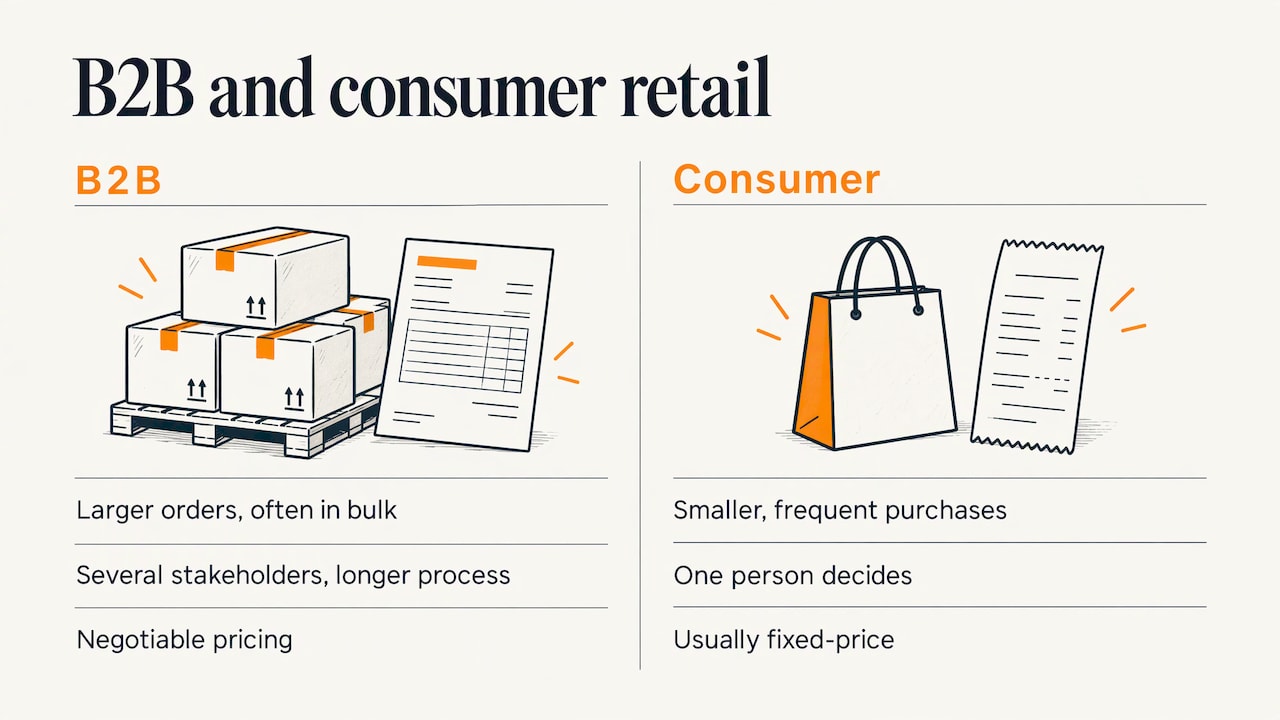
A quick way to think about it: a B2C site helps one person decide. A B2B site helps a company repeat a purchase correctly, under agreed terms, without calling anyone.
The core B2B ecommerce features at a glance
| Feature | What it does | Who it helps |
|---|---|---|
| Account hierarchies and roles | Mirrors the buyer’s company, locations and permissions | Procurement teams, your support staff |
| Contract and tiered pricing | Shows each customer their own price | Repeat buyers, your sales reps |
| Customer-specific catalogs | Limits what each account can see and order | Distributors, regional buyers |
| Quote request (RFQ) | Moves custom or large orders into a quote flow | Buyers with non-standard needs |
| Approval workflows | Routes orders over a limit to a manager | Larger buying organizations |
| Payment terms and methods | Net terms, purchase orders, cards, wires | Accounts payable teams |
| Bulk and reorder tools | CSV upload, saved lists, one-click reorder | Anyone buying the same items monthly |
| Search and product data | Finds technical products by spec | Engineers and buyers |
| ERP and inventory integration | Live stock, orders and invoices | Everyone, plus your operations team |
That list tracks what industry guidance describes as the essentials. TechTarget’s 2026 buyer’s guide names account hierarchies, role-based access, contract and tier pricing, RFQ quote-to-cash workflows, credit limits, punchout catalogs, approval workflows and bulk reorder tools as the features that separate B2B platforms from consumer ones.
Accounts, permissions and approvals
A company is not one person. A purchasing manager, a plant supervisor and an accounts payable clerk all touch the same order, and each needs a different level of access.
Account hierarchies and roles
Good account structure mirrors the customer. One enterprise guide recommends modeling parent companies, regional divisions and department cost centers, with role-based permissions, budget controls and spending limits, plus an onboarding workflow for new buyers. In practice that means:
- A company admin who invites and removes users.
- Buyers who can order within a spending limit.
- Approvers who release larger orders.
- Viewers, such as accounting, who see invoices but cannot buy.
- Separate ship-to addresses and cost centers under one company.
Purchase approvals
Approval routing belongs inside the checkout. According to a 2026 portal guide, orders that need manager sign-off should route within the portal rather than leave for email chains. The rule set is usually simple: order value above a threshold, certain product categories, or a specific cost center triggers a review. The key is that your customer defines the rule, not you.
Pricing, catalogs and quotes
This is where B2B sites most visibly part ways with retail.
Customer-specific pricing
Contract pricing means two customers can see different prices for the same part number. Tier pricing rewards volume. Both should appear the moment a buyer logs in, because a buyer who has to request a price for an item already on contract will not trust the site. Dynamic pricing can also cover bulk deals and regular reorder promotions, which suits distributors with predictable demand.
Customer-specific catalogs
Not every account should see every product. A catalog can be limited by contract, region, product line or approved-item list. For a manufacturer with a distributor channel and a direct channel, this keeps pricing and assortments separate while running on one site.
Quotes (RFQ)
Some orders will never be a one-click purchase: custom configurations, very large volumes, engineered parts. A request-for-quote flow lets the buyer submit specs and quantities, lets your team respond with a price, and lets the buyer convert the accepted quote into an order. Done well, the quote lives in the same account as the order history, so nothing gets lost in an inbox.
Checkout and payment options
Business buyers pay differently than consumers. A January 2026 report found that 32% of US B2B buyers say easy checkout is the most important online purchasing feature, and it advises accepting a range of methods: purchase orders, paper checks, credit cards and bank wire transfers.
Build these in from the start:
- Purchase order field on every order, with the PO number carried to the invoice.
- Net terms, with the buyer’s approved terms prefilled at checkout.
- Credit limits, so the site can show available credit and stop orders that exceed it.
- Multiple payment methods per account, set by your finance team.
- Tax exemption handling for resellers and exempt organizations.
Punchout catalogs are worth a look if your customers are larger organizations. They let a buyer browse your catalog from inside their own procurement system and send the cart back for approval. They are not a day-one need for most small and mid-size suppliers, but they matter once enterprise accounts show up.
Reordering, bulk orders and self-service
Most B2B revenue comes from repeat purchases, so reordering is arguably the highest-value feature on the list. A self-service portal available around the clock should include current stock, prepopulated payment terms, quote requests, reorders, bulk orders, and order tracking and history tied to company location and buyer permissions.
The practical tools:
- Quick order form. Type or paste SKUs and quantities instead of browsing.
- CSV upload. Load a whole order from a spreadsheet.
- Saved lists and templates. Monthly maintenance supplies, for instance, in one click.
- One-click reorder from order history.
- Order and invoice recall, so accounting can pull a past document without asking you.
If your team currently takes orders by phone or email, these five features usually remove the most manual work.
Search and product information
Industrial and technical catalogs are hard to browse. Buyers often know a part number, a dimension or a material, not a product name. Site search matters more here than almost anywhere in retail: one guide lists site search for complex and technical products and fast, responsive performance among the top priorities.
What to plan for:
- Search by part number, spec and cross-reference.
- Filters built on real attributes such as thread size, voltage or finish.
- Spec sheets, drawings and certifications downloadable on the product page.
- Stock status that reflects reality.
We cover the mechanics in how to build site search shoppers use and the performance side in improving ecommerce site speed without hurting the shopping experience.
Integrations that keep the operation running
A B2B store without integrations is just a second place to retype orders. The most important connection is to your ERP or inventory system. Enterprise buyers expect account pricing on login, real-time inventory reflecting the current ERP state, order history with one-click reorder, in-portal approvals and flexible payment terms.
Plan the connections in this order:
- ERP or accounting: customers, price lists, inventory, orders, invoices.
- Payments and tax: gateways, terms and exemption certificates.
- Shipping and logistics: freight quotes for large or heavy shipments.
- CRM: so sales reps see web orders and quotes next to the account history.
- Procurement systems: punchout, when larger customers ask.
Sales-support features matter too. Letting a rep place an order on behalf of a customer, or see what a customer sees, keeps your field team involved instead of working around the site. Analytics and reporting then show which accounts reorder, which quotes stall and which products are searched for but not found.
A note for companies that export: a B2B site should account for contract entitlements, large-volume shipping and applicable export regulations. Confirm requirements for your products and destinations with the relevant US government agencies or a trade compliance adviser.
What manufacturers need most
Manufacturers often sell through distributors, direct to large customers and to small repeat buyers, all at once. A familiar example of the model is a component maker such as Micron Technology, whose website lets business decision-makers buy chips in large quantities for products like smartphones.
For a manufacturer, the priority order usually looks like this:
- Customer-specific pricing and catalogs, so each channel sees the right products and prices.
- Quick order, CSV upload and reorder, to move repeat buyers off the phone.
- Spec-driven search and rich product data.
- ERP-connected inventory and order status.
- RFQ for custom and large orders.
- Approval workflows and punchout, once larger accounts onboard.
If you are building a plan around those priorities, our B2B ecommerce strategy guide and B2B ecommerce web design guide go deeper on sequencing and design.
How to prioritize your feature list
No one launches with everything. A workable approach:
- Interview your top ten customers and your sales and customer service staff. List every reason they call or email to order.
- Sort features into three groups: needed to stop phone and email ordering, needed to win larger accounts, and nice to have.
- Map each feature to a system. If it depends on ERP data, confirm the data is clean before you build.
- Launch with group one, measure reorder rate and support calls, then add group two.
- Design for growth. Choose an architecture that can add approvals, punchout or new catalogs without a rebuild.
Our perspective
After more than 38 years of building websites and marketing for companies in Columbus and beyond, we have seen the same pattern: the sites that earn their keep are built around how the customer works, not around a feature checklist. A B2B buyer wants to log in, see their price, find the part and reorder in a minute.
That is why we treat a B2B store as a custom web application project, with design, development, search, speed and SEO planned together. User-focused design keeps the portal easy for a plant supervisor, and technical implementation connects it to the systems you already run. We measure the result in business terms: fewer manual orders, more repeat purchases, more qualified leads.
If you sell to other businesses, start with the two or three features that remove the most friction for your best customers, and build from there.
Greg
Plan your B2B store with Marcy Design
We design and build custom ecommerce web applications for businesses that sell to other businesses, including manufacturers. Our team handles design, development, hosting, SEO and the marketing that brings buyers to the site, so one team owns the whole project.
If you already know which features your buyers need, send us your project details and we will respond with a proposal. If you are still shaping the plan, our website design services page shows how we work.
FAQ
What are the most important B2B ecommerce features?
Start with business accounts with roles, customer-specific pricing, flexible payment terms, quick reordering and ERP-connected inventory. These cover how companies buy: several users, agreed prices and repeat orders. Quotes and approval workflows follow as your customers grow.
How is a B2B ecommerce site different from a B2C site?
B2B sites serve organizations, so they handle larger orders, negotiated prices, multiple buyers per account and longer buying processes. B2C sites serve individuals, who typically buy smaller quantities at fixed prices. That is why B2B needs accounts, approvals and contract pricing.
What ecommerce features do manufacturers need?
Manufacturers benefit most from customer-specific catalogs and pricing, quick order and CSV tools, spec-based search, live inventory from the ERP and quote requests for custom work. Approvals and punchout matter as larger customers come online.
What payment options should a B2B site offer?
Offer purchase orders, net terms, credit cards, checks and bank wires, with each customer’s approved terms prefilled at checkout. A 2026 report recommends accepting a range of methods because buyers pay in different ways.
Sources
- B2B vs. B2C e-commerce: What’s the difference? (TechTarget)
- How to choose a B2B e-commerce platform (TechTarget)
- What Is B2B Ecommerce? (NetSuite)
- Guide to B2B ecommerce for 2025 (Algolia)
- Enterprise B2B eCommerce: The Complete Guide (Oro)
- B2B Buyer Portal: What Enterprise Buyers Expect in 2026 (Miva)
- B2B Ecommerce Websites in 2026 (BigCommerce)
- B2B Ecommerce Platform Feature Checklist (Shopify)
- B2B ecommerce website development: A guide (Salesforce)
- B2B or B2C eCommerce? (Privacy Shield, US government)