
 614.224.6226
Internal portal development is the work of building one secure, signed-in place where your people (or your clients) find information, use tools and finish tasks without hunting through email, shared drives and a dozen logins. The term covers three different projects: an employee portal (an intranet), a client portal, and an internal developer portal for engineering teams. They share a method: start from the jobs people need to do, connect the systems that hold the data, lock access down by role, and improve the portal after launch.
This guide explains each type, the features worth building, the security basics, and how to plan a build that people actually use.
TL;DR
- An internal portal is a single signed-in front door to your tools, documents and workflows. Its value comes from the systems it connects, not from the page design.
- Pick the audience first: employees, clients or engineers. Each needs different features, and mixing them early is the most common reason portals stall.
- Build around the five or six tasks people repeat most often, and personalize by role rather than by individual.
- Treat security as a requirement from day one: multi-factor sign-in, role-based permissions and an audit trail.
- Launch small, measure what people use, and keep improving. A portal is a product, not a one-time project.
Table of Contents
- What internal portal development actually covers
- Why build one: what the evidence supports
- Employee portal features that earn their place
- Secure portals for clients
- Developer portals: what the engineering version includes
- Perspective: what we have learned building for business clients
- A build plan that avoids the common failures
- Choosing a development partner
- How Marcy Design can help
- FAQ
- Sources
What internal portal development actually covers
Search for this phrase and most results describe the engineering version: the internal developer portal. IBM describes it as an interface where engineers discover and use tools, workflows, APIs, documentation and integrations, and it separates that from the internal developer platform, the environment that hosts those tools. Put simply, the platform is the engine and the portal is the dashboard.
Google Cloud uses a similar image, calling the portal the “front door” to the broader platform, the place where developers find and use services and tools.
The same idea applies outside engineering. A business that wants one place for HR forms, policies, order status, quotes and training has the same problem: scattered tools and no single entry point. A business that wants customers to download invoices, approve proofs and track projects has the same problem facing outward.
| Portal type | Who uses it | Typical job | Core connection |
|---|---|---|---|
| Employee portal (intranet) | Staff | Find policies, forms, news, tools | HR system, document storage, directory |
| Client portal | Customers, vendors | View orders, files, invoices, support | CRM, billing, ecommerce, project tools |
| Developer portal | Engineers | Find services, templates, docs, status | Code repositories, CI/CD, cloud platform |
Before you write a requirement, decide which row you are building. A portal for everyone is a portal for no one.
Why build one: what the evidence supports
The case for portals is about reducing friction. IBM says an internal developer portal brings a service catalog, software templates, documentation, workflow information and onboarding guidance together, which can reduce cognitive load and onboarding time.
Gartner’s guidance frames portals as a common focal point for platform-engineering and developer-experience programs, with a visible goal of consistent self-service access to tools, information and automation. The deeper benefit it names is greater consistency in how software is delivered and operated.
For non-technical portals, the Nielsen Norman Group says a good intranet portal gives easy access to enterprise information, resources and tools, and that it can consolidate applications, connect information and reduce fragmentation.
In plain business terms, a well-built portal tends to pay off in four places:
- Time spent searching. One search box and one navigation structure replace asking a colleague.
- Onboarding. New hires, new clients or new engineers see what they need in order, not in a forwarded email chain.
- Consistency. Everyone uses the current form, the current template, the current process.
- Fewer routine requests. Customers who can check status themselves do not call to ask.
The size of each gain depends on your company. Measure your own baseline (how many status calls a week, how long onboarding takes) before you build, so you can tell whether the portal worked.
Employee portal features that earn their place
The temptation is to launch with thirty modules. Resist it. Start from the tasks staff repeat, then add features that serve them.
The essentials
- Search that works. If staff cannot find the PTO policy in one query, they will stop trying. Good search across documents, people and tools is the single feature that decides adoption.
- Single sign-on. One login to the portal and the tools behind it. It removes password fatigue and makes access easier to manage when people join or leave.
- Role-based views. The Nielsen Norman Group’s research reports that role-based personalization generally works better than individual personalization. A warehouse supervisor and a sales rep need different home pages, but they do not need to customize every widget.
- Employee directory. Names, roles, departments, locations, and who covers what.
- Document library with ownership. Every policy has an owner and a review date, so stale files do not pile up.
- Forms and requests. Time off, equipment, expense reports and IT help requests submitted in the portal and routed to the right person.
- Announcements. One channel for company news, with the ability to target by team or site.
Features for the second release
- Training tracking and certification reminders
- Task dashboards pulling live data from operations, sales or production systems
- Approval workflows with status visible to the requester
- Mobile access for staff who are not at a desk
- Integrations with scheduling, payroll or quality systems
For manufacturers and other companies with shop-floor or field staff, mobile access and clear, short pages matter more than a rich social feed. Design for the person on a phone with gloves on, not the person at a dual-monitor desk.
Secure portals for clients
A client portal carries a different risk profile: you are exposing data to people outside your company. The feature list is shorter but the security bar is higher.
What clients expect to do
- See project, order or account status without asking
- Download invoices, contracts, reports and deliverables
- Upload files and approve work
- Message your team in a thread tied to the project
- Update their own contact and billing details
Security controls to build in
There is no single checklist that fits every business, and the right controls depend on what data the portal holds. A few controls are close to universal:
- Multi-factor authentication. OWASP defines MFA as requiring evidence from at least two distinct factors: something you know, something you have, something you are. It also notes that requiring two instances of the same factor, such as a password and a PIN, does not count as MFA. Plan which second factor your clients will actually accept, and test it with real users.
- Role-based permissions. Each client sees only its own records. Within a client account, an accountant may see invoices but not project files. Define roles before you build screens.
- Audit trail. Log who viewed, downloaded or changed what, and when.
- Secure file handling. Scan uploads, limit file types, and avoid sending sensitive documents as email attachments when a signed-in download will do.
- Account lifecycle. Remove or suspend access promptly when a client contact leaves, and when your own staff change roles.
If your portal handles regulated data such as health records, payment card data or financial account information, involve your compliance lead or outside counsel and a security professional early. Which rules apply (HIPAA, PCI DSS, state privacy laws) depends on the data and how you hold it, and fixing that after launch is expensive.
Developer portals: what the engineering version includes
If your reader is a CTO or engineering manager, the developer-portal pattern is worth understanding. Google Cloud says a portal typically includes self-service templates, a service catalog with metadata such as owner and environment, status views such as SLOs and DORA metrics, and documentation. The platform behind it supplies golden paths, codified practices and security controls.
Golden paths are worth a note. AWS describes teams using them to give pre-approved, automated routes for delivering services, including security scanning and policy-as-code. The developer does not have to know every security step, because the path does it.
Red Hat Developer’s overview says portals centralize tools, libraries, boilerplate and configuration while automating complexity around development and deployment, and links them to better productivity, collaboration and visibility.
A caution for smaller companies: this model assumes a platform-engineering team. AWS notes an estimate that 80% of large software engineering organizations will have platform engineering teams by 2026. If you have a handful of developers, a lightweight portal with a service list, runbooks and a few templates is usually the right size.
Perspective: what we have learned building for business clients
We have spent more than 38 years helping companies turn what they know into something customers and staff can use. Portals are a natural extension of that work, and we approach them the way we approach a website: start with the user, then do the technical work behind it.
Three opinions we hold firmly:
- The interface is the smaller half of the job. A portal that looks polished but connects to nothing becomes a bookmark nobody opens. Integration with your CRM, ecommerce, accounting or operations systems is where the value comes from, and where most of the effort belongs.
- Content ownership beats content volume. Every page needs a named owner. Without one, a portal is a year-old filing cabinet.
- Do the three or four things people ask for, well. Companies are better served by a focused first release that earns trust than by a broad one that confuses people.
The same discipline applies to portals as to public sites: clear navigation, accessibility and speed. That is why we treat accessibility as part of the build rather than a later fix, since a portal your own staff or clients cannot use with a keyboard or screen reader is a portal that fails some of them.
— Greg
A build plan that avoids the common failures
Gartner says successful portals require prioritizing developer needs and delivering integrated, sustainable portals as part of broader programs. The principle holds for any audience: put users first and plan for the long term. Here is a sequence that does that.
1. Define the audience and the top tasks
Interview six to ten real users. Ask what they do weekly, where they get stuck, and which systems they open most. Write down the top five tasks. These become your launch scope.
2. Map the systems and the data
List every system the portal needs to read from or write to: HR, CRM, ecommerce, accounting, file storage, ticketing, production tracking. Note which have APIs, which need custom connectors, and which hold data too sensitive to expose. Integration is usually where the budget and schedule are won or lost. Our guide to ecommerce platform integration covers many of the same questions, from data mapping to testing.
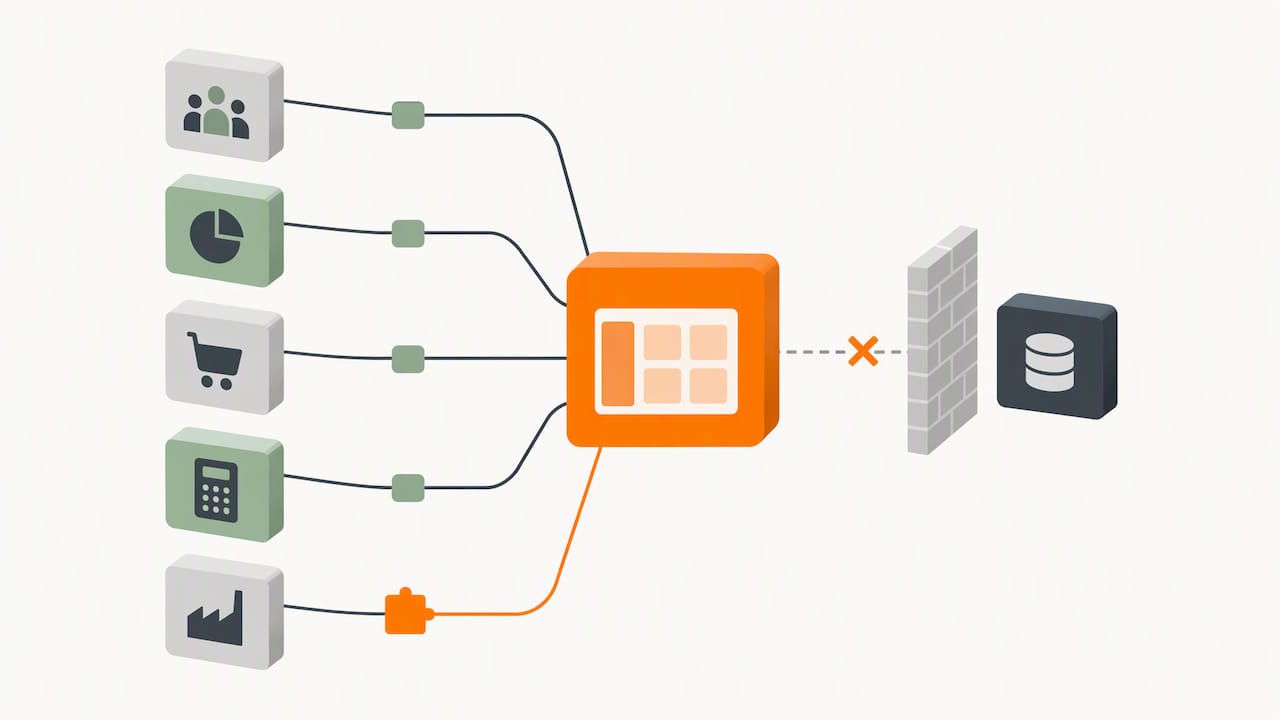
3. Decide build, buy or blend
Off-the-shelf intranet and portal software can suit a company whose needs are standard. Custom development makes sense when your workflows are specific, when you need to connect several unusual systems, or when a client portal needs to match your brand and your process. Many projects blend the two: a packaged core with custom modules where your business is different. Ask any vendor how data leaves the system if you switch, and who owns the code.
4. Design for roles and for search
Sketch the home page for each role before anything else. Test the navigation labels with real staff or clients. Use the words they use, not your org chart.
5. Build in thin slices
Release the first task end to end (for example, requesting time off, or approving a proof) before starting the second. Thin slices give you real feedback and let you adjust before you spend the rest of the budget.
6. Pilot, then roll out
Start with one department or a handful of friendly clients. Fix what they find. Then announce the portal with a clear reason to switch: the old form disappears on a stated date, or the status line is now answered in the portal. Without a reason to move, habits win.
7. Measure and keep improving
Track logins, search terms that return nothing, task completion and support requests. The searches that fail show you what content to add. Review the numbers monthly at first. A portal is closer to a product than a project, which is why Gartner ties its success to sustainability, not just launch.
Choosing a development partner
Whether you work with an agency or an in-house team, ask these questions:
- Who will own the system after launch, and what does support look like?
- How will security be handled, and who reviews it?
- Which of our systems have you connected before, and how?
- Will you build roles and permissions into the first release?
- How is the portal tested for accessibility and on mobile devices?
- What do we own at the end: code, designs, data?
Be wary of any proposal that begins with a screen design and ends there. The questions that decide your outcome are about data, access and adoption.
How Marcy Design can help
We design and build custom websites, web applications, ecommerce solutions, mobile experiences and hosting for companies in Columbus and across the country. A portal draws on all of them: web development and application work for the build, mobile and hosting services for access and uptime, and custom web design so the result is usable and on brand. If you are weighing a client portal, an employee portal or a connected ecommerce back end, tell us what you are trying to fix and we will help you scope a focused first release. For a sense of how we approach B2B builds, read our reference guide to professional B2B web development in Ohio.
FAQ
What is the difference between an internal developer portal and an internal developer platform?
The platform is the underlying set of infrastructure, technologies and automated processes. The portal is the interface developers use to find and use those capabilities, according to IBM. You can have a platform without a portal, but the portal is what makes the platform easy to discover and use.
What features should an employee portal have?
Start with search, single sign-on, role-based home pages, a directory, an owned document library, request forms and announcements. Add training tracking, approvals and live dashboards once people use the basics. Keep personalization at the role level, which the Nielsen Norman Group finds generally works better than individual personalization.
How do I make a secure portal for clients?
Use multi-factor authentication, separate permissions by role so each client sees only its own data, keep an audit log, and handle uploads carefully. Which legal requirements apply depends on the data you hold, so involve a security professional and, for regulated data, your compliance lead or attorney before launch.
Should we buy portal software or build a custom portal?
Buy when your needs are standard and the software connects to your systems. Build, or blend custom modules with a packaged core, when your workflows are distinctive or you need a client-facing experience that matches your brand. Either way, confirm that you can export your data.
How long does a portal project take?
It depends on how many systems must be connected and how many roles you support. A focused first release with a few tasks is much faster than a full intranet replacement. Scope the first release tightly and add modules after real users have tried it.
Sources
- What Is an Internal Developer Portal (IDP)? | IBM
- Common myths about platform engineering | Google Cloud Blog
- How to Implement Internal Developer Portals | Gartner
- Intranet Portals UX Design | Nielsen Norman Group
- Multifactor Authentication Cheat Sheet | OWASP
- Building an internal developer platform | AWS Prescriptive Guidance (PDF)
- Building an internal developer platform on AWS: Introduction
- A platform for building developer portals | Red Hat Developer