
 614.224.6226
A website maintenance plan is a written agreement, or an internal routine, that says who keeps your site updated, backed up, secure, fast and accessible, how often, and what happens when something breaks. A good plan covers backups you have actually tested, software updates, security monitoring, performance and uptime checks, accessibility reviews, and a small block of time for content changes. This guide walks through each part, gives you a schedule you can hand to a developer, and shows how to compare the types of plans on offer.
TL;DR
- A plan should name specific tasks, a frequency for each, and a person responsible. “We keep it updated” is not a plan.
- Backups are the part most often done badly. Store them off the server and test a restore on a schedule.
- Match the plan to the risk. A brochure site, a lead-generation site and an ecommerce store need very different levels of attention.
- Ask for monthly reporting, a response time for emergencies, and clarity on what counts as a content change versus new project work.
- Whoever built the site usually knows it best, which makes maintenance faster and cheaper to diagnose.
Table of Contents
- Why a site needs a plan and not just occasional fixes
- What a website maintenance plan should include
- A maintenance schedule you can copy
- Types of maintenance plans
- How to choose a provider
- Our perspective
- When maintenance is not enough
- Maintenance support from Marcy Design
- Common mistakes to avoid
- FAQ
- Sources
Why a site needs a plan and not just occasional fixes
A website is software running on a server, and software ages. Plugins, themes, the CMS itself and the server stack all release updates, many of them security patches. Certificates expire. Forms stop delivering email. A page that was fine in January links to a product you discontinued in June.
None of that announces itself. Most owners learn about a problem from a customer, or from a search result that now carries a warning. A plan replaces that surprise with a calendar.
Federal guidance backs the basic idea. CISA’s website security guidance lists steps organizations should take to protect against website attacks, and keeping software current and reviewing your hosting arrangements sit at the center of it. If you want a plain-language overview from us on the same theme, our piece on keeping your website safe covers the everyday habits.
What a website maintenance plan should include
The tasks below are the core. Not every site needs every item at the same depth, but a plan that skips any of them should say why.
Backups and restore testing
This is the line item that decides whether a bad day is an inconvenience or a crisis. Two points matter most.
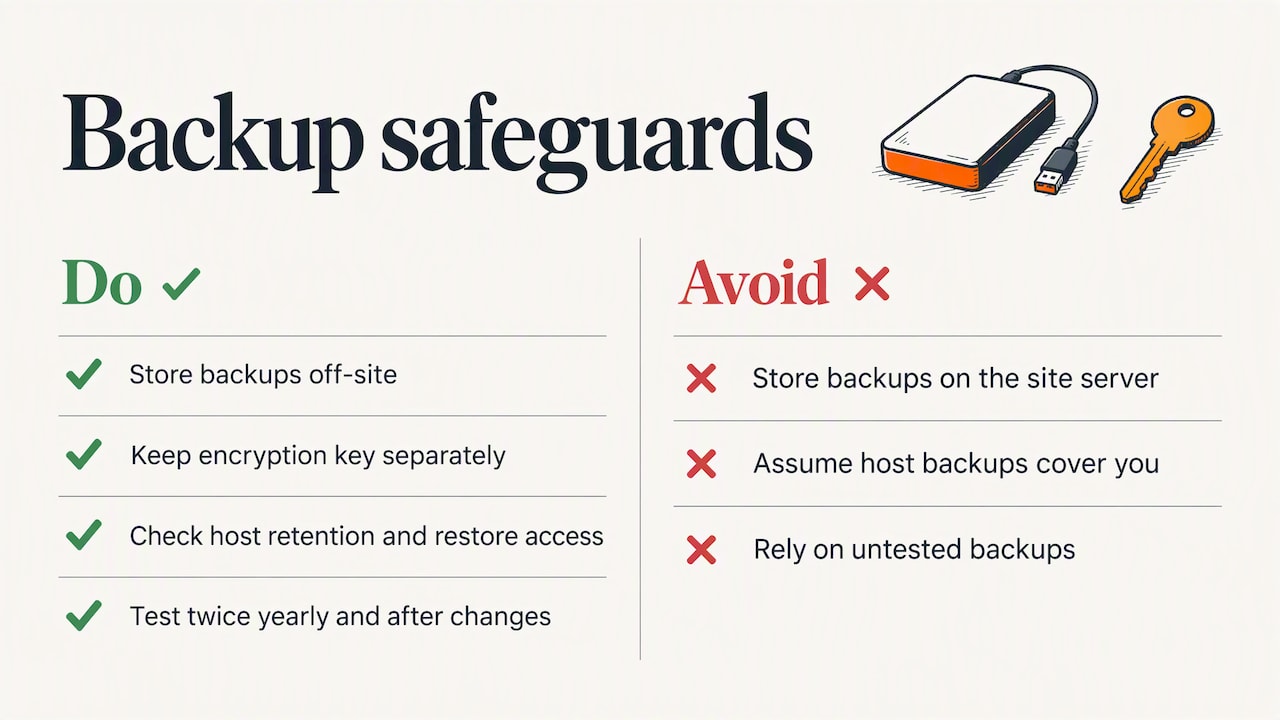
First, where the backup lives. NIST advises storing backups at a protected, off-site location, and saving the encryption key somewhere separate. A backup stored on the same server as the site goes down with the site. Many owners assume their host’s backups cover them. Check what the host actually retains, for how long, and whether you can restore it yourself.
Second, whether anyone has ever restored from it. A backup that has never been tested is a hope, not a safeguard. Ask for a documented restore test at least a couple of times a year, and after any major change to the site.
Software updates and patching
The CMS, themes, plugins, libraries and server software all need updating. The risk is not only skipping updates but applying them blindly. A responsible routine updates a staging copy first, checks key pages and forms, and then pushes to the live site. Security patches for known vulnerabilities should move faster than cosmetic updates. CISA’s guidance stresses keeping software up to date and prioritizing the known exploited vulnerabilities, and it recommends multi-factor authentication on administrative access. Both belong in your plan.
Security monitoring
At minimum: malware scanning, a web application firewall or equivalent filtering, login protection, review of user accounts (remove the former employee and the old contractor), and HTTPS enforced across the entire site. Ask who gets alerted when a scan finds something and how quickly they act.
Uptime, speed and performance
Uptime monitoring should check the site every few minutes and alert a human. Speed needs a regular look too, because images pile up, scripts get added and pages slow down gradually. Our practical guide to website performance optimization explains what to measure and fix.
Accessibility checks
The W3C’s current recommendation is WCAG 2.2, published in December 2024. New content, new plugins and redesigned templates can quietly break accessibility, so a periodic review belongs in the plan. We suggest a quarterly scan plus a manual check of key pages (home, contact, checkout or quote form) with a keyboard and a screen reader. If your site serves the public, or you sell to government or education buyers, ask your attorney what standard you are expected to meet.
Content updates
Most plans include a small monthly allowance for text changes, staff updates, new images or a new landing page. Define the allowance in hours or tasks, and define what happens past it. This is where disputes begin, so get it in writing.
SEO health
Broken links, redirect chains, missing titles, indexing errors and expired structured data all erode search visibility. A maintenance plan is not the same as an SEO campaign, but it should catch technical issues. If you want to understand where maintenance ends and optimization begins, read what SEO is and why it matters.
Reporting and a recovery plan
You should receive a short monthly report: what was updated, what was found, what was fixed, traffic and uptime numbers. You should also have a one-page recovery plan: who to call, where the backups are, who holds the logins and domain registrar account, and what the first hour looks like after an outage.
A maintenance schedule you can copy
This is the checklist version. Adjust the frequency upward for ecommerce and for sites that collect sensitive data. If you run WordPress, the same cadence applies to core, plugins and themes, and it matches the structure of published agency checklists such as the WP Umbrella checklist, which groups tasks as daily, weekly, monthly, quarterly and yearly.
| Frequency | Task | Why it matters |
|---|---|---|
| Daily (automated) | Off-site backup, uptime monitoring, malware scan | Limits data loss and shortens detection time |
| Weekly | Review security alerts, check form submissions arrive, apply urgent security patches | Catches silent failures and closes known holes |
| Monthly | Update CMS, plugins and themes on staging, then live; test key forms and checkout; review user accounts; check broken links; run a speed test; send the report | Keeps the site current without breaking it |
| Quarterly | Restore test from backup; accessibility review; review search console errors; check analytics goals | Proves recovery works and finds slow decay |
| Yearly | Domain and SSL renewal check, hosting review, content audit, copyright and legal pages, plugin cleanup, full security review | Removes the dull but expensive surprises |
Two of those rows deserve emphasis. Weekly form tests sound trivial, yet a form that stops sending mail can cost a business leads for weeks. And the quarterly restore test is the item most often skipped and most often regretted.
Types of maintenance plans
We describe them by type here, because the labels vary from provider to provider. Compare what is included, not what the tier is called.
| Plan type | Typically covers | Best for | Watch for |
|---|---|---|---|
| Hosting-only upkeep | Server updates, basic backups, uptime | Simple brochure sites with rare changes | Usually no plugin updates, no restore testing, no content help |
| Essential care | Backups, updates, security scans, monthly report | Small business sites that change a few times a year | Content changes billed separately |
| Managed care with content time | Everything above plus a monthly block of hours, performance and accessibility checks | Lead-generation sites, manufacturers, nonprofits | Unused hours that vanish at month end |
| Ecommerce care | Faster patching, checkout testing, payment integration monitoring, priority response | Online stores | Response time promises with no written commitment |
| Hourly, as needed | You call when something breaks | Sites you can afford to have down | Slow response and no preventive work |
Published prices vary widely. Several providers list small-business tiers in the low hundreds of dollars a month, and complex stores cost more. We do not publish a price list for our own plans, because scope depends on the platform, the number of integrations and how much changes month to month. A quote after a short site review is the honest way to price it.
Doing it yourself
Some owners can handle it. If your site is simple, you are comfortable on staging copies, and you will really run the checklist every month, the cost is mostly your time plus tools. The danger is drift: the month the owner is busy is the month the vulnerable plugin goes unpatched. If you go this way, put the monthly tasks on a recurring calendar invite and share the logins with a second person.
How to choose a provider
Ask these questions before you sign:
- Who built or knows the site? A provider unfamiliar with custom code takes longer to diagnose problems, and some will refuse to touch custom work.
- Where do backups go, and when was a restore last tested? You want specifics, not reassurance.
- What is the response time for an outage? Look for hours, in writing, and ask how to reach a person after hours.
- What counts as a content change? Text and image swaps are normally in. New pages with new functionality are usually project work.
- Do you own the accounts? Your domain registrar, hosting and analytics logins should be in your company’s name.
- What does the report show? Ask for a sample.
- How do I leave? There should be no lock-in on your code, content or credentials.
Our perspective
We have built and supported business websites in Columbus for more than 38 years, and the pattern we see is consistent: sites rarely fail because of one dramatic event. They fail because nobody owned the small recurring jobs.
A few convictions come out of that work. Maintenance is cheaper when the people doing it understand how the site was built, so we like to support what we design and develop. The plan should be sized to what the site does for the business: a manufacturer whose website feeds the sales team needs faster response than a site that serves as an online business card. And the plan should include the unglamorous proof, a restore test, a form test, an accessibility pass, rather than only a promise of “monitoring.”
We also think maintenance is where design and marketing results are protected. A site that loads slowly, drops forms or breaks on a new phone undoes the work done to attract visitors. That is why we treat upkeep as part of the same conversation as performance, SEO and lead generation, not a separate line item bolted on later.
— Greg
When maintenance is not enough
A plan keeps a sound site healthy. It cannot fix a site that is fundamentally out of date. If you are paying to patch an aging theme, working around a platform that no longer receives updates, or seeing mobile users leave, the money is better spent elsewhere. Our guide to signs you need a new business website lists the signals, and how to modernize an outdated business website covers the middle path when a full rebuild is not yet necessary.
Maintenance support from Marcy Design
If you would rather hand this off, we design, build, host and support websites for small businesses, manufacturers, nonprofits and veteran-owned companies across Central Ohio. Because our team handles website design and the development work behind it, support comes from people who know your site. Tell us what you run today and we will recommend a scope. You can start from our services overview or reach us through marcy.com.
Common mistakes to avoid
- Trusting the host’s backups without checking them. Confirm retention, location and how you restore.
- Updating everything live, all at once. One incompatible plugin can take down checkout.
- Leaving old accounts active. Former staff and vendors are a common weak point.
- No named owner. Every task needs a person or a firm responsible.
- Treating the hosting bill as the maintenance plan. Hosting keeps the server running. It does not review your plugins, forms or accessibility.
- Ignoring the starting point. A site with outdated software needs a catch-up cleanup before a routine plan can work. Ask for it to be scoped separately.
FAQ
How much does it cost to pay someone to maintain a website?
It depends on the platform, the number of integrations and the response time you need. Published small-business plans from providers commonly sit in the low hundreds of dollars a month, and stores and custom applications cost more. We quote after reviewing the site, so you pay for the work the site needs.
What should a website maintenance plan include?
Off-site backups with restore tests, tested software updates, security scanning, uptime and speed monitoring, accessibility checks, a content-change allowance, and a monthly report. It should also name an emergency contact and a response time. If any of these is missing, ask why.
Do websites need monthly maintenance?
Most business sites benefit from it. Monitoring and backups should run daily and automatically, while updates, form tests and link checks fit a monthly rhythm. Rarely changed brochure sites can stretch some tasks to quarterly, but security patches should not wait.
Is a website support plan the same as a maintenance plan?
The terms overlap, and providers use them differently. Maintenance usually means preventive upkeep, such as updates, backups and monitoring. Support often adds help requests and small changes. Read the task list rather than the plan name.
Sources
- Website Security | CISA
- CISA Insights: Implement Cybersecurity Measures Now to Protect Against Potential Critical Threats
- How to Recover from a Cyber Attack | NIST
- Web Content Accessibility Guidelines (WCAG) 2.2 | W3C
- WordPress Maintenance Checklist: 27 Tasks for Agencies (2026) | WP Umbrella