
 614.224.6226
What if connecting more tools made your ecommerce operation harder to manage, not easier? When customer, order, and inventory data sit in separate systems, ecommerce platform integration can create dependable flows between the tools your business already uses. The goal isn’t to connect everything. It’s to reduce manual work and give customers a smoother experience without adding unnecessary complexity.
Concerns about delays, inconsistent records, or a disruptive technical project are sensible. A careful plan starts with real business needs: which systems should share data, what information needs to move, and how the rollout will be tested and managed.
This guide will help you identify useful integrations, plan data flows, and approach implementation step by step. It also explores how connected information can support more relevant customer journeys, including mobile-friendly experiences. A guided interaction can adapt to a person’s answers, unlike a static form. That difference can make lead capture, onboarding, professional consultations, and assessments feel more engaging and easier to complete. Strong integration connects reliable business data with customer journeys that feel clear and personal.
Key Takeaways
- Use recurring operational friction to decide which systems to connect first, rather than integrating tools simply because they’re available.
- Map the information that needs to move between systems and decide who owns each part of the process before choosing an integration approach.
- Understand how ecommerce platform integration can support clearer product discovery and more relevant customer interactions.
- Keep the first rollout focused on one high-priority workflow, then test it and review its performance before expanding.
- Assess potential partners by asking about relevant platform experience, communication, documentation, testing, and post-launch ownership.
What Ecommerce Platform Integration Connects, and Why It Matters
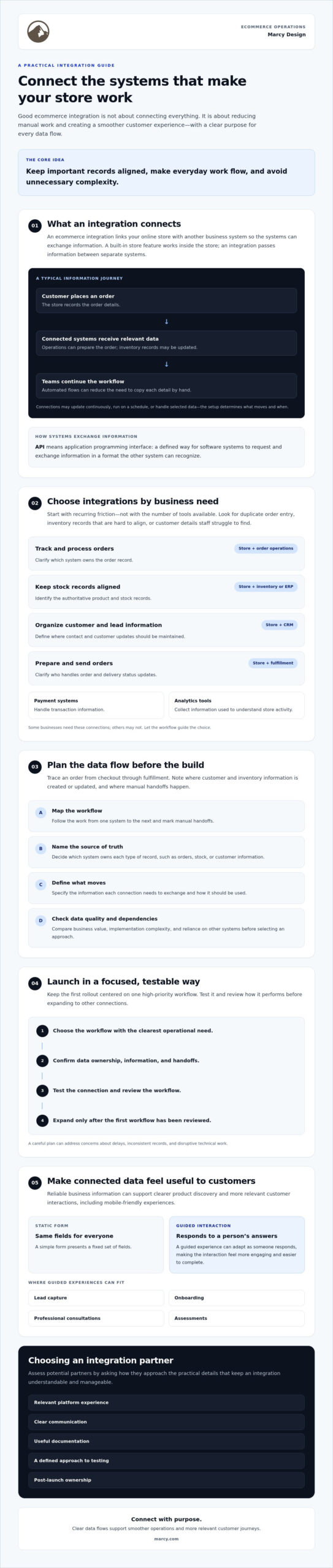
An ecommerce platform integration connects an online store with another business system so they can exchange information. For example, order details might go to a fulfillment system, available inventory might be updated, or a customer’s information might be added to a customer relationship management system. The aim is practical: keep important records aligned and help everyday work move from one step to the next.
A built-in platform feature isn’t necessarily an integration. A feature works within the store itself, while an integration connects separate systems and defines how information passes between them. The distinction matters when planning. A store may display order data, for example, but a separate connection may be needed to share that data with the system staff use to prepare shipments. The broader idea is part of enterprise application integration, which focuses on connecting applications that otherwise operate separately.
Which business systems commonly connect to an online store?
Start with the systems involved in customer service and daily operations. A CRM can organize customer and lead information, while an ERP or inventory system can help coordinate product, stock, and order records. Because these systems may serve different teams, clarify which one is the main source for each type of information.
Other connections support specific tasks. Payment systems handle transaction information; fulfillment systems help manage order preparation and delivery; analytics tools collect information used to understand store activity. You may need some of these connections, but not all of them. Let the workflow guide your choices.
How does ecommerce integration move information?
An API, or application programming interface, is a defined way for software systems to request and exchange information. Think of it as an agreed set of instructions: one system sends specific details in a format another system can recognize. The exact data and timing depend on how each connection is designed.
Consider an order journey. A customer places an order, the store records its details, and a connected operations system may receive the information so staff can prepare it. An inventory connection may also update stock records. With an automated flow, these updates can happen between systems without someone copying each detail by hand. Without that connection, a team may need to enter information manually. Some integrations update continuously, while others run on a schedule or handle only selected data.
Before choosing a setup, map the workflow, identify which system owns each record, and decide what information needs to move. This gives your ecommerce platform integration a clear purpose and keeps the technical scope tied to business priorities.
Which Ecommerce Integrations Should You Prioritize First?
Choose integrations based on the work they need to improve, not the number of connections available. Start with recurring friction: orders that require duplicate entry, inventory records that are hard to keep aligned, or customer details that staff can’t easily find. A practical ecommerce integration guide can help explain common system connections, but your priorities should come from your own workflows.
How do you match integrations to business needs?
Trace an order from checkout through fulfillment, then note where customer records and inventory information are created or updated. Record each manual handoff and identify the system that should be the source of truth for each data type. This makes gaps visible before you select a tool or plan a rollout.
| Business need | Systems to assess | Data and ownership to clarify |
|---|---|---|
| Track and process orders | Store and order operations system | Order details; decide which system owns the order record |
| Keep stock records aligned | Store and inventory or ERP system | Product and stock data; identify the authoritative inventory record |
| Organize customer and lead information | Store and CRM | Contact and customer records; define where updates should be maintained |
| Prepare and send orders | Store and fulfillment system | Order and delivery details; clarify who handles status updates |
Next, compare potential integrations by business value, implementation complexity, and dependence on other systems. Check data quality, too. An integration can move incomplete or inconsistent records faster, but it won’t resolve unclear ownership by itself. Consider what would happen if a connection stopped working: would the team have a workable manual process, or would a key task stall? Prioritize essential connections for launch and leave useful but non-urgent improvements for a later phase.
Should you use a platform-native connection or custom integration?
A platform-native connection may suit a common workflow, while a custom integration may be worth considering when standard options don’t meet a specific business requirement. Neither choice is automatically right. Verify compatibility with your existing systems, which data is exchanged, who maintains the connection, and what vendor documentation is available. Confirm these details before committing to a scope.
Keep the first phase focused on a high-priority workflow. If that work also calls for storefront changes, you can explore website design services as part of the broader planning conversation.
How Guided Ecommerce Experiences Make Integrations More Useful
A connected store can pass customer information between systems, but the customer experience depends on how you collect that information in the first place. A static form shows everyone the same fields. A guided interaction can respond to a customer’s choices, asking relevant follow-up questions and skipping ones that don’t apply. This can make the experience feel more personal and the information more useful for the next step.
This is where ecommerce platform integration can support the front end as well as business operations. If a customer shares a preference or describes a need, that information may be passed into an appropriate customer workflow, depending on how the systems are configured. For background on how applications exchange information, see Informatica’s overview of application integration technology.
Where can guided interactions support ecommerce journeys?
Use a guided experience when a customer needs help deciding what to do or provide next. For lead capture, a shopper might select an area of interest before sharing contact details, helping route the inquiry appropriately. During onboarding, a sequence of relevant questions can gather the details needed to begin, rather than presenting every possible field at once.
Professional consultations and assessments can benefit from the same approach. A visitor can describe their goals or circumstances, then receive prompts that help them share useful context. In each case, keep the interaction focused: each question should help the customer move forward or help the business respond more appropriately.
What should businesses measure in interactive versus static experiences?
Compare similar journeys and look beyond the number of submissions. Track whether people start and complete the experience, where they abandon it, and whether the information collected is relevant enough to support a useful next decision. Treat higher completion as a goal to test, not a guaranteed result. If a branching interaction adds needless steps, a simple form may serve customers better.
- Completion: Do users finish the experience they started?
- Abandonment: At which question or step do they leave?
- Information quality: Does the response help with product discovery, follow-up, or service guidance?
Connected information can also make a journey feel more consistent across touchpoints, so customers don’t have to repeat relevant details unnecessarily. Collect only what the experience needs, explain why you’re asking, and handle information thoughtfully. Privacy obligations can vary by business and context, so confirm applicable requirements with a qualified advisor.
How to Plan and Launch Ecommerce Integrations Step by Step
A dependable launch starts with the workflow, not the technology. Keep the first phase focused on one high-priority process, such as getting online orders into the system staff use to prepare them. A narrow scope makes it easier to clarify responsibilities, test realistic cases, and spot issues before the connection supports live work.
- Map the current workflow. Trace the process from its starting point to its outcome. Note where staff copy information, wait for updates, or use a workaround.
- Set the scope. Choose one business problem to solve first. Define what a successful outcome looks like, and leave lower-priority connections for a later phase.
- Map data and ownership. Document what information needs to move, which direction it travels, and which system is the source of truth. Name an internal owner for the process and for each key data record.
- Check access and dependencies. Confirm who can authorize access, what other systems or workflows the connection depends on, and what technical requirements apply. Verify compatibility with relevant vendors or developers.
- Plan for exceptions. Decide how to handle incomplete records, changes, duplicates, or a failed transfer. Specify who reviews errors and how staff should continue the process if the connection is interrupted.
- Test, launch, and review. Test representative scenarios before enabling the connection in live operations. After launch, review errors and assess whether the integration still supports its original business objective.
What should an integration discovery checklist include?
Keep discovery practical. For each system, record the information it provides or receives, the direction of updates, the process owner, and any access needed. Add dependencies, exceptions, and manual steps staff perform today. Then ask vendors or developers to confirm platform compatibility and technical requirements. This shared checklist gives business and technical teams a common plan before work begins.
How can teams test and monitor an integration?
Use an appropriate test environment when available, and check typical orders as well as incomplete records, updates, and failure scenarios. Confirm the information reaches the intended system and that staff know what to do when it doesn’t. Assign someone to review errors, define an escalation path for unresolved issues, and revisit the connection as workflows change.
Good planning turns ecommerce platform integration into a managed business change, not a switch flipped and forgotten. If you’re shaping a broader ecommerce project, explore Marcy Design’s website design services as one part of planning the online experience.
Choosing an Ecommerce Integration Partner for Your Business
The right partner should make a complex project easier to understand, not harder to evaluate. Look for a team that starts by learning how your business works, explains its recommendations in plain language, and connects technical choices to customer and operational needs. For an ecommerce platform integration, experience with your exact tools matters. Ask directly rather than assuming a provider supports your platform or systems.
What questions should you ask a potential integration partner?
Use the first conversation to understand how the partner approaches the work. Ask:
- How will you learn our current workflows and identify which connections matter most?
- Have you worked with our ecommerce platform and the systems we need to connect? Can you describe a relevant example?
- What will be documented, including data flows, ownership, assumptions, and error handling?
- Who plans and carries out testing, and how will our team review the results?
- Who handles questions, maintenance, and requested changes after launch?
Ask for examples that resemble your business process, not just a list of technologies. Verify results or client claims before relying on them. A strong partner should be clear about what they know, what needs confirming, and where another vendor or specialist may need to be involved.
How does an agency connect integration to the broader website experience?
Integrations affect more than back-office workflows. They can shape what customers see, what information they’re asked to provide, and whether their experience feels consistent across devices and touchpoints. If your project includes a wider site refresh, consider how website design services fit alongside ecommerce development and integration planning. If AI-enabled capabilities are relevant, ask how they would support a defined business or customer need and how their role would be assessed.
Marcy Design is a Columbus-based agency with ecommerce development, website design, and AI-powered solutions among its listed services. It may be a local partner to speak with about a broader ecommerce project, but confirm platform and third-party system experience directly. Ask how the proposed approach fits your workflows, what the team would document, and who would own testing and post-launch questions.
Build a More Connected Ecommerce Experience
Successful ecommerce platform integration isn’t about connecting every available tool. It’s about choosing the systems that address real workflow friction, deciding which system owns each record, and planning a focused rollout with testing and clear ownership.
Connected business data can support smoother operations, while thoughtful customer-facing interactions help shoppers find relevant information and move through each step with greater clarity. Together, they can create a stronger experience for both your team and your customers.
The right plan depends on your platforms, workflows, and priorities. Marcy Design is a Columbus-based digital agency with ecommerce development and AI-powered solutions among its listed services. If you’re ready to explore how your store and business systems could work together, discuss your ecommerce integration project with Marcy Design.
Frequently Asked Questions
What is ecommerce platform integration?
An ecommerce platform integration connects an online store with another business system so they can exchange information. For example, an order can pass from the store to an operations system, while inventory updates can flow back to the store. The purpose is to support a defined workflow, reduce unnecessary manual handoffs, and keep important records aligned. The right connection depends on your business processes and which system should own each record.
Which systems should an ecommerce platform integrate with first?
Start with the systems that address a recurring operational problem. If staff repeatedly copy order details, assess a connection to the system used to process or fulfill orders. If customer information is difficult to organize, consider whether a CRM connection would help. Inventory, payment, fulfillment, and analytics systems serve different needs. Map your current workflow, identify the friction, and prioritize by business value, complexity, and the impact of a connection being interrupted.
How do ecommerce platforms integrate with a CRM or ERP?
An ecommerce platform can exchange selected information with a CRM or ERP through a platform-supported connection or another integration approach. A CRM connection may pass customer or lead details into customer records. An ERP connection may coordinate operational information such as orders or inventory. Before implementation, clarify which system owns each record, what information moves, and when updates happen. Confirm compatibility and maintenance responsibilities with the relevant vendors or developers.
Can ecommerce integrations disrupt an existing online store?
They can introduce risk if workflows, data, access, and failure handling aren’t planned and tested. Reduce uncertainty by limiting the first phase to a clear business process, checking compatibility, and testing typical orders, incomplete records, updates, and failure scenarios in an appropriate environment before launch. Assign someone to review errors and define how staff should continue work if the connection is interrupted. A careful rollout helps teams identify issues before relying on the integration in live operations.
What is the difference between an API and a platform integration?
An API is a defined way for software systems to request and exchange information. A platform integration is the actual connection set up between systems to support a workflow. For example, an integration may use an API to pass order details from an online store to an operations system. An API alone doesn’t explain which records move, who owns them, or how errors are handled. Those details need to be planned for the specific connection.
Can interactive tools improve an ecommerce customer journey?
Interactive tools can make a customer journey more relevant by adapting prompts to a person’s answers, unlike a static form that shows everyone the same fields. A guided product finder, lead capture flow, or onboarding sequence can help customers share useful information step by step. That may support clearer next steps, but better completion isn’t guaranteed. Compare completion, abandonment, and the usefulness of responses to understand whether the guided experience is helping customers.
How should a business measure ecommerce integration success?
Measure success against the business problem the integration was meant to solve. Track whether manual copying has decreased, whether records reach the right system, how often errors occur, and whether teams can complete the workflow as intended. For customer-facing interactions, also review completion, abandonment, and the relevance of information collected. Columbus businesses considering an agency partner can speak with Marcy Design, a local agency offering ecommerce solutions, and confirm platform experience directly.