
 614.224.6226
What if your website could recognize what a customer may need next and guide them toward a useful answer? That’s the promise of using AI to predict customer behavior. By analyzing signals such as browsing patterns, past purchases, and service interactions, AI can help businesses make more informed decisions. A prediction is valuable, though, only when it leads to a helpful next step.
If you’re unsure which signals matter, or concerned that AI could get it wrong and make an experience feel impersonal, look beyond the forecast. The goal isn’t to treat a prediction as a certainty. It’s to use it thoughtfully, with human judgment and a clear benefit for the customer.
This guide explains how prediction works, then compares static forms with interactive experiences that adapt to customer responses. You’ll see how guided tools can support lead capture, onboarding, consultations, and assessments, and how AI insights can inform more relevant customer journeys for Columbus businesses.
Key Takeaways
- Using AI to predict customer behavior means estimating likely patterns from customer signals, not treating an individual forecast as a certainty.
- Follow a clear process: define a goal, review relevant data, identify patterns, act on a forecast, and refine the approach based on outcomes.
- Interactive experiences can adapt questions and guidance to a customer’s responses, while static forms present the same fields to everyone.
- Start with one customer journey and a useful outcome, such as improving lead capture, onboarding, consultations, or assessments.
- Connect predictions to customer-focused website and ecommerce experiences, and keep human judgment involved in decisions and follow-up.
What using AI to predict customer behavior actually means
Using AI to predict customer behavior means analyzing information about past and present customer activity to estimate what people may do next. A business might use it to anticipate which visitors are more likely to request information, or which customers may need guidance before completing a purchase. The estimate describes a pattern, not a certainty about any one person.
Predictive analytics uses patterns in customer data to estimate likely future actions and help a business choose a relevant next step. For an overview of the wider approach, see Predictive Analytics and AI.
A forecast is useful only if it leads to a relevant, respectful response. The goal isn’t to label people or claim to know their private motives. It’s to make an experience more relevant while leaving customers free to choose what they do next.
What customer signals can AI use?
Signals are observable details that can help answer a specific business question. They might include the pages someone visits, what they’ve purchased before, or the answers they provide in a form. A retailer could use product-page visits and past purchases to decide which product information to highlight. A service business could use form responses to direct a prospective customer to relevant information.
The useful signals depend on the goal and the data available. A page visit is an observed action. Assuming that a visitor is ready to buy is an interpretation, and it may be wrong. Keep the distinction clear: use evidence to offer helpful options, not to claim certainty about what someone wants.
Prediction is guidance, not certainty
AI models find patterns in examples and use them to estimate likely outcomes. If a pattern appears among customers who completed a purchase, a model may identify other visitors with similar observed activity. That doesn’t mean every visitor will act the same way. Circumstances, preferences, and timing differ, so use a forecast as one input to a decision.
Input quality matters. Incomplete records can leave out important context, outdated information may no longer reflect customer behavior, and data that doesn’t represent the people using an experience can skew the pattern. Review what the model uses and whether its predictions remain useful over time.
Consider the consequences before acting on a prediction. A low-stakes suggestion, such as showing related product information, may be straightforward. A sensitive or consequential inference calls for human review before it affects a customer’s experience. Keep the response proportionate, relevant, and easy to move past. A forecast should support judgment, not replace it.
How AI turns customer data into a behavior forecast
A useful forecast starts with a business question, not a hunt for data. Once a team knows what it wants to understand, it can identify relevant information, look for patterns, estimate a likely outcome, and decide whether that estimate should change the customer experience. Using AI to predict customer behavior is a process, not a one-time report.
Prediction quality depends on relevant inputs, a clear goal, and regular checks against what customers actually do. A model can analyze information quickly, but it can’t make an unclear business question useful on its own.
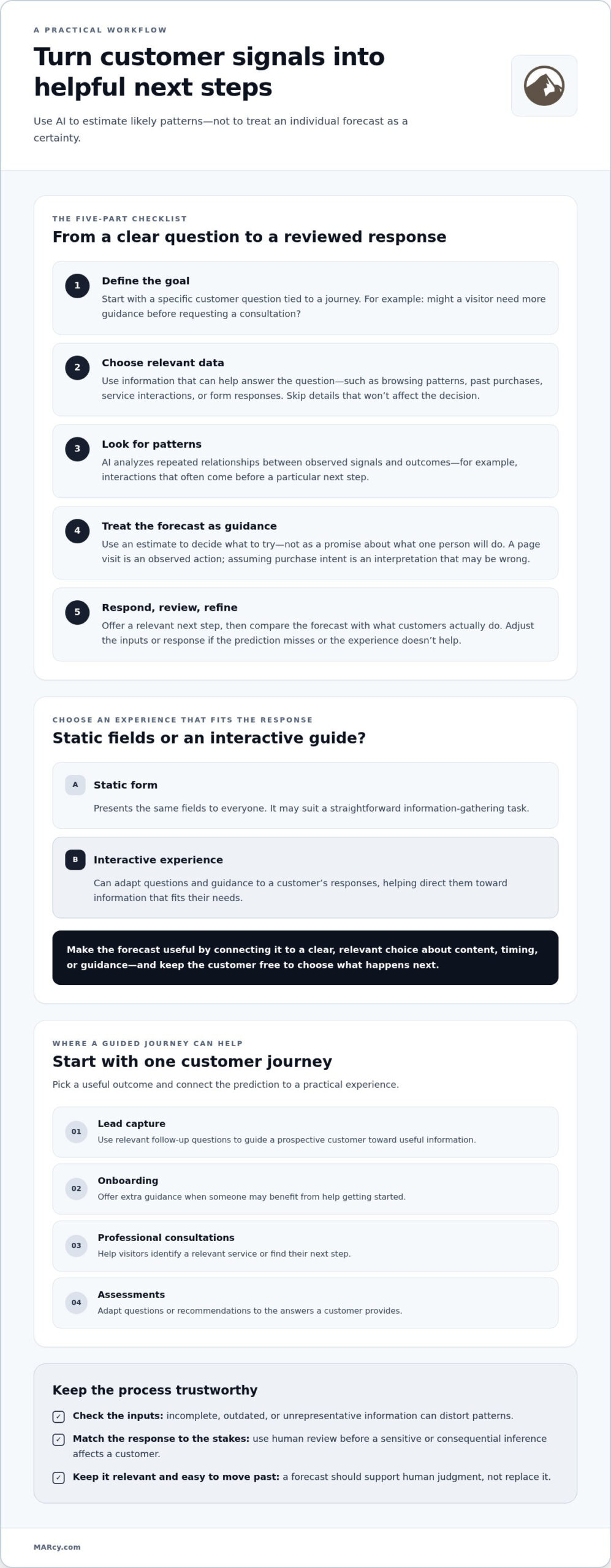
- Define the goal. Choose a specific question tied to a customer journey, such as whether a visitor may need more guidance before requesting a consultation.
- Collect relevant data. Select information that can help answer that question, and avoid gathering details that won’t affect the decision.
- Analyze patterns. The model looks for repeated relationships between past signals and outcomes, such as which combinations of interactions often come before a particular next step.
- Generate a forecast. It estimates which outcome may be more likely in a new situation. Use this to decide what to try, not as a promise about an individual.
- Take action and review. Offer an appropriate next step, then compare the forecast with what customers actually do. Use what you learn to refine the inputs or response.
Start with a specific customer question
Ask what the business needs to decide. Which information might help a prospective customer choose a next step? Could someone benefit from extra onboarding guidance? Connect the question to a possible change in the experience. For example, if a consultation form suggests that a visitor needs help identifying a service, the site could offer a guided route to relevant information. If the answer wouldn’t change what you offer, the prediction may not be worth pursuing.
Translate a forecast into a relevant response
A forecast becomes useful when it informs a practical choice about content, timing, or guidance. A business might present a tailored explanation or invite a visitor to answer a relevant follow-up question. Keep the response clear and optional where appropriate. Then evaluate whether it helps: do customers complete the next step, need less clarification, or choose a different route? These observations help teams assess usefulness rather than assume the prediction worked.
Test both the forecast and the response. If the prediction often misses, review whether the available signals fit the question. If the forecast seems sound but customers don’t engage with the suggested next step, the experience may need adjustment. Thoughtful AI integration services can connect predictive capabilities with a website or business process, keeping the customer journey and business goal at the center.
Interactive experiences versus static forms for acting on predictions
A forecast can suggest what information a customer may need, but the next step is designing an experience that responds helpfully. A static form presents the same fields to everyone. An interactive experience can use a person’s answers to shape what they see next, making the path more relevant without assuming the system knows everything about them.
That distinction matters when using AI to predict customer behavior. A prediction can inform which question or guidance to offer, while the customer’s own response steers the interaction. Personalization and engagement are design goals, not guaranteed outcomes. A guided experience should make the next step clearer, not add friction or pressure.
| Static form | Step-by-step interactive experience |
|---|---|
| Shows the same fields to each visitor | Can adapt follow-up questions to previous answers |
| May ask for details that aren’t relevant to everyone | Can guide people toward information related to their stated needs |
| Leaves visitors to interpret what to do next | Can provide clear prompts and indicate progress |
| Offers limited context about a response | Can organize answers into a more useful next step |
What makes a guided experience interactive?
Interactivity means the experience responds to the customer rather than simply collecting information. A fixed form might ask every visitor to choose from the same fields. A guided flow could ask a relevant follow-up based on an earlier answer, then explain why that detail helps. Clear progress cues show what remains, while options to edit or revise responses keep customers in control. The goal is a conversation-like path, not a longer form.
Where guided experiences can help
In a lead-capture experience, someone interested in a particular service could see a relevant follow-up instead of unrelated questions. During onboarding, a customer’s stated goals could guide them to the setup information that fits their situation. For a consultation, a short guided intake can organize priorities before a conversation with a professional. An assessment can use responses to present a relevant explanation or next step, while giving customers a chance to review their answers.
These experiences work best when every question has a purpose and the next step genuinely helps. Don’t add interaction just to make a page feel dynamic. If a simple field does the job, keep it simple.
Measure completion rates in context rather than promising a particular result. Compare how people move through the experience, where they pause or leave, and whether the next step serves their needs. A higher completion rate alone doesn’t prove the experience is better if customers are confused or receive irrelevant follow-up. Use the responses and outcomes to refine the questions, guidance, or flow.
A practical, responsible workflow for predicting customer behavior
Good implementation starts small. Instead of trying to predict every customer action, choose one journey where better guidance could make a real difference. Using AI to predict customer behavior should support a specific customer or business purpose, with a clear way to check whether the experience helps.
Use this sequence to shape a focused test:
- Choose one journey. Start with lead capture, onboarding, consultation preparation, or an assessment. Pick a point where customers could benefit from clearer direction.
- Define a useful outcome. Decide what should improve for the customer, such as finding relevant information or completing a next step with less uncertainty. Connect that outcome to a business decision, too.
- Map the current experience. Note what customers see, what they’re asked to do, and where they appear to need more explanation or help.
- Review available signals. Identify which existing information can inform the experience. Check that it’s relevant, reasonably current, and suitable for the purpose. Avoid adding data that won’t change the decision.
- Test and learn. Compare a guided version with the existing experience. Review customer responses, engagement, and completion, then use the findings to refine the approach before considering another journey.
Choose and test one customer journey
An assessment can be a practical starting point when people need help understanding which information applies to them. Map the existing path first: where do customers pause, ask for clarification, or leave without a clear next step? Then introduce a guided version that responds to their answers. Compare the two experiences thoughtfully, accounting for differences in audience or context rather than assuming every change in behavior came from the new design.
Keep the experience useful and trustworthy
Ask only for information that serves the stated purpose. Explain questions in plain language, and make clear how an answer shapes the next prompt or guidance. Give customers room to correct a response, and involve a person before acting on an inference that could meaningfully affect someone. Review results regularly. Confusion, skipped questions, or disengagement can signal that the flow needs revision.
Look beyond a single metric. Engagement and completion can show how customers move through the experience, but they don’t prove the result was relevant or helpful. Consider whether people reached the information or next step they needed, and whether the business outcome aligns with the original goal. Keep predictions and responses under review, especially as customer needs or available data change.
A focused use case can connect AI with a real digital customer journey. Marcy Design provides AI integration for business needs, alongside website and ecommerce solutions.
How Marcy Design can connect AI predictions with better digital experiences
A forecast only becomes valuable when it fits naturally into the customer journey. That’s where strategy, design, and AI integration meet. Marcy Design starts with the business goal, where customers need support, and how a digital experience can make the next step clearer.
Using AI to predict customer behavior can inform decisions across a website, an ecommerce experience, or a digital marketing effort. The prediction is one input. Design determines how that insight becomes useful to a person, whether through clearer information, a relevant prompt, or a guided route through a decision.
Bring prediction into the website or ecommerce journey
Consider an ecommerce business that wants to help shoppers find products relevant to their needs. Start by clarifying the customer journey and business outcome, then consider how available information could support a more useful experience. An AI-informed approach should complement clear navigation and helpful content, not make customers feel boxed in by assumptions. Marcy Design’s AI services connect AI integration with practical business and digital needs, including thoughtfully designed website and ecommerce experiences.
The same principle applies beyond online shopping. A website can guide a prospective customer toward information related to their stated interest, while an onboarding flow can make important setup guidance easier to find. The right approach depends on the goal and the people using the experience. Keep the human perspective in view, and make it easy for customers to choose a different path.
Turn insight into a considered next step
Prediction shouldn’t sit apart from design and marketing. A consistent journey connects what a customer sees in an advertisement or other marketing content with what they encounter on the website. If a signal suggests a visitor needs more information, the next experience can prioritize clear, relevant content rather than push an unrelated offer. That alignment helps each touchpoint feel considered.
Marcy Design brings website design, ecommerce solutions, and AI-powered solutions together with attention to the customer journey and the business goal. Based in Columbus, Marcy Design works with local businesses to connect digital strategy with customer-focused website and ecommerce experiences. The focus is to give technology a clear purpose and keep customer needs and human judgment at the center.
Ready to explore how AI insights could support your website or ecommerce experience? Discuss an AI-informed digital experience with Marcy Design.
Make your next customer interaction more useful
The best next step isn’t necessarily a bigger AI project. It may be improving one point in the customer journey where people need clearer direction. Choose that moment, decide what a helpful experience would look like, and build from there. That gives your team a practical way to explore using AI to predict customer behavior while keeping customer needs and human judgment in view.
Start with a question: what could make it easier for someone to move forward? The answer can guide your design, the information you present, and how you assess whether the experience works. Keep listening to customer responses as you refine it. Progress comes from making each interaction more relevant, not from adding technology for its own sake.
Ready to turn an idea into a considered digital experience? Explore Marcy Design’s AI services and take the next step.
Frequently Asked Questions
Can AI accurately predict what a customer will do next?
AI can estimate likely behavior, but it can’t know exactly what an individual will do. The estimate depends on whether available signals are relevant, current, and complete, and on how the business defines a successful prediction. For example, a team might assess whether a forecast identifies visitors who later request information, rather than treating a predicted purchase as certain. Use forecasts to inform decisions, then compare them with observed outcomes. Don’t promise a particular action.
What data does AI use to predict customer behavior?
AI may use website interactions, purchase history, or answers customers provide, depending on the question being addressed. A business trying to understand which product information visitors need may use different signals from one preparing for a service appointment. Start by identifying what decision the information will support. Review whether the data is current and meaningful for that purpose, and avoid collecting extra details simply because they’re available. Useful inputs differ by business and customer journey.
How can AI predict customer behavior on a website?
AI can analyze available website interaction patterns to estimate which content or next step may be relevant. For instance, if a visitor returns to a service comparison page, a team could make a related explanation easier to find. Then observe whether visitors use that information or continue along another path. Treat the forecast as a design signal, not an invisible rule that makes decisions for customers or guarantees more conversions.
Are interactive forms better than static forms for lead capture?
Interactive forms can adjust follow-up questions based on earlier answers, while a static form may be clearer for a simple request, such as asking someone to be contacted. Choose the format that fits the customer’s task. For a more involved inquiry, a guided flow may help organize relevant details. Compare engagement and completion in context, and consider whether the responses are useful rather than assuming either format will perform better.
How can AI personalization avoid feeling intrusive?
Keep personalization tied to a clear purpose and signals that make sense for the interaction. If someone views information about a service, offering a related explanation is less presumptive than claiming to know why they’re interested. Make questions and next steps easy to understand, and let customers review or change their answers. Monitor feedback and signs of confusion or discomfort. Useful guidance should feel relevant, not surprising or pressuring, and a prediction shouldn’t be treated as insight into private motives.
Can a small business use AI to predict customer behavior?
Yes. A small business can begin with a focused question and information it already has, without trying to build an organization-wide program. For example, a Columbus business could examine whether visitors who view a particular service page go on to submit an inquiry, then consider whether clearer next-step guidance would help. The customer benefit and quality of available information matter more than adopting AI for its own sake. Review the test before expanding it.
How can AI support customer onboarding and consultations?
AI-informed onboarding can direct customers to setup instructions related to their stated needs, while a consultation intake can organize questions for a more focused conversation. For instance, a customer could review and correct a short summary of their priorities before speaking with a professional. That context can help structure the discussion, but it doesn’t replace a person’s judgment. A human can account for exceptions, clarify ambiguous answers, and offer guidance that a prediction alone can’t provide.