
 614.224.6226
What if your customer reviews could do more than reassure visitors? A row of star ratings may catch the eye, but it won’t help someone find feedback about their specific needs or decide what to do next. Knowing how to display customer reviews on your website means pairing authentic proof with a clear path forward.
Start by choosing reviews that answer questions visitors are likely to have, then decide whether a simple quote or an interactive collection will help them find that feedback. Place reviews near relevant decisions, keep their source and context clear, and make the next step easy to spot. This guide covers review formats, selection and placement, plus ways to use reviews in lead capture, onboarding, professional consultations, and assessments. For Columbus businesses, a clear, mobile-friendly review experience can be part of a website that helps local visitors understand your services and take the next step.
Key Takeaways
- Match your review display to the page’s purpose, from a concise service-page quote to an interactive collection visitors can explore.
- Learn how to display customer reviews on your website with relevant feedback, clear attribution, and enough context to keep it credible.
- Organize reviews around visitors’ questions so they can find experiences that relate to their needs.
- Place reviews along key journeys, including ecommerce, lead capture, onboarding, consultations, and assessments, with a clear next step.
- After launch, observe how visitors use reviews and move through the page to identify opportunities to improve the experience.
Why customer reviews belong on your website, and what visitors need from them
A service description explains what a business offers. A customer’s account can add a different perspective: what the experience was like and which concerns it addressed. That’s why how to display customer reviews on your website starts with purpose, not decoration. Feedback should help visitors assess whether an offering fits their situation.
A review display is selected customer feedback placed within relevant website content to help visitors evaluate a decision. It differs from a standalone testimonial quote, which is usually one endorsement presented on its own. A review display may bring together attributed feedback around a page or topic. It’s also distinct from a brand-written claim, a rating summary without the underlying comments, a case study that tells a fuller project story, or a social media post shown outside its original context. For foundational context, Wikipedia’s overview of customer reviews discusses their role in purchasing decisions and questions of reliability.
A star rating offers a quick signal, but it can’t explain what a customer needed or valued. A review display gives feedback a place in the page’s story, where visitors can connect it to the product, service, or decision in front of them.
What makes a customer review useful to a website visitor?
Specificity makes feedback easier to apply. “Great service” tells a prospective customer little. A review that describes the customer’s original challenge and what they valued about the experience gives them more to consider. The detail doesn’t need to be dramatic. It needs to be relevant and presented with enough context to make the comment understandable.
Consider someone weighing a website redesign. A review that mentions clearer navigation or a smoother mobile experience speaks to concrete concerns. A positive review about a different service may not answer that visitor’s question. Relevance beats volume: a carefully chosen set of useful experiences is more helpful than a crowded page of generic praise.
Where do reviews fit in the visitor journey?
Place feedback near a decision point, where it can add perspective without interrupting the next step. On a lead-capture page, a concise review near the form can address concerns about starting a conversation. Keep the form’s purpose clear, and choose feedback related to the offer instead of adding praise simply to fill space.
A professional consultation page has a different job. Visitors may be deciding whether the conversation will address their needs. A review describing a customer’s questions or experience working through a similar decision can help set expectations, while the page explains what to do next. Thoughtful website design can bring these elements together so feedback supports the page rather than competing with it. Reviews can inform a decision, but they can’t guarantee trust, a completed form, or a business outcome.
Static testimonials or interactive review displays: choose the right experience
The right format depends on what visitors need to do. A short testimonial can provide focused reassurance; a larger review collection can help people explore feedback by topic. An interactive display adds controls such as filters or expandable details. More features aren’t automatically better. Choose the format that makes relevant feedback easy to find and use.
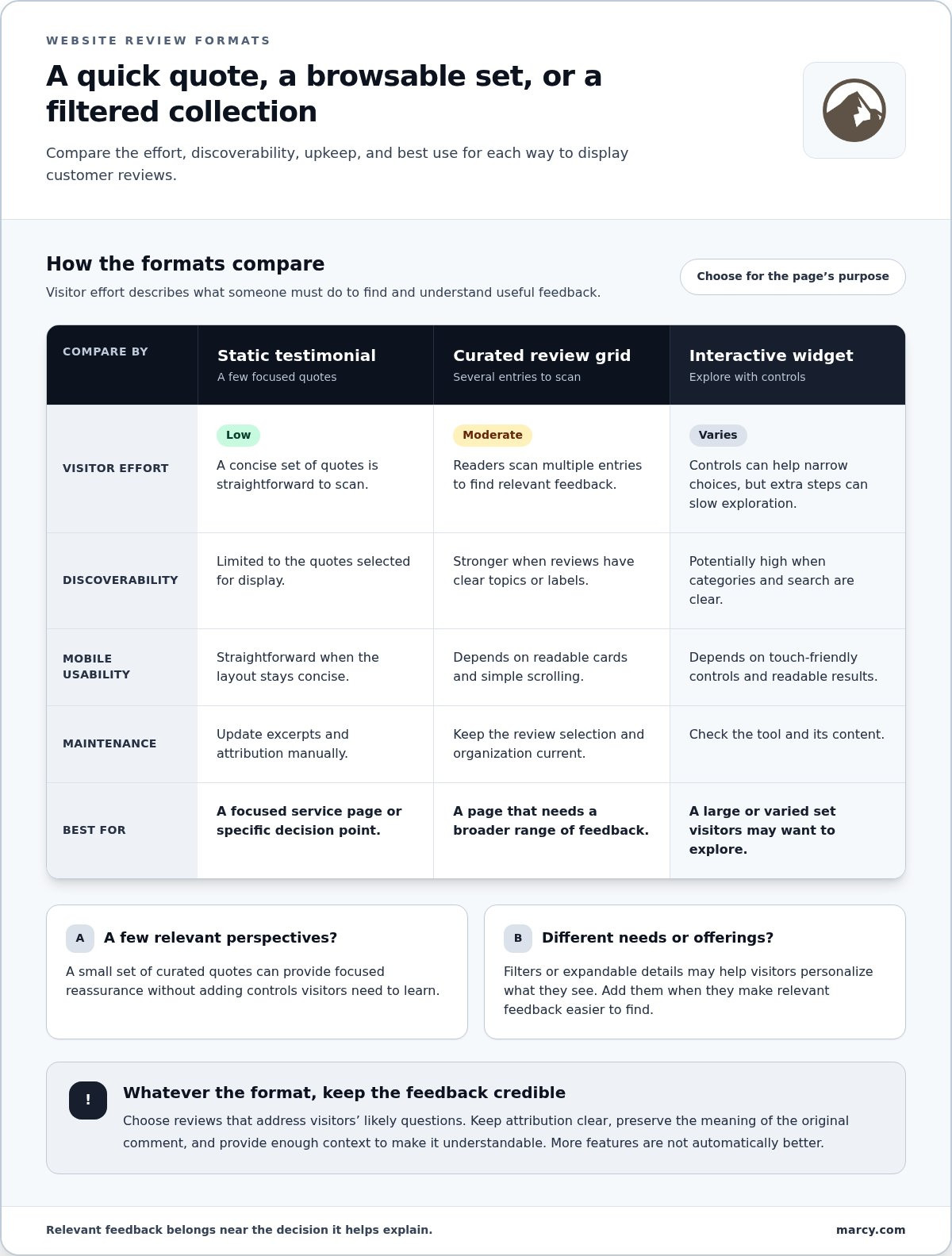
Use this comparison to decide how to display customer reviews on your website. Visitor effort means what someone must do to locate and understand useful feedback.
Static testimonial quotes
Visitor effort: low. Discoverability: limited to the selected quotes. Mobile usability: straightforward when the layout is concise. Maintenance: update excerpts and attribution manually. Best for: a focused service page or a specific decision point.
Curated review grid
Visitor effort: moderate as readers scan multiple entries. Discoverability: stronger when reviews have clear topics or labels. Mobile usability: depends on readable cards and simple scrolling. Maintenance: keep the selection and organization current. Best for: a page that needs a broader range of feedback.
Interactive review widget
Visitor effort: varies with the controls. Filters can narrow choices, but extra steps can also slow exploration. Discoverability: potentially high when categories and search are clear. Mobile usability: depends on touch-friendly controls and readable results. Maintenance: check the tool and its content. Best for: a large or varied set of reviews visitors may want to explore.
When is a simple testimonial section enough?
Choose a small set of curated quotes when visitors need a quick, focused signal rather than a browsing experience. On a service page, place feedback near the related offer and select excerpts that speak to likely questions. Keep each quote concise, preserve the meaning of the original review, and include clear attribution. The section should be easy to scan on a phone or desktop, with no controls for visitors to learn.
Static content is also easy to shape around a page’s purpose. A testimonial can sit beside a service description without competing with it. If the page needs only a few relevant perspectives, filters may add complexity without helping readers decide.
When does an interactive review tool make sense?
Interactivity earns its place when it helps visitors personalize what they see. A category filter might let someone browse reviews about a particular service; expandable details can keep the initial view compact while leaving more context available. This is useful when feedback covers different needs or offerings. Still, don’t make visitors click through a tool just to find basic reassurance.
Check that the display loads smoothly, controls work on mobile, labels are understandable, and visitors can use it accessibly. Interactive tools also need attention as content and site components change. A thoughtful website design approach can help the review format feel like part of the page, not an add-on.
In short: static displays prioritize speed and focus; interactive displays support exploration when visitors have a reason to browse. Neither format guarantees higher completion rates. Choose based on the page’s purpose, then make the next step clear.
How to choose and organize reviews without weakening trust
A review section earns credibility through careful selection and accurate presentation, not sheer volume. Use a consistent process before adding feedback to a page. That keeps each review relevant and helps you avoid excerpts that overstate a customer’s experience.
- Define the page goal. Identify the decision the page supports and the questions visitors may have.
- Select relevant feedback. Choose reviews that speak to the page’s service, product, or customer concern.
- Preserve context. Keep the customer’s meaning intact, and don’t remove details that change how the comment reads.
- Attribute the review. Identify the source and provide appropriate customer details while respecting privacy and permissions.
- Review the display. Check wording, ratings, dates, source information, and the overall impression before publishing.
How should a business select reviews for a specific page?
Start with the page, not the most enthusiastic quote in your collection. A product page should feature feedback about that product or a closely related customer experience. A service page should prioritize comments that help explain what the service was like. This makes the display more useful to visitors evaluating that particular choice.
Keep excerpts faithful to their original meaning. Trimming unnecessary wording can make a review easier to read, but don’t edit it to imply a stronger result or broader endorsement than the customer gave. If a shorter quote needs context, add a brief, clearly separate introduction rather than rewriting the customer’s words.
Variety matters, too. If every page repeats the same claim, the feedback can feel staged and may not answer the questions unique to each page. Choose representative experiences that reflect different relevant perspectives, and avoid showing only comments that create a misleading impression of the broader feedback.
What details make a review display credible?
Make the source clear. A first-party testimonial is feedback collected directly by the business, such as a comment submitted after a purchase. An external-platform review was posted on a separate review site or service. Labeling the source helps visitors understand where the feedback came from. Don’t present a business-collected testimonial as though it were independently posted elsewhere.
Before republishing, verify that you have appropriate permission, that the source platform’s terms allow the intended use, and that any applicable requirements are addressed. Protect customer privacy: use only identifying details that are appropriate to share, and don’t assume a public comment can be reused in every context.
Keep ratings, dates, names, and quoted wording accurate. If you display an overall score, make sure it’s supported by the reviews shown or by a clearly identified source and method. Avoid unsupported averages, unverifiable endorsements, or design choices that make selected feedback look like a complete record. Trust depends on the whole presentation. A clear process for how to display customer reviews on your website helps visitors assess both the feedback and its context.
Where and how to place reviews across key website journeys
Think of review content as part of the visitor’s route through your site, not a block that must appear everywhere. A homepage can introduce a range of customer experiences and help people choose where to go next. On an ecommerce site, reviews can accompany product browsing and give shoppers a customer perspective as they compare options. Keep the path forward clear on the surrounding page.
As visitors begin a relationship with your business, reviews can also help orient them. In onboarding, feedback about using a process or getting started can complement instructions and clarify what the experience may involve. For an assessment, a guided display can help people explore feedback connected to different needs before continuing. Keep the assessment itself prominent so review browsing supports the task instead of becoming a detour.
How can reviews support onboarding and assessments?
Use onboarding reviews to add a customer perspective while people are learning how an experience works. For example, a comment about clear steps may reinforce the instructions on a welcome page. Avoid implying every customer’s experience will be identical. Let the review offer context while the onboarding content explains what the visitor should do.
Assessments can benefit from a more guided review experience. Categories or expandable examples can let visitors focus on feedback related to their situation instead of scanning unrelated comments. Keep the controls simple and the assessment’s next step visible. Test the layout on mobile and desktop so people can explore feedback without losing their place.
How should reviews connect to the wider website journey?
Make each review element support a clear transition. A homepage can direct visitors toward relevant sections; product pages can keep shopping details and customer feedback connected; onboarding pages can lead into the next setup step. Consistent layout and responsive behavior help visitors understand how these parts fit together. A considered website design experience can bring review content into the wider journey without making it feel like an add-on.
Use the visitor’s task as your guide. When review exploration adds useful context and the next action stays clear, customer feedback becomes a purposeful part of moving through the site.
Build a review experience that supports your website strategy
A review display works best when it helps visitors move forward, not just pause to read. Start with the page’s goal, then choose a format and content that make relevant feedback easy to explore. A guided experience can help visitors focus on reviews that match their situation, answer a lingering question, and continue to a form or another next step. That’s a practical way to approach how to display customer reviews on your website without assuming one layout will suit every page.
Before publishing, map the experience:
- Goal: Decide what visitors should understand or do on the page.
- Format: Choose a static selection or interactive display based on how visitors may want to explore feedback.
- Content: Make sure reviews add useful context to the page and its next step.
- Usability: Check readability, mobile layout, accessibility, loading, and whether visitors can move smoothly from reviews to the intended action.
- Measurement: Record a baseline so you can compare visitor behavior after launch.
How should a business assess a review display after launch?
Walk through the page as a visitor. Can someone identify where the reviews came from, understand their context, and find feedback relevant to their needs? On mobile, do the controls work, and is the next action easy to locate? If an interactive display helps visitors narrow the feedback, check whether they can then continue to the form without confusion or unnecessary detours.
Compare page engagement and form progression with the site’s own baseline. Notice whether visitors use review controls, proceed to the next step, or leave with questions. These observations can guide refinements, but they don’t prove the display caused a change. Consider other page updates and patterns over time before drawing conclusions.
How can web design bring reviews and next steps together?
Use visual hierarchy to guide attention. Review content should be readable, interactive controls should be easy to find, and the primary action should stand out. Responsive layouts adapt to different screen sizes, helping visitors move between review exploration and the next step on mobile or desktop. Avoid letting a widget dominate the page or push essential actions out of view.
Design choices should reflect the page’s purpose. An ecommerce page can connect feedback with product details, while a lead page can keep its form easy to resume after review browsing. This is also where website content connects with the wider marketing journey. A consistent approach to digital marketing services can help align the website experience with other customer touchpoints.
Thoughtful layout, guided exploration, and ongoing measurement can help visitors find relevant proof and keep moving toward a useful next step. Marcy Design creates custom websites and mobile-responsive web solutions tailored to business goals. Explore Marcy Design’s website design services to bring customer feedback and clear actions together in a cohesive online experience for your Columbus business.
Make your next website update count
Your review display can evolve alongside your business. Use what you learn from visitor interactions and questions to refine the experience, then keep feedback connected to the decision each page helps people make. That’s how to display customer reviews on your website as a useful part of a larger customer journey, rather than a feature that sits still.
Marcy Design creates custom websites tailored to business goals, with mobile-responsive solutions that help keep content clear and usable across devices. If you’re ready to bring customer feedback and meaningful next steps together in a cohesive online experience, explore website design services. Start with one page where relevant feedback can help visitors make their next decision.
Frequently Asked Questions
Can I display Google reviews directly on my website?
Yes, you can display Google reviews on your website through an integration or review-display tool that sources feedback from Google. When deciding how to display customer reviews on your website, identify Google as the source and give visitors a way to view the original reviews. Before publishing, check the tool’s current functionality and Google’s terms, since features and display options can change.
Should I show all customer reviews or only selected testimonials?
You don’t need to put every review on every page. A focused selection can keep a product or service page easy to scan, while a separate review area can offer broader browsing. Don’t present a handful of selected comments as though they represent every customer’s experience. For a fuller picture, let visitors reach the original source or a more complete review collection.
Do customer reviews on my website help SEO?
Reviews can add useful, customer-written detail to a page, which may help visitors understand what you offer and how it fits their needs. They aren’t a guaranteed way to improve search rankings. Keep review content relevant to the page and readable as text, rather than relying on an image alone. For a Columbus business, clear service and location information should still explain what the business does and where it serves customers.
Can I use customer reviews without permission?
Don’t assume that a review being publicly visible means you can republish it anywhere. Before adding a customer’s words, confirm you have permission for the intended use, protect personal details, and check the source platform’s terms. Keep the wording faithful, especially if you shorten it, and identify where it came from. When permission or reuse terms are unclear, use feedback you have approval to publish instead.
Where should reviews appear on a business website?
Place reviews where they can answer a question about the page’s offer. On a product page, that could be near details visitors compare before buying; on a service page, it could sit alongside information about the work. A homepage can point to a broader collection, while a contact page can feature feedback relevant to starting a conversation. Keep the main action easy to spot.
Are review widgets accessible on mobile devices?
Some are, but accessibility depends on how the widget is built and configured. Test it on a phone using touch controls, keyboard navigation where available, and screen-reader tools. Check that buttons have clear labels, text remains readable when enlarged, and interactive elements don’t overlap or disappear. If visitors can’t operate the widget easily, offer a simple way to read the review content without relying on its controls.
How many reviews should I display on a website page?
There’s no fixed number that works for every page. Show enough feedback to help visitors evaluate that page’s offer without pushing key information or the next action out of view. A short service page may need only a few concise examples; a dedicated review page can accommodate more, especially if visitors can browse by topic. Check the layout on smaller screens, where long review lists take more effort to explore.