
 614.224.6226
The most popular ecommerce platform may be the wrong foundation for your Ohio business. The best ecommerce platform for Ohio small business depends on what you sell, how you manage orders, and what helps customers confidently complete a purchase. With so many options and technical terms to sort through, it’s easy to focus on the platform name instead of the day-to-day fit.
You don’t need to choose based on popularity alone. This guide compares options such as Shopify, BigCommerce, Wix, Squarespace, and WooCommerce through the practical questions that matter: setup, ongoing management, customization, and the shopping experience. You’ll see how a clear, guided path can help customers find the right product or answer, whether they’re browsing, completing onboarding, requesting a consultation, or sharing details through a lead form or assessment. We’ll also look at how platform choice connects to local operations and future growth beyond Ohio, so you can build a shortlist around your business goals, not extra complexity.
Key Takeaways
- The best ecommerce platform for Ohio small business depends on your products, daily operations, customer journey, and plans for growth.
- Compare hosted platforms, open-source tools, and custom development by how they balance setup, management, flexibility, and complexity.
- Make product discovery and checkout easier with mobile-friendly pages, clear information, and guided experiences that respond to shopper needs.
- Shortlist platforms by documenting requirements, testing real workflows, and planning how orders and customer service will run.
- Connect platform choice to a broader ecommerce strategy, so your store’s design and capabilities support business goals as you grow.
What should an Ohio small business expect from an ecommerce platform?
An ecommerce platform is the software and connected services that let a business present products online, take orders, and manage the work behind each sale. It supports the storefront customers browse and the core selling tasks that follow, from checkout to order tracking. For a broader introduction to online commerce, see What is E-commerce?
A platform is not automatically your entire business system. Marketing automation, which sends or coordinates promotional messages, and customer relationship management (CRM), which helps organize customer and prospect details, may be separate tools. Some platforms offer related features; others rely on integrations or apps. The best ecommerce platform for Ohio small business is the one that fits your workflows and serves your customers’ needs, not simply the one with the longest feature list.
Which business needs should shape your Ohio platform shortlist?
Start with how your business sells, not with a popularity ranking. A small catalog of similar products creates different demands from a store with many variations, frequent inventory changes, or products that need detailed explanations. Consider order volume, how you track stock, and who will manage the store. Your team’s comfort with technical setup matters too: a platform that requires ongoing configuration may be a poor fit if no one has time or expertise to maintain it.
Next, define where customers are and how orders reach them. A business serving nearby customers may organize fulfillment differently from one selling statewide, nationwide, or across multiple markets. Map the workflows already in use before comparing platforms:
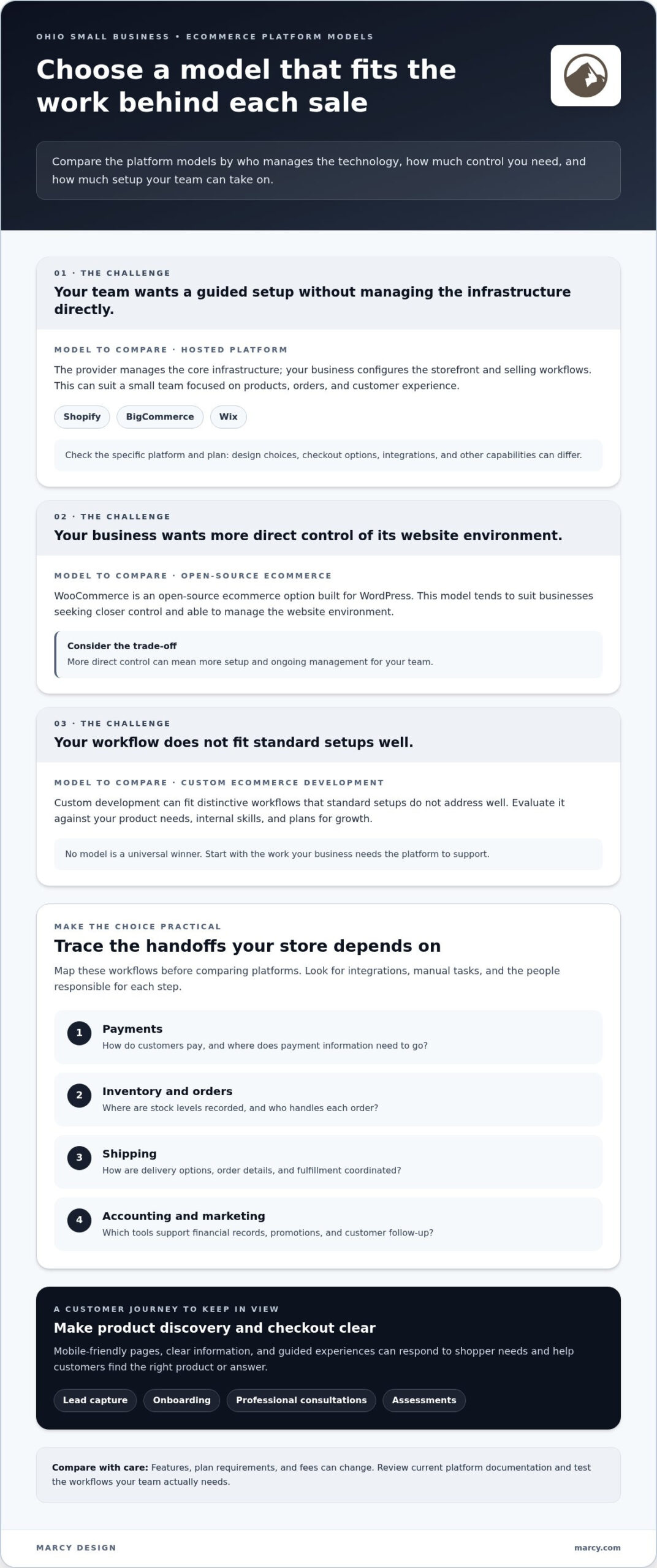
- Payments: How do customers pay, and where does payment information need to go?
- Inventory and orders: Where are stock levels recorded, and who handles each order?
- Shipping: How are delivery options, order details, and fulfillment coordinated?
- Accounting and marketing: Which tools support financial records, promotions, and customer follow-up?
This simple map helps reveal where a platform needs to connect with another system, and where a manual task could slow down your team.
What does a platform manage, and what may require another tool?
The storefront is the customer-facing part of the store: product pages, navigation, and the path to purchase. The product catalog holds details such as descriptions, options, and prices. Checkout collects the information needed to place an order, while order management helps the business review and process purchases. Reporting turns store activity into information the team can use to make decisions.
These pieces work together in daily operations. A customer selects a product, completes checkout, and creates an order for your team to fulfill. Inventory records need to reflect what is available, while customer support needs a clear way to answer questions about purchases. If a separate accounting or CRM system is involved, information may need to move between it and the store.
Some capabilities are built into a platform. Others depend on integrations, apps, or business systems managed separately. Don’t assume features are identical across platforms, or that a connection will work exactly as your workflow requires. Review current platform documentation and identify how each tool handles your must-have tasks. Thoughtful custom website design can also help the storefront present those capabilities clearly, so the operating system behind the sale supports a useful customer experience.
How do ecommerce platform models differ for Ohio small businesses?
Platform comparisons make more sense when you start with the model behind the software. Hosted platforms, open-source tools, and custom ecommerce development differ in who manages the technology, how much control you have, and how much setup your team takes on. Shopify, BigCommerce, and Wix are examples of hosted platforms; WooCommerce is an open-source ecommerce option built for WordPress.
There’s no universal winner. Hosted platforms often suit teams seeking a guided setup and less infrastructure management; open-source platforms tend to suit businesses wanting more direct control and able to manage the website environment; custom development can fit distinctive workflows that standard setups don’t address well. Those are starting points, not rules. Your product needs, internal skills, and plans for growth should shape the decision.
When might a hosted ecommerce platform make sense?
A hosted platform can simplify the technical foundation: the provider manages core infrastructure, while the business configures its storefront and selling workflows. This guided approach may appeal to a small team that wants to focus on products, orders, and customer experience rather than managing hosting and security directly. Shopify, BigCommerce, and Wix are examples to compare, not interchangeable solutions.
Design choices, checkout options, integrations, and other capabilities depend on the specific platform and plan. A feature that appears built in on one service may require an app or a different plan on another. Platform terms and fees can also change, so review the provider’s current documentation and consider the full set of tools your workflow needs, rather than relying on an old comparison.
When might WooCommerce or custom development be a better fit?
WooCommerce works with WordPress, which can appeal to businesses seeking closer control over their website and content. That flexibility also brings responsibility: the owner or team must account for the broader website environment, including hosting, security, updates, and compatible extensions. The exact work depends on the setup, so compare the control you gain with the ongoing management it requires.
Custom ecommerce development is another route when a business has a distinctive buying process or needs its storefront to connect with specific operational systems. For example, a standard product-and-checkout flow may not be enough if customers need a tailored path to select options or submit details before a purchase. Custom work can align that experience with business goals, but it calls for clear planning around build, maintenance, and future changes.
To compare fairly, write down which tasks your team wants to manage, which it would rather simplify, and where a standard workflow falls short. Then weigh each model against that list. If a tailored storefront could bridge your platform and customer journey, custom website design and ecommerce development can help translate those requirements into a cohesive experience.
Which platform features improve an Ohio shopper’s buying journey?
A store can offer the right products and still leave shoppers unsure what to do next. Platform features matter when they help people find relevant options, understand a product, and move toward a purchase, especially on a phone. The best ecommerce platform for Ohio small business should support a customer journey that feels clear and useful, rather than adding interaction for its own sake.
Start with the basics: product pages should explain what an item is, show its options, and make important details easy to scan. On mobile, shoppers should be able to read, browse, and move through checkout without awkward layouts or unnecessary steps. Accessible design matters too. Clear labels, logical page structure, and usable controls make it easier for more customers to navigate.
A well-designed guided experience connects a customer’s needs to relevant choices and a clear next step. A static page presents the same information to everyone. An interactive tool can respond to a shopper’s selections, helping narrow the path. When questions are relevant and each step feels manageable, shoppers may be more willing to continue and complete the action, whether that’s finding a product, submitting a request, or reaching checkout. It’s a way to reduce friction, not a promise of a particular completion rate.
When can interactive tools outperform static forms?
A product finder can ask what a shopper needs, then present a smaller set of relevant options. An assessment can guide someone through questions before suggesting a product category or useful resource. These tools work best when each question has a clear purpose, the shopper can see how their answers shape the next step, and there’s an easy path to explore other choices.
Lead capture can offer value in return for a customer’s details. Instead of an unexplained email field, explain what the shopper can receive, such as a product guide or relevant follow-up. For a complex purchase, a guided consultation path can clarify what information to share and what happens next. Compared with a bare contact form, this context can make the action feel more worthwhile and easier to finish.
How can onboarding and personalization support conversion?
Onboarding helps a new customer take the first steps after choosing a product or service. A short sequence can collect relevant preferences, explain what to expect, or point to useful setup information. Keep each prompt focused. Asking only for details that help with the next step makes the process feel more personal and avoids adding effort that could cause someone to drop off.
Personalization should make decisions easier, not simply add recommendations. A store might use a shopper’s selected size, intended use, or preferences to highlight matching options. Keep product descriptions and alternatives visible so customers can compare and decide for themselves. Before choosing features, test the journey on a phone and a larger screen. Make sure each interaction moves shoppers forward without blocking a clear route to browse or buy.
How can you evaluate and launch the right ecommerce platform in Ohio?
Choose with a working test, not a feature list alone. The best ecommerce platform for Ohio small business is the one your team can operate and customers can use smoothly, from first product view to completed order. A practical evaluation moves through five steps: document requirements, shortlist platforms, test real workflows, model day-to-day operations, and plan a focused launch.
- Document needs. Record your must-have sales workflows, products, inventory process, customer support needs, and tools the store must connect with.
- Shortlist platforms. Compare only options that appear capable of supporting those requirements, and check current feature and integration details in official documentation.
- Test workflows. Walk through representative customer and staff tasks, including checkout and order handling.
- Model operations. Clarify who maintains product information, fulfills orders, answers questions, and manages connected tools.
- Plan the launch. Prepare essential content and settings before expanding the catalog or adding more complex features.
What should a practical platform test include?
Use a real product journey. Ask a test shopper to find an item, understand its options, and reach checkout on a phone. Then review the staff side: do inventory changes make sense, are order notifications clear, and can the team complete routine admin tasks without unnecessary steps? Test different customer scenarios, such as a nearby Ohio order and one shipping beyond the region, to understand how fulfillment settings support your service approach.
List every connection the workflow depends on, including payment, shipping, accounting, and marketing tools. Confirm how each integration works in the current platform setup. Also identify where customer and business data is stored, who can access it, and what happens to that data if you change systems. Treat tax, privacy, and other regulatory settings as items to verify against current authoritative guidance for your business. Don’t rely on assumptions or old platform instructions.
How can an Ohio business plan a manageable launch?
Keep the first release focused. Start with a manageable product selection and a fulfillment process your team can explain and repeat. Prepare accurate product descriptions, images, shipping settings, payment configuration, and customer support workflows before opening the store. For example, decide how staff will respond to a local pickup question or a delivery inquiry from another Ohio community, then make the relevant information easy for customers to find.
If the store needs a complex selection process, an assessment or guided consultation can help clarify requirements before development begins. Intelligent storefront features may also support tailored experiences; explore AI-powered solutions as part of that planning, while keeping customer needs and practical workflows at the center.
Ready to turn your requirements into a clear store plan? Plan your ecommerce website design around the way your business serves customers and manages orders.
How can Columbus small businesses turn platform choice into a growth-ready store?
A platform is the foundation, not the whole strategy. A growth-ready store connects technology, design, and day-to-day operations to what the business wants customers to do. That might mean helping shoppers compare products, guiding them through a more involved purchase, or making it easy to get support. The best ecommerce platform for Ohio small business is only a strong fit when its capabilities serve those goals.
What does tailored ecommerce development add?
Thoughtful development shapes how customers move through the store. Site structure can make important categories easy to find. Product discovery can help shoppers narrow their options, while clear product pages and checkout steps support confident decisions. These choices should reflect the real customer journey, not just the features available in a platform.
Custom design can express a distinctive brand while working within the selected ecommerce foundation. It can also bring customer-facing pages and internal processes into a more coherent experience, without assuming a particular platform partnership. Marcy Design’s ecommerce development services can be tailored to a business’s goals, operations, and customer experience, including mobile-responsive web solutions.
AI-powered integrations are most useful when they address a defined need. For example, a store could explore an AI-assisted product question experience to help shoppers find relevant information. The project should first establish what questions customers need answered, what information the tool can draw on, and how the experience connects shoppers to reliable next steps. The technology should support the buying journey, not add novelty or confusion.
What are the next steps for a Columbus business?
Bring the essential project details together before choosing a direction. A clear discussion can connect four areas:
- Products: What the store sells and what customers need to know before buying.
- Audience: Who the store serves and how those shoppers make decisions.
- Operations: How the team manages orders, inventory, fulfillment, and customer questions.
- Growth: How the business expects its catalog, customer journey, and systems to evolve.
This shared picture helps distinguish must-have requirements from features that can wait. It also gives design and development decisions a practical purpose, whether the project involves refining a straightforward storefront or planning a more distinctive customer journey. For additional local perspective, Marcy Design’s Columbus web design and business-growth guide can help connect website decisions with broader business goals.
Ready to turn your platform decision into a clear project plan? Discuss your ecommerce website project with Marcy Design and explore a tailored path toward a store built around your customers and operations.
Build your next stage around the customer
Your store doesn’t need every feature on day one. It needs a clear purpose and room to adapt as your products, customers, and operations evolve. Treat platform choice as the start of a practical growth plan: decide what you want shoppers to accomplish, then shape the technology and design around that goal. That’s a more useful way to define the best ecommerce platform for Ohio small business than choosing by popularity alone.
Marcy Design brings Columbus roots dating to circa 1986 to ecommerce development, custom website design, and mobile-responsive web solutions. The right project can connect those capabilities to your business priorities, creating a storefront that reflects your brand and gives customers a clear path forward.
Have a store idea or a platform decision to put into action? Map out your ecommerce project with Marcy Design. Take the next step with a plan shaped around your business, and build with confidence as it grows.
Frequently Asked Questions
What is the best ecommerce platform for a small business in Ohio?
There isn’t one platform that’s best for every business. For a Columbus shop with a straightforward catalog and a small team, a hosted service may reduce technical upkeep. A business with specialized workflows or a WordPress site may prefer a more flexible setup. Compare platforms using your actual tasks, such as adding a product, changing availability, handling a return, and answering a customer’s order question.
Is Shopify or WooCommerce better for a small Ohio business?
Shopify may suit a business that prefers a hosted service and a guided setup, while WooCommerce may appeal to a business that wants to build ecommerce into a WordPress site and have closer control. The trade-off is how much of the technical environment your team manages. Compare a typical week of store tasks, not just feature lists, and review current provider documentation before deciding.
Can I use an ecommerce platform if I already have a WordPress website?
Yes. WooCommerce is an ecommerce option built for WordPress, so it can add store functionality to an existing WordPress site. Before choosing that route, map how the store will fit the current theme, plugins, content, and maintenance process. For example, test whether a staff member can update a product without disrupting an important page. A separate hosted store is another possible approach, though its connection to your site needs planning.
How much does an ecommerce platform cost for a small business?
Costs vary by platform, plan, and the tools your store needs, so there isn’t one reliable total for every small business. Look beyond the advertised subscription: account for payment processing, possible platform transaction fees, themes, apps, and any separately managed hosting or maintenance. Build a comparison using current official pricing pages, then include the tools your team actually expects to use. Avoid paying for capabilities you don’t need yet.
What should an Ohio business check before setting up sales tax and shipping?
Confirm tax obligations and setup using current guidance from the Ohio Department of Taxation and any other relevant tax authorities for your business. Don’t rely solely on a platform’s default settings. For shipping, define where you’ll deliver, which services and rates you’ll offer, how you’ll handle local pickup if relevant, and what customers will see before checkout. Test sample destinations and confirm the checkout reflects your intended policies.
Can interactive product finders or assessments help online shoppers choose?
They can help when shoppers face a meaningful choice, such as selecting a product by size, intended use, or preferred features. A static form asks everyone the same questions; a guided finder can use an answer to shape the next prompt and narrow relevant options. Keep questions focused, explain recommendations clearly, and allow shoppers to browse products without completing the tool. That keeps the experience helpful rather than obstructive.
What happens if my business outgrows its ecommerce platform?
You can reassess the platform as your catalog, order processes, or connected systems change. A move may involve transferring product details, customer and order records, content, and integrations, then testing the new store before switching over. Keep an inventory of the systems your team relies on and the data they use. Planning portability early can make a future change more manageable, even if you don’t need to migrate now.