
 614.224.6226
A location page earns rankings when it describes a real place your customers can visit or a market you genuinely serve, with details no other page on your site has. A page that swaps one city name for another does not. Build one strong page per real location, add service area pages only where you have something specific to say, and link everything into a structure people can browse.
TL;DR
- Create a location page for every real, customer-facing location. Create a service area page only when a market has its own logistics, rules or project history.
- Each page needs facts unique to that place: address or coverage details, local projects, testimonials, photos, staff and real customer questions.
- Pages that are near copies built to catch similar searches fall under Google’s doorway abuse policy.
- Link a locations directory to each page, each page to its services, and each service page back to the places it covers.
- Keep your address, hours and structured data identical to your Google Business Profile.
Table of Contents
- Location pages and service area pages: what is the difference?
- When do you need each type?
- What belongs on a location page
- How to build service area pages that are not thin
- Avoid doorway pages and misleading claims
- Structure and internal linking
- Examples: what good location pages have in common
- Perspective: why we build these pages around proof
- Building your location page plan, step by step
- Want help planning and building your location pages?
- FAQ
- Sources
Location pages and service area pages: what is the difference?
A location page represents a place where customers can find you: a storefront, office, showroom, clinic or warehouse with a counter. It lists the address, hours, directions, staff and the services available there.
A service area page represents a market you travel to or serve remotely. A plumber based in Columbus who works in Dublin and Westerville does not have a facility in either suburb. The page for those suburbs exists to help people there decide whether you are the right fit.
The distinction matters because a website page does not create a physical presence. Search Engine Land’s guidance on structuring geographic pages warns that structured data that conflicts with a Business Profile or with the page itself can create conflicting signals about your business. Calling a service area page a “location” and marking it up with an address you do not staff is the quickest way to cause that conflict.
| Location page | Service area page | |
|---|---|---|
| Represents | A real, customer-facing facility | A market you serve without a facility there |
| Core content | Address, hours, directions, staff, services on site | Local projects, testimonials, logistics, local expertise |
| Structured data | Matches the Business Profile address | Service area only, no invented address |
| How many | One per real facility | Only where the market justifies it |
When do you need each type?
The research behind this article gives a clear rule of thumb. A real, customer-facing facility generally deserves an authoritative location page. Service area pages should be approved exceptions for markets with distinct logistics, local regulations or substantial project experience that cannot be handled well on an existing page.
That gives you a practical test. Ask three questions before you create a page for a place:
- Would someone in this place need information they cannot get from my main service page? Different permit rules, delivery windows, travel fees or response times count.
- Do I have proof from this place? Finished projects, named customers who agreed to be quoted, photos taken there.
- Would I be comfortable if a visitor landed on this page and nowhere else? If it is only a doorway to your contact form, it fails.
If you answer no to all three, cover the area in a single “Areas we serve” section on your main page instead of publishing a thin page for each suburb.
A worked example
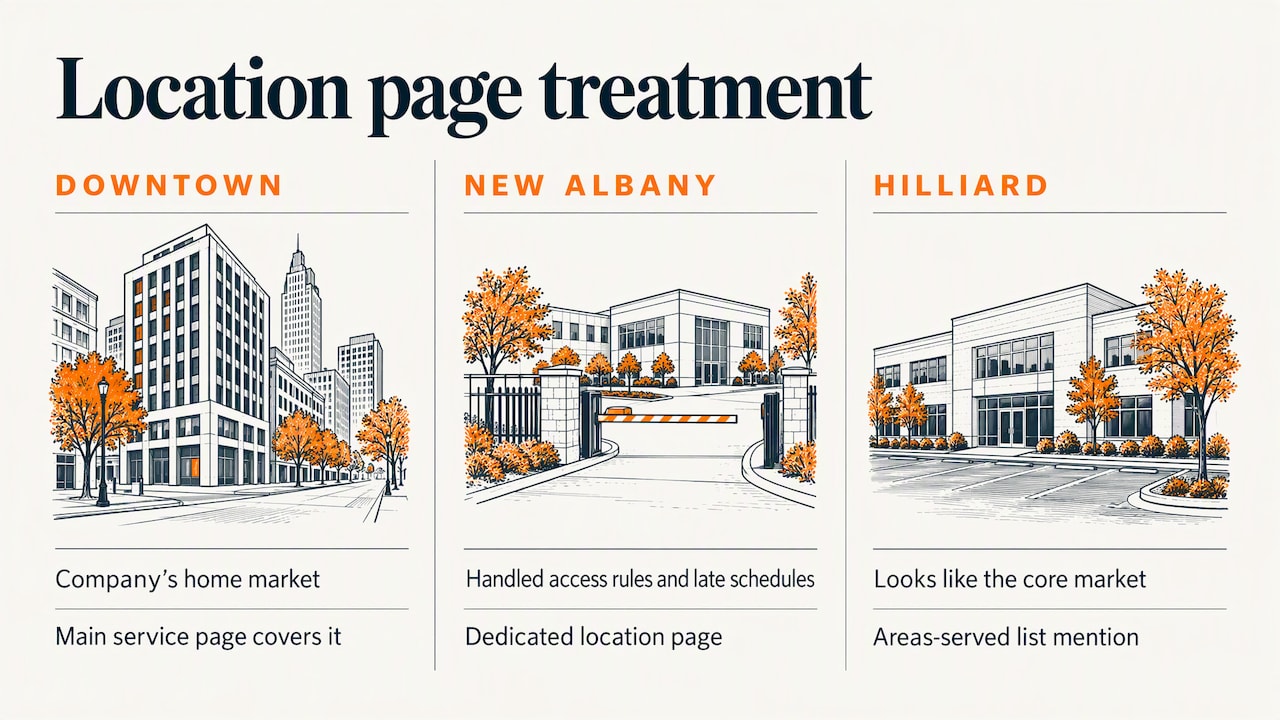
Imagine a commercial cleaning company with one office in Columbus. It serves downtown, Dublin, New Albany and Hilliard. Downtown is its home market, so the main service page covers it. New Albany has large office parks with building-access rules and after-hours schedules the company has handled for several clients, so it earns a page. Hilliard looks much the same as the core market, so it gets a line in the “areas we serve” list rather than its own page. This is an illustration, not a client case, but the logic holds for most local service businesses: pages follow evidence, not a list of ZIP codes.
What belongs on a location page
An effective location page answers the practical questions a visitor has before they come in or call. According to Search Engine Land, that means the address, hours, services, staff, directions, accessibility and what to expect. It can also carry local testimonials, original photography and FAQs built from real customer questions.
A solid structure from top to bottom:
- Name, address, phone and hours near the top, in text rather than an image, exactly as they appear on your Business Profile.
- A short description of what this location does, written for the people who use it.
- Services available here, each linking to its full service page.
- Directions and parking, including entrances, landmarks and accessibility details.
- The team at this location, with names and roles.
- Original photos of the building, the team and recent work. Stock images add nothing.
- Local reviews or testimonials from customers of this location.
- FAQs drawn from calls and emails you actually receive.
- One clear next step: call, book or request a quote.
There is no useful universal percentage of content that must be unique, so do not chase a number. Ask instead whether the page tells a visitor something true and specific to this location.
How to build service area pages that are not thin
The common failure is a template with a city name dropped in. Search Engine Land’s service area page guide says these pages should be helpful and customer-centric, act as final destinations and be unique rather than copies with the city swapped. It suggests building them from local testimonials, project showcases, offers, staff, community involvement or local expertise, and placing them in a structure visitors can browse.
Here is what that looks like in practice for a business serving the Columbus area:
- A project from that community. A named job in Westerville, with photos, the problem, what you did and the result.
- A customer quote from someone in that suburb, with permission.
- Local specifics. Municipal permit practices, typical building ages, seasonal conditions, travel or scheduling notes. Only include what you know to be true.
- A people element. The technician, project manager or account lead who usually covers that area.
- An offer or process that actually differs by place, if one does.
- Internal links to the related service pages and to neighboring areas you serve.
If you cannot fill most of that list for a suburb, do not publish the page yet. Collect the testimonials and project photos first.
What a strong page title and H1 look like
Keep it natural: a service plus a place, such as “Commercial Cleaning in New Albany, Ohio”. Use the same pattern in the title tag and the H1, add the place in the first paragraph where it reads naturally and avoid repeating the city in every sentence. Repetition does not help a human and signals a template.
Avoid doorway pages and misleading claims
Google’s spam policies describe doorway abuse as creating substantially similar pages to rank for similar queries and funnel visitors to a less useful intermediate page. They also prohibit intentionally showing false information about a business or service. Fifty near-identical suburb pages are the textbook case.
Three rules keep you clear:
- Do not publish a page for a place you do not serve.
- Do not list an address that is not a real location of yours. Google’s guidance says service-area businesses that do not serve customers at their address should remove it from their profile. Hybrid businesses can show an address and also set a service area.
- Keep your stated service area realistic. Google says a business’s overall service area generally should not extend more than about two hours of driving time from where it is based.
If you manage many locations, note the requirements for bulk verification: locations must be listed on your official website, match what you submit and be existing physical locations. Service-area businesses can bulk verify only if their locations are customer-facing during regular hours.
One more policy affects agencies and franchise networks. Google’s site reputation abuse policy targets third-party pages published with little or no first-party oversight to take advantage of a host site’s ranking signals, and violations can lead to a manual action. Every location page on your domain should be one you review and stand behind.
Structure and internal linking
Good structure lets a visitor and a crawler both reach any page in a few clicks. The approach recommended in the multi-location structure guide is:
- A locations directory that links to regional hubs or directly to individual pages.
- Regional hubs that link to the facilities in that region.
- Location pages that link to the services available there.
- Service pages that link back to the relevant facilities.
For a single-office business with a handful of service areas, this simplifies to: an “Areas we serve” page, linked from the footer and main navigation, that lists each area and links to its page; each area page linking to the matching services; and each service page linking to the areas.
Keep business facts consistent everywhere. The name, address and phone number on your pages should match your Business Profile character for character, and any structured data should describe the real-world location. Our guide to Google Business Profile optimization covers the profile side of this, and our post on optimizing your site for local search covers the basics of on-page signals.
Examples: what good location pages have in common
Rather than point you to a gallery of pages that will change, here are the patterns that separate strong examples from weak ones.
A strong multi-location page reads like the front door of that branch. The address and hours are visible without scrolling, a map and parking notes follow, then the staff, the services offered at this site, photos of the actual building and reviews from its customers. Each page differs because each branch differs.
A strong service area page reads like a case file. It opens with who you help in that community, shows two or three real projects with photos, quotes a local customer and explains anything that changes about how you work there. It ends with a single call to action.
A weak page of either type has a paragraph of generic copy about the service, the city name inserted a few times, a stock photo of a skyline and a list of nearby towns. If you could paste it into another city’s page by changing one word, it is thin.
Audit your own pages with that last test. Open two area pages side by side. If the differences are only place names, rewrite one or merge them.
Perspective: why we build these pages around proof
We have been building websites and marketing programs for businesses in Columbus and across Ohio for more than 38 years, and the pattern with local pages has not changed: the ones that work are the ones that look like the business actually did something there.
When we plan a site for a company that serves several communities, we start with the real footprint. Which offices are open to customers? Which suburbs generate repeat work? Where do we have photos, quotes and finished projects? Those answers decide the page list, not a spreadsheet of every town within driving distance.
Design matters as much as the SEO. A location page is a conversion page, so we treat it like one: clear contact details, fast loading, easy tap-to-call on mobile and a layout that lets a visitor see in seconds that you serve their area. Good copy, original photography and a clean internal link structure all come from the same plan.
Our approach is to combine custom design, technical implementation and search strategy so the pages can be measured. If a page does not earn visits or inquiries, we improve it or fold it into a stronger one.
Greg
Building your location page plan, step by step
- List your real locations. Anything customers can visit during posted hours is a candidate for a location page.
- List your service markets. For each, note the number of past projects, the testimonials you hold and anything that differs in how you work there.
- Score each market. Pages go to markets with real evidence or distinct logistics. The rest go in a single areas-served section.
- Gather original assets. Photographs, quotes and project summaries from each place.
- Write each page for a person. Start with the facts they need, then the proof, then the next step.
- Match your Business Profile and markup. Same name, address, phone, hours and service area everywhere.
- Link it in. Directory, services, neighboring areas and your main navigation or footer.
- Review twice a year. Update hours, staff, projects and reviews. Remove or merge pages that never earn traffic or inquiries.
If you are earlier in the process and wondering where location pages sit among other SEO work, our small business SEO guide explains what to do first, and what SEO is and why it matters gives the fundamentals. For page-level fixes, see our notes on on-page SEO.
Want help planning and building your location pages?
Marcy Design is a Columbus, Ohio web design and marketing agency. We design and build custom websites, handle the technical setup and support them with SEO solutions, so your location and service area pages are planned, written and linked as part of one site rather than bolted on.
If you want a second opinion on which pages your business actually needs, talk to us about website design and we will look at your locations, services and current site together.
FAQ
How many location pages should my business have?
One for each real, customer-facing location, plus service area pages only for markets that justify them. Search Engine Land’s guidance treats service area pages as approved exceptions for markets with distinct logistics, local regulations or substantial project experience. If a market does not meet that bar, mention it on a broader page.
Can I create a page for every city I serve?
You can, but only if each page is useful and different. Google’s spam policies treat substantially similar pages built to rank for similar queries as doorway abuse. A city page works when it carries local projects, testimonials, staff or logistics that the other pages do not.
Should a service area business show its address?
Only if customers actually visit it. Google says service-area businesses that do not serve customers at their address should remove it from their profile, while hybrid businesses can show an address and set a service area. Your website should say the same thing your profile does.
What is the difference between a location page and a service area page?
A location page describes a physical place customers can go to, with its address, hours and team. A service area page describes a market you serve without a facility there, and it works through local proof such as projects and testimonials.
Do location pages need unique content?
They need unique, useful content, but there is no universal percentage to hit. Judge each page by whether it answers real questions about that place. If two pages differ only by the city name, combine or rewrite them.
Sources
- Multi-location SEO: How to structure geographic pages (Search Engine Land)
- Service Area Pages: Boost Local SEO Across Locations (Search Engine Land)
- Spam Policies for Google Web Search (Google Search Central)
- Manage your service areas for service-area and hybrid businesses (Google Business Profile Help)
- Common issues that delay bulk verification (Google Business Profile Help)
- What web creators should know about our March 2024 core update and new spam policies (Google Search Central)