
 614.224.6226
A traditional CMS keeps your content and your website’s design in one system. A headless CMS stores content on its own and sends it to a website, app or any other screen through an API. For most small business websites that run through one channel, a traditional CMS is the simpler, faster choice. Headless earns its place when the same content has to feed several channels, or when the front end needs custom engineering. The rest of this guide shows how to tell which situation you are in.
TL;DR
- Traditional CMS: content, templates and publishing live in one system. Editors get visual tools and a quick launch, which suits a single business website.
- Headless CMS: content is stored as structured data and delivered by API to any front end. You get design freedom and reuse across channels, and developers build the presentation layer.
- Cost and staffing: headless usually needs more development and more moving parts. Traditional platforms cost less on simpler projects.
- Decide by need: count your channels, your in-house technical skill, your budget and your growth plans before you pick a technology.
- Middle path: many teams keep a familiar editing experience and add headless pieces only where they pay off.
Table of Contents
- What “headless” actually means
- Side-by-side comparison
- Where headless shines
- Where a traditional CMS is the better fit
- What headless asks of your team
- Headless vs. WordPress
- Example platforms by type
- Our perspective: choose the architecture after the goals
- How to decide: a practical checklist
- Quick scenarios
- How we can help
- FAQ
- Sources
What “headless” actually means
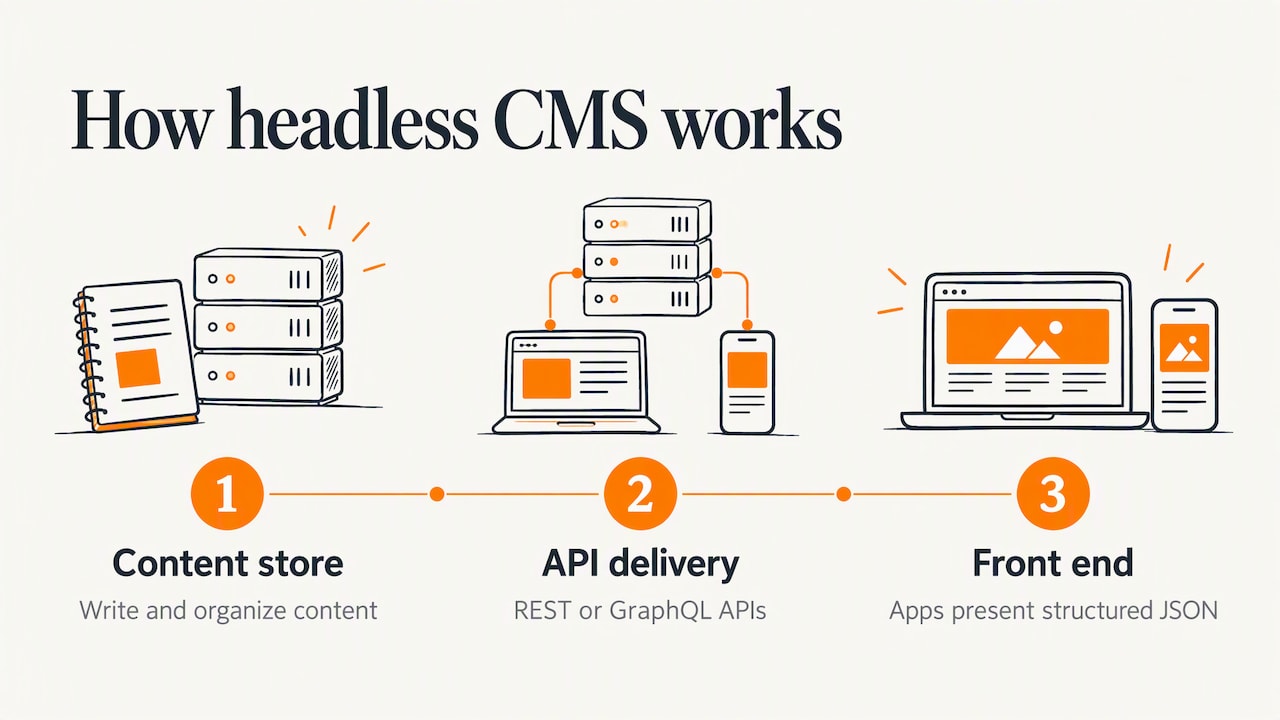
Think of a CMS as a body and a head. The body is where you write, organize and store content. The head is what shows that content to visitors: the pages, templates and layout.
In a traditional system the two are welded together. In a headless system the head is removed. As TechTarget explains, a headless CMS acts as a central repository for content and delivers it through APIs such as REST or GraphQL to any front end, with no built-in presentation layer.
Adobe’s documentation puts the same idea in architectural terms: headless means leaving out the final renderer, so the apps or sites that consume the content are responsible for presenting it. And because headless content is treated as raw, structured data, often JSON, rather than finished pages, it can be reshaped for each place it appears.
What a traditional CMS does
A traditional CMS handles authoring, templates, rendering and publishing in one package. You log in, type into a visual editor, pick a template and publish. WordPress is the best-known example, and 64.2% of all websites with a CMS use WordPress, according to Sitecore. If you want the plain-language case for managing a site this way, we cover it in why a content management system matters for your next website.
Side-by-side comparison
The table below summarizes the differences that matter most to a business owner.
| Factor | Traditional CMS | Headless CMS |
|---|---|---|
| Architecture | Back end and front end are coupled | Back end and front end are separate, linked by API |
| Editing | Visual, WYSIWYG, in-context preview | Form-based editing; preview must be built |
| Launch speed | Fast, with ready-made themes and templates | Slower, because the front end is built from scratch |
| Design freedom | Within the limits of the theme or custom theme work | Any framework, any design |
| Channels | Mainly the website | Website, mobile app, kiosks, voice, and more |
| Developer need | Low for basic sites | Ongoing and specialized |
| Typical cost | Lower for simple projects | Higher when custom development and hosting are needed |
These points match the summary in TechTarget’s comparison: traditional systems offer easier WYSIWYG editing and quicker setup, while headless systems offer front-end flexibility but require developers to build the presentation layer.
Where headless shines
One content source, many channels
If you publish the same product data, articles or location details to a website, a mobile app and an in-store screen, a single content repository saves a lot of duplicate work. Adobe notes that headless content can be pushed by API to mobile apps, single-page applications and voice devices, and is not tied to one front-end framework. Salesforce lists front-end freedom, reuse from one repository, omnichannel delivery and parallel work by editors and developers among the main benefits.
Performance and scaling
Separating the front end gives you room to tune each side on its own. Vercel describes how this makes content easier to cache and deliver globally through a CDN and lets the front end scale separately from the content back end. Zend adds that front-end performance is often faster because modern JavaScript frameworks handle rendering, which cuts server-side template processing.
Security posture
With the editing system tucked behind an API, the public site no longer exposes your CMS login and plugins directly. Zend’s analysis says this can reduce the attack surface compared with a traditional CMS. It is a design advantage, not a guarantee: a headless build still needs secure APIs, patched dependencies and sound hosting. Our website security checklist applies to either approach.
Market momentum
The category is growing quickly. Sitecore cites a projection that the headless CMS market will grow from $750 million in 2022 to $5.5 billion in 2032, a 21.1% compound annual growth rate. Growth alone is no reason to adopt it, but it means tooling and developer skills keep maturing.
Where a traditional CMS is the better fit
A traditional system is built to get a site live and keep it easy to run. For a business website managed mainly through one channel, TechTarget points out that it is usually simpler, because authoring, templates, rendering and publishing come in one package. Prebuilt design templates and WYSIWYG tools make basic site creation workable for nondevelopers.
Cost follows the same logic. Zend notes that traditional platforms typically cost less on smaller or simpler projects because pre-built solutions exist, while headless can cost more once custom development and hosting are added.
Salesforce makes a similar point from the headless side: the architecture pays off most when content must serve multiple channels, brands or surfaces, and for a smaller single-site project the upfront development investment may not be justified.
What headless asks of your team
Headless is a trade. You gain freedom, and you take on responsibility for the head. Plan for these realities before you commit.
- Developers are part of the workflow. Headless platforms rely on developers to build and maintain the front-end layer. Working with APIs calls for specialized development knowledge.
- Editing needs design. Adobe observes that headless setups can lack in-context WYSIWYG editing and may need technical help even for small content changes unless the editing experience is built deliberately. Preview is a feature to plan, budget and test.
- Consistency takes a system. Because each channel renders content itself, Adobe’s guidance is that a deliberate design system and shared components keep the experience consistent across channels.
- More parts to manage. A headless stack often combines a content service, a front-end application, hosting and sometimes third-party tools, so budgeting and ownership need to be clear from day one.
None of this makes headless a poor choice. It makes it a project that needs a clear brief and a capable development partner.
Headless vs. WordPress
This is the comparison most owners actually face, because most already run, or are considering, WordPress.
Standard WordPress is a traditional CMS. “Headless WordPress” keeps WordPress as the place editors write content but drops its themes, sending content through the API to a custom front end. Automattic’s agency guide describes this as decoupling the back end from the front end, and says whether it makes sense depends on whether the project needs specialized interactivity or multi-platform delivery that standard WordPress cannot provide.
Two practical effects follow:
- Two technology stacks. The same guide notes that headless WordPress usually means managing PHP on the back end and JavaScript on the front end, which adds developer complexity.
- Editor experience changes. Headless setups often lose the native site editor and live preview that traditional WordPress offers, so content teams may need more technical workflows.
So the question is rarely “headless or WordPress.” It is whether your project needs more than a well-built WordPress site delivers. We walk through that decision in Is WordPress the right CMS for your site.
Example platforms by type
Platform names change often, so judge by category rather than brand.
- Traditional or monolithic: standard WordPress is the common example. Brightspot’s guide groups it with simple, web-centric publishing needs.
- Headless: API-first content platforms, some hosted as a service and some self-hosted, aimed at complex, multi-channel needs.
- Hybrid: systems that keep a visual editor and templates but also expose content by API. Brightspot argues that hybrid is the practical choice for most enterprise teams balancing editorial speed with technical complexity.
For a small business, the hybrid idea is worth keeping in mind: you do not have to go all in on one model on day one.
Our perspective: choose the architecture after the goals
We have built websites for 38 years, and the technology has changed many times. What has not changed is that the best results start with the business goal, not the platform. A site that is fast, easy to update, accessible and found in search will outperform a fashionable architecture that your team cannot run.
Our view is simple. If your website is the main place customers meet you, you want an editing experience your own people enjoy using, a design built around your visitors, and a technical foundation that is secure and quick. For many of the businesses we serve, including manufacturers, nonprofits and growing local companies, that points to a custom-designed site on a well-chosen traditional or hybrid CMS.
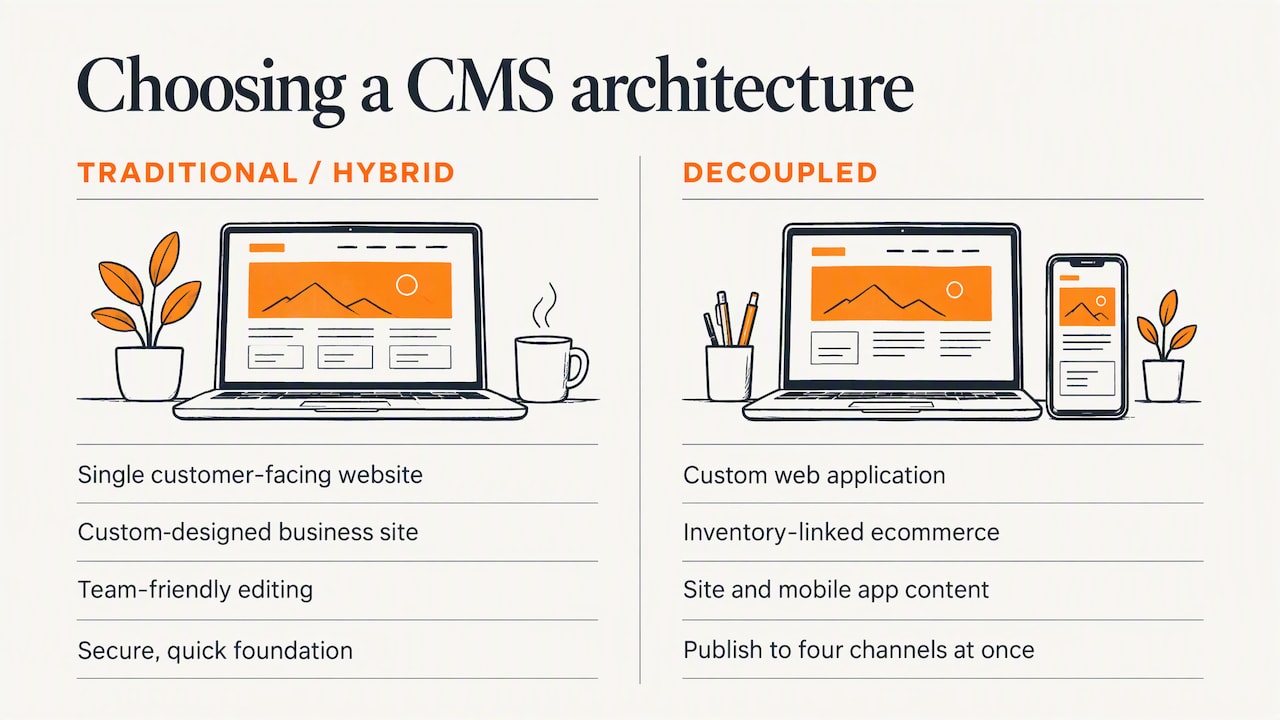
When the picture is bigger, we build for it. If you need a custom web application, an ecommerce platform tied into inventory and fulfillment systems, or the same content feeding a site and a mobile app, a decoupled approach can be the right design, and our development team can plan it with you. The point is that the decision should be tailored to your channels, your team and your budget, and made with measurable results in mind.
Before we recommend anything, we ask what your team will do on a Tuesday afternoon when a price changes or a new product needs a page. If the answer is “log in and edit it,” the CMS should make that easy. If the answer is “push content to four channels at once,” the architecture should reflect that.
— Greg
How to decide: a practical checklist
The research from Brightspot frames the decision around publishing needs, technical resources, budget and growth plans. Here is how those four play out for a small business.
1. Count your channels
One website, maybe with a blog: lean traditional. A website plus a customer app, a portal, in-store displays or several brand sites sharing content: lean headless or hybrid.
2. Be honest about technical capacity
Who will maintain the front end after launch? If you have no in-house developers and no agency on retainer, a headless build leaves you exposed. If you do have a development partner, the equation changes.
3. Set the budget for the whole life of the site
Include build, hosting, maintenance, security updates and content tooling. A lower build cost on a traditional platform can be the better value, and a higher headless investment can be justified when it replaces several separate systems.
4. Think about growth, but do not pay for it early
TechTarget notes that headless becomes more compelling when an organization needs multiple channels, customized front ends, reusable content or expects to scale content operations. If those are plans rather than current needs, choose a platform that can add an API layer later.
5. Think about ecommerce
Online stores often need product data in several places: the site, marketplaces, email and sometimes a mobile app. That is a real use case for decoupling, and also a place where integrations carry most of the cost. Our guides on custom ecommerce for small business and ecommerce platform integration cover what to plan for.
6. Do not forget search
Whatever the architecture, pages must be fast, crawlable and well structured to rank. A custom front end gives you control over all of that, and it also makes it your job to get it right. See why SEO is a vital part of web design.
Quick scenarios
- Local service company with a 20-page site and a blog. A traditional CMS with a custom design. Editing is simple, launch is quick and cost stays reasonable.
- Manufacturer with a large product catalog, a dealer portal and a mobile app. Structured content delivered by API starts to make sense, ideally with a hybrid editing experience.
- Nonprofit with events, donations and a volunteer app. Usually a traditional CMS with integrations first, with decoupling considered if the app becomes central.
- Growing retailer selling on its own site and elsewhere. A platform that exposes product content through APIs, planned alongside integrations.
How we can help
We design and build custom websites, ecommerce applications, mobile apps and web applications, and we host and support them afterward. If you are weighing a traditional, hybrid or headless approach, we will look at your channels, your team and your goals and recommend the setup that fits, not the one that sounds newest.
Start with our website design services, see the full range of web development and marketing services, or contact us for a proposal.
FAQ
What are the disadvantages of using a headless CMS?
Headless typically needs more developer involvement, since someone has to build and maintain the front end. It can also cost more where custom development and hosting are required, and editors may lose live visual preview unless it is built for them. These points are about planning, and a good project scope covers each one.
Is a headless CMS worth it for a small business?
It is worth it when you publish the same content to several channels or need a custom front end that a template cannot give you. For a single business website, a traditional or hybrid CMS is usually simpler and faster to launch. Match the choice to your channels, team and budget.
What does “headless” mean in a CMS?
It means the content management back end is separated from the “head,” the front end that displays content. The CMS stores content and delivers it through an API, and a separately built website or app presents it.
Can I use WordPress as a headless CMS?
Yes. WordPress can serve as the content back end while a custom front end displays the content. This adds a second technology stack and may remove the native site editor and live preview, so it suits projects with specific interactivity or multi-platform needs.
Is a headless CMS more secure?
It can be. Decoupling the front end from the CMS can reduce the attack surface, because the administration system is not exposed in the same way as on the public site. Security still depends on how the APIs, hosting and dependencies are built and maintained.
Sources
- What is a headless content management system (TechTarget)
- Traditional CMS vs. headless CMS: What’s the difference? (TechTarget)
- Learn About CMS Headless Development (Adobe Experience League)
- How a Headless CMS works (DatoCMS)
- Headless CMS vs. Traditional CMS (Sitecore)
- Headless CMS vs. Traditional CMS (Zend)
- The CMS evolution: Traditional, headless, hybrid (Adobe)
- What Is a Headless CMS? Architecture, Benefits & Use Cases (Salesforce)
- What is a headless CMS? Benefits, use cases (Vercel)
- What Is Headless WordPress? (Automattic)
- How to choose the right CMS (Brightspot)
- CMS selection guide (Brightspot)