
 614.224.6226
Checkout optimization is the work of removing every unnecessary field, surprise, and doubt between “add to cart” and “order confirmed.” Shoppers who reach checkout have already decided they want the product. If they leave now, the cause is usually something your store did: a hidden fee, a forced account, a long form, a payment option they don’t trust. This guide covers what causes abandonment, which fixes pay off first, and how to measure and test changes so you aren’t working on hunches.
TL;DR
- Most checkout losses come from a short list of causes: unexpected costs, forced accounts, long forms, weak trust signals, and slow or buggy pages.
- Show the full price early, offer guest checkout, cut fields to what you truly need, and make the mobile experience as good as desktop.
- Measure checkout on its own: the share of shoppers who start checkout and finish it, step by step, not just sitewide conversion.
- Change one thing at a time, test it against the old version, and keep what the data supports.
- Not every cart is recoverable. A large share of abandoners were only browsing, so aim at the losses you can actually fix.
Table of Contents
- Why checkout is where sales are won or lost
- What makes shoppers abandon checkout
- Fixes that usually pay off first
- Find the friction before you change anything
- Our perspective: fix the business rules before the buttons
- Where we can help
- A practical order of work
- FAQ
- Sources
Why checkout is where sales are won or lost
Analytics usually shows the same pattern: plenty of product views, a healthy number of add-to-carts, and then a steep drop. That drop is the most expensive in your funnel, because you’ve already paid to bring the shopper in and persuaded them to choose a product.
The Baymard Institute, which has spent years testing ecommerce usability, estimates that the average large ecommerce site could lift its conversion rate by 35% through better checkout design. That figure comes from large sites, so treat it as a sign of the scale of the opportunity, not a promise for your store. Still, it explains why checkout is usually the first place we look when a client says “traffic is fine but sales are flat.”
Baymard’s researchers also note that abandonment often happens because users get frustrated or can’t work out how to complete a field. In other words, many lost orders are usability failures, not price or product problems. Those are fixable.
What makes shoppers abandon checkout
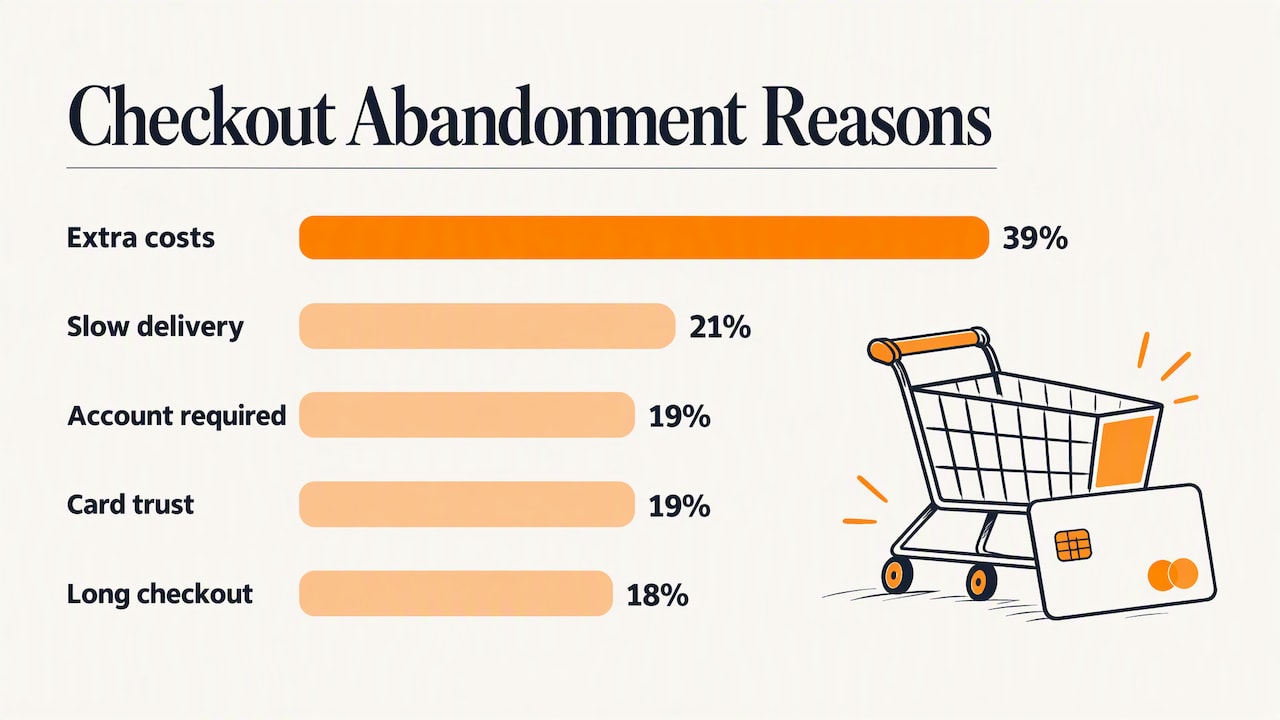
Start with the reasons, because they decide your priorities. Statista’s 2025 data on US shoppers ranks the causes like this:
| Reason for abandoning | Share of US shoppers |
|---|---|
| Extra costs (shipping, taxes, fees) | 39% |
| Delivery was too slow | 21% |
| Site required creating an account | 19% |
| Didn’t trust the site with card details | 19% |
| Checkout was too long or complicated | 18% |
The same source lists return policies, site errors or crashes, not seeing the total cost upfront, too few payment methods, and declined cards as further causes.
Two points matter here.
Most of these are not design polish. Extra costs, delivery speed, and return terms are business decisions presented on a page. A prettier button won’t rescue a store that reveals a $14 shipping charge on the final screen.
Some abandonment is not a problem. Baymard’s 2026 update found that 42% of US online shoppers had abandoned a cart in the previous three months because they were just browsing or weren’t ready to buy. Carts function as wish lists. Don’t judge your checkout against a zero-abandonment fantasy. Judge it on the share of people who clearly intended to buy and then couldn’t.
Fixes that usually pay off first
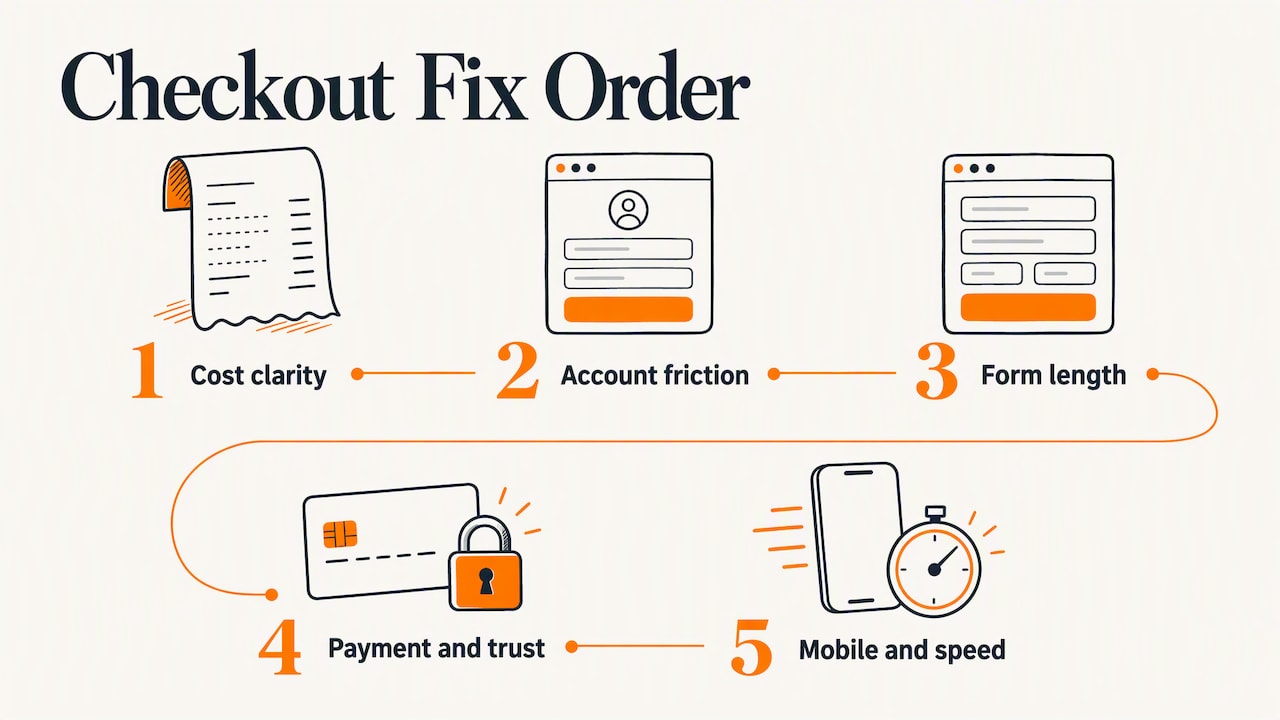
We work through checkout in this order: cost clarity, account friction, form length, payment and trust, then mobile and speed. The order reflects how much each tends to cost you, using the abandonment reasons above.
Show the full price early
The top reason for leaving is cost that appears late. Fix it before anything else.
- Put a shipping estimate on the product page or in the cart, not after the address form.
- If you collect sales tax, show an estimate as soon as you know the ZIP code.
- If you offer free shipping over a threshold, show progress toward it in the cart.
- Keep promo code fields understated. A prominent empty box sends shoppers off to search for a code. A plain text link that expands the field keeps them on task, a practice PayPal’s checkout guidance also recommends.
If your margins can’t support free shipping, a clear flat rate shown early beats a surprise calculated at the end.
Offer guest checkout
Forcing an account before payment is one of the most avoidable losses. Nearly one in five US shoppers in the Statista data cited it. Make guest checkout the default path, collect the email address, and offer account creation after the order is placed, when the shopper has something to save (their order history, tracking, faster reorders).
If you sell to repeat B2B buyers, such as a manufacturer with distributors who reorder monthly, accounts have real value. In that case, keep guest checkout for first orders and make login fast for returning customers.
Cut the form down
Baymard’s benchmarking found the average site presents 14.88 form fields, while most could get by with 6 to 8. Go through your own form field by field and ask whether you need the answer to complete and ship this order.
- Remove fields you collect “just in case”: birth date, gender, a second phone number. Baymard found shoppers consider abandoning when asked for a birth date (35%), phone number (15%), or gender (11%), and many sites never explain why they’re asking.
- Combine where you can: one full-name field instead of two, a single “billing same as shipping” checkbox checked by default.
- Explain the fields you must keep. A short note beside the phone number (“only used if there’s a delivery problem”) removes the doubt.
- Autofill and address lookup shorten the form further and cut typing errors, which means fewer failed deliveries.
Put the email address first. If a shopper leaves midway, you at least have a way to follow up with a cart reminder, as long as your consent and privacy practices allow it.
Make the flow feel linear
Baymard’s experts describe the best checkouts as ones where users never wonder where they are, what happens next, or whether going back will break something. That gives you a practical checklist:
- Show a progress indicator if your checkout has more than one screen, with clear step names.
- Keep the back button working and keep entered data when a shopper goes back.
- Ask for one kind of information at a time: contact, shipping, delivery method, payment, review.
- Make the primary button obvious. PayPal’s guidance says larger, higher-contrast primary buttons can raise conversion by as much as 3%. Treat that as an upper-end vendor figure and test it on your own store.
- Write error messages that name the field and say how to fix it. “Invalid input” is not an error message.
- Validate fields as the shopper moves on, not only after they press “Place order” and the page reloads with a red wall of text.
One page or several? There’s no universal winner. A single long page can feel heavy on a phone, while a multi-step flow can feel slow if each step reloads. What counts is that each screen has one clear job and the shopper can see the end. Test both if your platform allows.
Give shoppers payment options and reasons to trust you
A shopper who hesitates over a card form is asking two questions: is this page safe, and will this company honor my order? Answer both on the page.
- Secure the whole checkout with HTTPS. Google’s merchant requirements call for valid SSL certificates on checkout pages to protect payments and personal information, and it’s also the baseline shoppers expect.
- Offer the payment methods your customers actually use: major cards, plus digital wallets that let mobile shoppers pay without typing a card number. Look at what your own customers ask for before adding methods you’ll rarely use.
- Show recognizable payment marks near the pay button, and make your returns policy, contact details, and shipping times visible without leaving checkout.
- Write the returns policy in plain language and lead with the return window and who pays for return shipping.
Don’t decorate the page with a dozen generic badges. A few relevant signals placed next to the payment fields do more than a row of logos in the footer.
Make it fast and easy on a phone
A large share of ecommerce browsing happens on phones, and a form that is tolerable on a laptop can be miserable on a five-inch screen. Check these on a real device, not only a browser’s mobile preview:
- Tap targets large enough for a thumb, with space between them.
- The right keyboard for each field (numeric for ZIP and card number, email keyboard for email).
- Fields that don’t get hidden behind the on-screen keyboard.
- Wallet payments near the top, so a returning customer can finish in seconds.
Speed belongs here too. Slow pages, timeouts, and errors push people out at the worst moment. We’ve written about keeping an online store fast without hurting the shopping experience, and the same principles apply to checkout scripts: every third-party widget you add (chat, review pop-ups, tracking pixels) is a candidate for removal on checkout pages.
Find the friction before you change anything
Redesigning a checkout from a hunch is how stores trade one problem for another. Spend a week diagnosing first.
Measure checkout as its own funnel
Sitewide conversion rate blends browsers, window shoppers, and buyers into one number. A Boston Consulting Group report notes that conversion can be measured per session or by focusing on the lower-funnel conversion that begins when a customer starts checkout. The second view isolates the part you’re optimizing.
Set up these measurements in your analytics tool:
| Metric | What it tells you |
|---|---|
| Cart-to-checkout rate | How many carts turn into a started checkout |
| Checkout completion rate | Of those who start, how many pay |
| Drop-off by step | Which screen loses the most people |
| Drop-off by device | Whether mobile is the weak point |
| Payment failure rate | How often cards are declined or errors occur |
| Average order value | Whether a change hurt order size while lifting conversion |
Segment by device and by new versus returning customers. A checkout that works for returning desktop buyers can fail first-time mobile visitors, and the average hides it.
Watch real sessions
Numbers tell you where people leave. Session recordings and a few usability tests tell you why. Watch ten or twenty abandoned sessions and note where people hesitate, rage-tap, scroll back and forth, or re-enter a field. Then ask three or four people who haven’t seen your store to buy something and talk through what they see. Patterns show up fast: a confusing shipping choice, a coupon box that sends people off to hunt for codes, a button that looks disabled.
Also read your own support inbox. Questions like “does this include tax?” or “can I change my address after ordering?” point to missing information on the page.
Test changes one at a time
Once you have a ranked list of suspects, change one thing and compare it against the current version, splitting traffic between them. Some rules we follow:
- One hypothesis per test. “Showing shipping cost in the cart will reduce drop-off at the shipping step” can be proven or disproven. “Redesign checkout” can’t.
- Run it long enough. Cover at least a couple of full weeks so weekday and weekend behavior are both in the data, and don’t stop the moment a result looks good.
- Check traffic volume. A small store with a few hundred checkouts a month may not get a clean answer from a split test. In that case, make the clear fixes (hidden costs, forced accounts, broken mobile fields) and compare before and after, noting what else changed that month.
- Watch the downstream numbers. A change that lifts completed orders but raises refunds or payment failures hasn’t won.
Our perspective: fix the business rules before the buttons
We’ve been building websites and online stores for more than 38 years, and checkout problems rarely start with design. They start when the store’s policies and its presentation disagree: shipping that’s priced one way and described another, a returns policy nobody can find, an account requirement added because marketing wanted emails.
So we start every ecommerce engagement by walking the buying path as a customer would, on a phone, with a real card, noting every moment of doubt. Then we sort what we find into two piles. One is presentation: field order, error messages, button contrast, speed. The other is policy: shipping thresholds, tax display, return terms. The second pile is the owner’s call, and often the bigger win.
We also push back on copying the biggest retailers. A national brand with millions of repeat customers can ask for an account and still get the order. A small manufacturer or local retailer is earning trust on every first purchase, and the checkout should behave accordingly: fewer fields, plain words, no surprises, and someone reachable if something goes wrong.
— Greg
Where we can help
If your analytics show shoppers dropping out between cart and confirmation, we can audit the path, fix what’s costing you orders, and build or rebuild the store around a checkout that fits your customers. Our ecommerce web application work covers custom stores for small businesses and manufacturers, including checkout flows, payment integrations, and the speed and mobile work that supports them.

For more background before you talk to anyone, our guide to ecommerce conversion rate optimization in Columbus and our custom ecommerce guide for small business explain how we approach the wider store, not just the last step.
A practical order of work
If you want a plan you can start this week, use this sequence:
- Pull the funnel numbers for cart, checkout start, and completion, split by device.
- Place every cost on the page early: shipping, tax estimate, fees.
- Turn on guest checkout and move account creation after payment.
- Audit every field and remove, combine, or explain.
- Test on real phones and fix keyboards, tap targets, and hidden fields.
- Rewrite error messages and add inline validation.
- Add trust cues next to the payment fields and put your returns terms in view.
- Remove nonessential scripts from checkout pages.
- Test the next change against the current version and keep a simple log of what you changed and what happened.
Most stores will find that steps 2 through 4 account for most of the early gain, because they address the largest abandonment reasons. Later steps are smaller but add up, and they’re where ongoing testing earns its keep. For a few more tactics outside the checkout itself, see our piece on simple ways to raise ecommerce conversions.
FAQ
What is a good checkout conversion rate?
There’s no single benchmark that fits every store, because it depends on your products, price points, traffic sources, and device mix. Track your own checkout completion rate over time and compare it with your past performance and across devices. If mobile completes far less often than desktop, that gap is your first target.
Should I use a one-page or multi-step checkout?
Neither wins everywhere. What matters is that each screen has one clear job, the shopper can see how much is left, and nothing is lost when they go back. If your platform allows both, test them against each other on your own traffic.
How many fields should a checkout form have?
As few as it takes to take payment and ship the order. Baymard’s benchmarking found the average site shows nearly 15 fields while most could manage with 6 to 8. Remove anything you collect for convenience rather than need, and explain the fields that look intrusive, such as phone number.
Is guest checkout really better than requiring an account?
For first-time buyers, usually yes. Statista’s 2025 data has about 19% of US shoppers abandoning because an account was required. Keep an easy login for returning customers and invite shoppers to create an account after they’ve paid.
Can I recover shoppers who already abandoned?
Some, not all. Many abandoners were never ready to buy, so a reminder email won’t change their mind. For the rest, an email that returns them to the saved cart, with shipping and return terms visible, is the usual approach, provided you collected their address with proper consent.
Sources
- Baymard Institute: E-Commerce Cart & Checkout Usability Research
- Statista: United States cart abandonment reasons 2025
- Baymard Institute: Reasons for cart abandonment and checkout usability benchmark
- Baymard Institute: Checkout optimization and reducing abandonments (PDF)
- Baymard Institute: shopper reactions to personal data requests (PDF)
- Baymard Institute: Ecommerce checkout UX guide
- PayPal: 10 ways to optimize checkout (PDF)
- Google Merchant Center: Checkout requirements and best practices
- Boston Consulting Group: Leading Online Shoppers to the Finish Line