
 614.224.6226
Ecommerce site search is the search box on your own store, and it works when a shopper can type what they want, in their own words, and see the right products at the top. That depends on five things: clean product data, synonym and typo handling, a well-built autocomplete, useful filters, and a habit of reading what shoppers search for and fail to find. This guide walks through each one, with the numbers and documentation behind them, so you can brief a developer or judge the search you already have.
TL;DR
- Shoppers who use search are often the ones closest to buying, so a weak search box costs real revenue. Treat it as a core part of the store, not a plugin you install and forget.
- Relevance starts with product data: accurate names, tags and weighted attributes, plus synonyms and misspelling tolerance.
- Autocomplete is common but usually done badly. Keep suggestions short, scoped and never auto-select the first one.
- Never show a dead end. Zero-result pages should offer alternatives, and every failed query is a to-do item for your catalog.
- Measure click-through rate, conversion rate, zero-results rate and average click position, then fix what the data points to.
Table of Contents
- What ecommerce site search does
- Why search is worth fixing first
- Start with product data, not software
- Handle synonyms, typos and natural language
- Design autocomplete deliberately
- Give filters a real job
- Never leave a shopper at a dead end
- Measure whether search is working
- Choosing how to implement it
- Our perspective
- Work with Marcy Design on your store’s search
- FAQ
- Sources
What ecommerce site search does
Site search lets visitors type keywords or phrases to find products instead of clicking through category pages and filters. Salesforce describes it as a tool that replaces browsing listing pages with a typed query, and it separates two kinds of intent worth designing for:
- Known-item searches, such as a product name or model number. The shopper knows what they want and expects it first.
- Product-type searches, such as “stainless steel coffee machines.” The shopper has a need and wants a sensible set of options to compare.
The second kind is where most stores stumble. A search engine that only matches exact words does fine with model numbers and badly with descriptions, symptoms or use cases. Shopify’s search guide reports that 38% of sites fail to fully support symptom-based queries such as “dry skin relief,” which means shoppers with a clear need leave without a product.
Why search is worth fixing first
The Nielsen Norman Group puts it plainly: shoppers cannot buy products they cannot find. Search is also where intent is highest. Someone who types into a search box has stopped browsing and started looking for something specific.
The numbers back this up, with a note that they come from vendor reporting rather than independent audits:
- Shopify’s 2025 reporting says 80% of consumers have abandoned an ecommerce site because of poor search, while 79% are likely to buy after using an effective search feature.
- The same guide cites research from Nosto finding that 7 in 10 consumers are likely to complete a purchase when results are personalized based on their purchase history.
- Baymard’s testing of 19 leading stores turned up more than 700 search-specific usability issues. Even large, well-funded sites get this wrong.
If you are already working on conversion, search belongs on the same list as page speed and checkout. Our notes on improving ecommerce site speed without hurting the shopping experience and easy ways to increase ecommerce conversions cover the neighboring problems.
Start with product data, not software
The most common mistake is shopping for a search tool before looking at the catalog. Search can only return what your data describes. Three habits make the biggest difference.
Name and tag products the way shoppers talk
Accurate product names and tags are the first relevance lever, according to Shopify’s guide. If your catalog says “ambulatory footwear” and shoppers type “walking shoes,” no algorithm will rescue you. Write titles and attributes in customer language, then keep the internal jargon in a separate field.
Weight the fields that matter
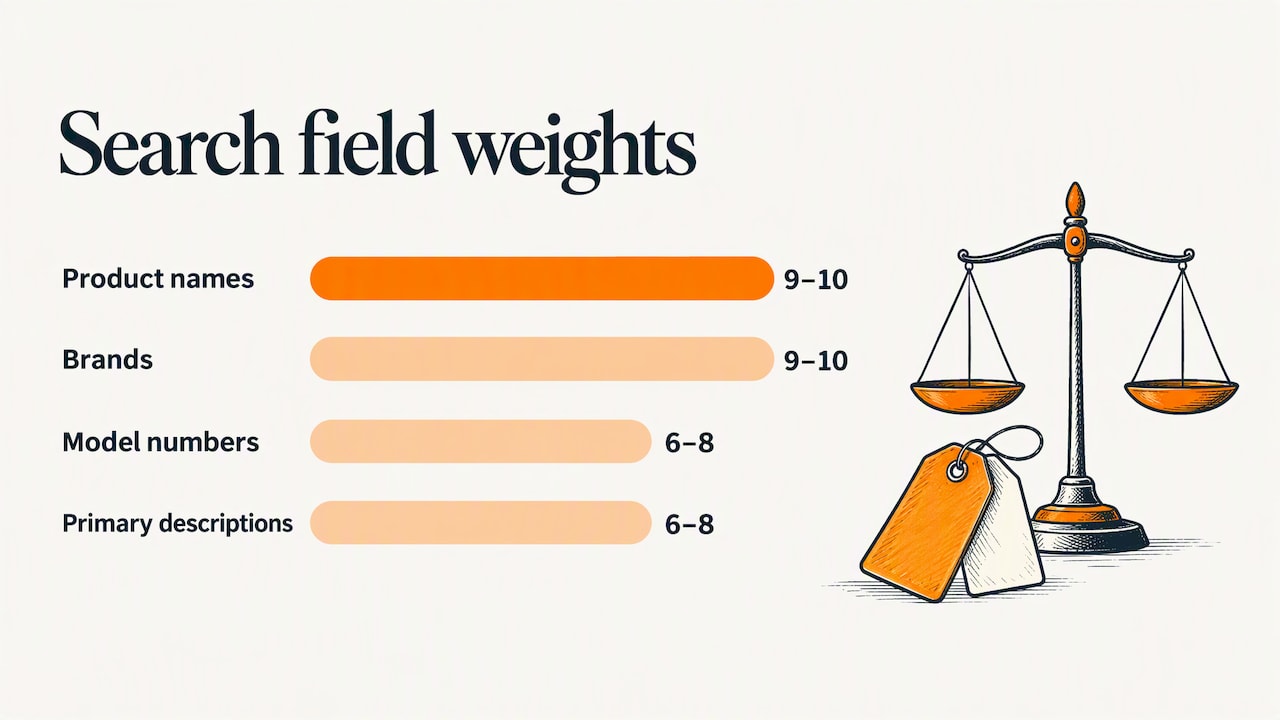
Not every field should count equally. Adobe Commerce’s documentation suggests weights of 9 to 10 for product names and brands, and 6 to 8 for model numbers and primary descriptions. Whatever platform you use, the principle holds: a match in the product name should outrank a match buried in a long description.
The same documentation notes that SKU, product name and category attributes are typically searchable by default, and advises against spaces in SKU naming conventions. It is a small detail, but SKU searches are common in B2B and parts catalogs, and inconsistent SKU formats quietly break them.
Plan for long queries
TechTarget points out that shoppers far along in the buying process use long, specific queries, so the search field needs to be wide enough to hold them. A narrow box that cuts off a query midway signals that long searches are not welcome.
Handle synonyms, typos and natural language
Shoppers do not know your catalog vocabulary, and they mistype. Both problems have standard fixes.
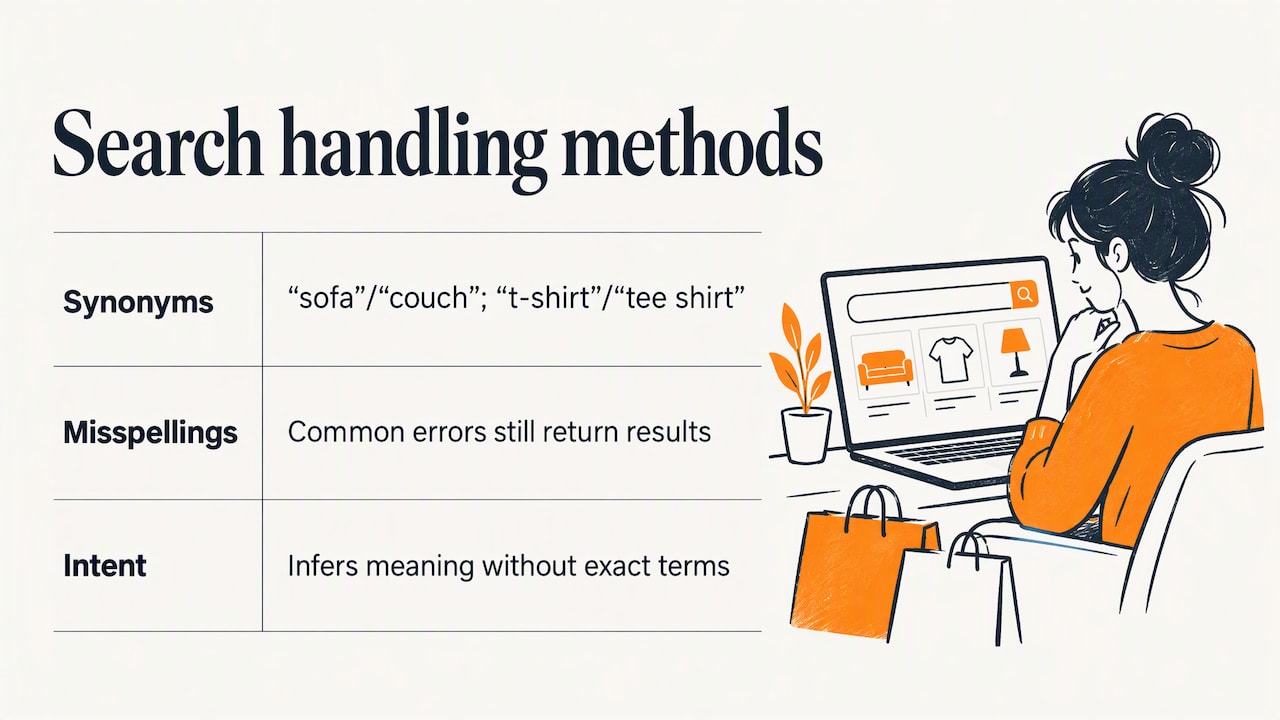
Synonyms. Adobe’s documentation recommends mapping vocabulary differences, with “sofa” and “couch” as the example. Algolia’s 2024 guide recommends a synonym dictionary too, such as “t-shirt” to “tee shirt.” Start with the obvious pairs, then grow the list from real queries.
Misspellings. Default misspelling management means a shopper typing a common error still sees results. Fuzzy matching and natural-language processing do the same job for searches that would otherwise return nothing, as TechTarget explains.
Intent. Modern search has moved from simple keyword matching toward AI and natural-language processing that infers what the shopper means even when the exact term is missing, as the Algolia guide observes. For a small catalog, careful synonyms and clean data get you most of the way. For a large or highly technical catalog, intent-aware search starts to pay for itself. We cover that territory in our guide to AI-powered ecommerce solutions.
Design autocomplete deliberately
Autocomplete saves time and mental effort, as the Nielsen Norman Group notes. It is also easy to get wrong. Baymard’s 2022 research found that 80% of ecommerce sites offer autocomplete, but only 19% implement it correctly against usability best practices.
A practical checklist, drawn from that research:
- Limit the list. No more than 10 suggestions on desktop, and 4 to 8 on mobile.
- Show scope. When a suggestion searches within a category, make that clear, for example “running shoes in Women’s.”
- Respect touch. On mobile, keep suggestions visible above the keyboard and spaced so thumbs do not hit the wrong one.
- Do not preselect. Searchspring’s guide advises never highlighting the first suggestion by default, because pressing Enter should run the exact query the shopper typed.
- Show more than text. Rich results with an image and price help shoppers recognize a product before they click, a point also made in Shopify’s best-practice list.
The same check applies on every device. Test on a real phone with a real thumb, not only in a browser window resized on a desktop.
Give filters a real job
Filters and facets let shoppers narrow a large catalog by attributes such as color, size, brand and price. Adobe describes them as tools that make product discovery faster and easier, and TechTarget lists filters as the way to control a result set that is too broad.
Filtering is also where many stores quietly fail. Baymard’s product list and filtering benchmark found that 36% of leading ecommerce sites have filtering flaws severe enough to harm shoppers’ ability to find and choose products. Some fixes cost little:
- Show a live product count next to each filter option, so a shopper never clicks into an empty page.
- Use attributes that match how people choose, not how your inventory system stores items.
- Keep the selected filters visible and easy to remove.
Never leave a shopper at a dead end
TechTarget names four common problems: inaccurate results, zero results, slow results and result sets that are too broad. Zero results is the most damaging because the shopper gets nothing at all.
A good no-results page does three things:
- Offers alternatives. Shopify reports that almost a quarter of consumers think merchants could improve search by suggesting alternative products when there is no exact match.
- Suggests a next step. A spelling correction, a related category or a way to contact you.
- Feeds your catalog work. Adobe recommends monitoring zero-result queries and responding with alternatives such as synonyms. Every one is either a vocabulary gap, a typo you should absorb, or a product shoppers want that you do not carry.
That last point is easy to miss. A list of failed searches is free market research.
Measure whether search is working
Search needs ongoing attention. Adobe’s search performance guidance names the metrics worth watching:
| Metric | What it tells you |
|---|---|
| Unique queries | What shoppers actually ask for, and how varied it is |
| Click-through rate | Whether results look relevant enough to click |
| Average click position | Whether the right product sits near the top (lower is better) |
| Conversion rate | Whether searchers go on to buy |
| Zero-results rate | How often shoppers hit a dead end |
Review these monthly at first. Sort the zero-result queries by volume, fix the top ten with synonyms, product data or new content, and check that the rate falls. Then look at high-volume queries with a low click-through rate: they usually mean the ranking is wrong even though results appear. Adobe’s wider view is that search quality comes from continuous refinement of vocabulary, product data and rules based on shopper behavior.
Search data also informs decisions beyond the search box. Queries show what to stock, which categories need better pages, and what language belongs in your ads and email. Our guide to ecommerce conversion rate optimization shows how to fold this into a broader testing routine.
Choosing how to implement it
There are three broad routes, and the right one depends on catalog size, traffic and how much control you need:
- The search built into your platform. Fast to launch, adequate for small catalogs, limited in tuning. It improves a lot once your data is clean and synonyms are in place.
- A dedicated hosted search service. Adds typo tolerance, intent matching, merchandising rules and analytics. A good fit when the catalog is large or the queries are descriptive.
- Custom search built into your own application. Gives full control over ranking, filters and the interface, which matters for complex catalogs such as manufacturing parts with technical specifications.
Whichever route you take, make the search bar prominent. Shopify’s guide lists this alongside accurate naming and tagging as a basic that many stores still miss. Put the box in the header on every page, make it wide, and label it plainly.
If you are weighing a rebuild, our buyer’s guide to ecommerce website development services and the piece on custom ecommerce for small business explain how to scope the work, and where search fits in the brief.
Our perspective
Most search problems we see are not software problems. They are catalog problems and attention problems. The store has thousands of products named by whoever entered them, no synonyms, and nobody has opened the search report in a year.
We start by reading the queries. What do shoppers type, what do they find, and where do they give up? From there we decide whether the fix is cleaner product data, better ranking rules, a redesigned autocomplete, or a custom build that fits the way the catalog is actually structured. For manufacturers with technical part numbers and specifications, the last option is often the right one.
Search also has to work with everything around it: page speed, mobile layout, filters, product pages and checkout. Our approach is tailored solutions and user-focused design, with the technical implementation handled by the same team, so search is built as part of the shopping experience and not bolted on at the end. After more than 38 years in business, we have learned that the details shoppers never notice are the ones that make them buy.
Greg
Work with Marcy Design on your store’s search
If your search box is costing you sales and you want a team to fix it, we can help. Marcy Design is a Columbus, Ohio agency that designs and builds ecommerce web applications, from product data and search to mobile layout and hosting. We can review how your store handles queries today and plan the changes that matter most.
See our ecommerce web application services, or contact us through our website to talk through your catalog. If search is part of a broader redesign, our website design services cover the whole experience, and our SEO solutions help bring the right shoppers in before they ever reach the search box.
FAQ
What is the difference between site search and Google search for ecommerce?
Site search is the search box on your own store, and it only searches your catalog and content. Google search brings people to your store from outside. Both matter, but site search is where a visitor who is already on your site tells you exactly what they want.
How many autocomplete suggestions should I show?
Baymard’s research recommends no more than 10 suggestions on desktop and 4 to 8 on mobile. Make category-scoped suggestions clear, and keep mobile suggestions visible and well spaced so they are easy to tap.
What should I do about searches that return no results?
Show alternatives instead of an empty page: corrected spellings, related products or categories, and a way to get help. Then log the query. Adobe recommends monitoring zero-result queries and adding synonyms or other fixes, so each failed search improves your catalog.
Which metrics show whether my search is working?
Track click-through rate, conversion rate, zero-results rate, average click position and unique queries. Adobe’s guidance names these as the core measures. Review them regularly and compare searchers’ conversion to that of other visitors.
Do I need AI-powered search?
Not always. Clean product data, synonyms and typo tolerance fix a lot for small catalogs. Intent-aware search helps most when the catalog is large or shoppers describe needs instead of naming products. Our guide to AI for ecommerce personalization explains where it fits.
Sources
- Ecommerce Site Search Best Practice (Salesforce)
- 15 Ecommerce Site Search Best Practices + Tools (Shopify)
- The State of Ecommerce Search (Nielsen Norman Group)
- E-Commerce Search Usability Research Studies (Baymard)
- Live Search Best Practices (Adobe Commerce)
- How does e-commerce search work? (TechTarget)
- Ecommerce site search: best practices (Algolia)
- 9 UX Best Practice Design Patterns for Autocomplete (Baymard)
- The ultimate ecommerce site search guide (Searchspring)
- 16 eCommerce Site Search Best Practices (Doofinder)
- Search Performance (Adobe Commerce)