
 614.224.6226
What if the best online store isn’t the one with the most features, but the one that makes every next step clear? Choosing custom ecommerce solutions for small business isn’t about adding complexity. It’s about shaping the shopping experience around what you sell, how customers make decisions, and how your business works behind the scenes.
It’s reasonable to ask whether a ready-made platform will be enough or whether a generic storefront will leave customers unsure where to go. The right level of customization depends on your requirements. A focused catalog may work well with standard tools, while a more involved customer journey may benefit from tailored features that connect browsing, ordering, and business workflows.
This guide explains what custom ecommerce means in practical terms and how to choose features based on customer needs. We’ll compare static pages with interactive experiences, such as guided product selections, assessments, and lead-capture forms, and show how clear prompts can help visitors take the next step. You’ll also learn how to compare platforms and plan a sensible path forward without building more than your business needs.
Key Takeaways
- Custom ecommerce can tailor design, content, development, and integrations to your products and workflows without requiring every component to be built from scratch.
- Compare static forms with guided interactive tools to decide which approach gives customers the right steps and context.
- Evaluate ready-made builders, configurable platforms, and custom development by flexibility, control, workflow fit, and implementation needs.
- Start with a real customer task: identify friction, choose an appropriate interaction, and check how clearly it guides the next step.
- Plan custom ecommerce solutions for small business around customer needs, practical business goals, and a coherent online journey.
What Custom Ecommerce Solutions Give Small Businesses Beyond a Basic Online Store
An online store needs to do more than display products and accept orders. It should help customers find what they need, understand their options, and complete a purchase through a process that works for the business. E-commerce includes different models, including business-to-consumer and business-to-business transactions, as outlined in E-commerce. The right experience depends on the customers you serve and how your business operates.
A custom ecommerce solution is an online store shaped around a business’s products, customers, workflows, and goals, using tailored design, content, development, and integrations where they add value. Customization doesn’t mean building every component from scratch. A business might use an established ecommerce platform, then tailor its navigation, product pages, and connections to other business systems. The aim is a coherent shopping experience, not complexity for its own sake.
How a tailored online store differs from a basic storefront
A standard template offers a familiar structure for presenting products and completing common shopping tasks. It can be a good fit when its features match the business’s needs. A tailored experience starts with a more specific question: what do customers need to find, understand, or do before they’re ready to order?
A retailer selling products that vary by size, material, or intended use might organize navigation and product information to help shoppers compare relevant options. A service business may need pages that explain its process and guide visitors toward an inquiry rather than a conventional checkout. In each case, the structure and content should reflect the actual buying journey. Custom ecommerce solutions for small business are most useful when they make the store clearer and better aligned with how the business serves customers, not simply because customization is possible.
Design is one part of that work. Custom website design can support a store’s visual identity and make its structure easier to follow. Development, content, and integrations can also connect the shopping experience with relevant business workflows.
Which small businesses can benefit from custom ecommerce
Suitability depends on the customer journey and operational requirements, not company size alone. A small retailer may sell products that need richer comparisons or clearer organization. A service business might use its website to explain an offering and collect useful inquiry details. An organization with a particular ordering or approval process may need store functions that support those steps.
Start by identifying where a generic storefront makes customers or staff adapt to the tool instead of the tool supporting their needs. Are shoppers finding it difficult to distinguish options? Does order information need to flow into an existing workflow? Would clear guidance help visitors understand what to do next? If a basic layout can’t support an important task well, targeted customization may be worth considering. Columbus businesses can use the same approach: identify the problem, prioritize changes that solve it, and build from there.
How Interactive Ecommerce Experiences Guide Customers More Clearly
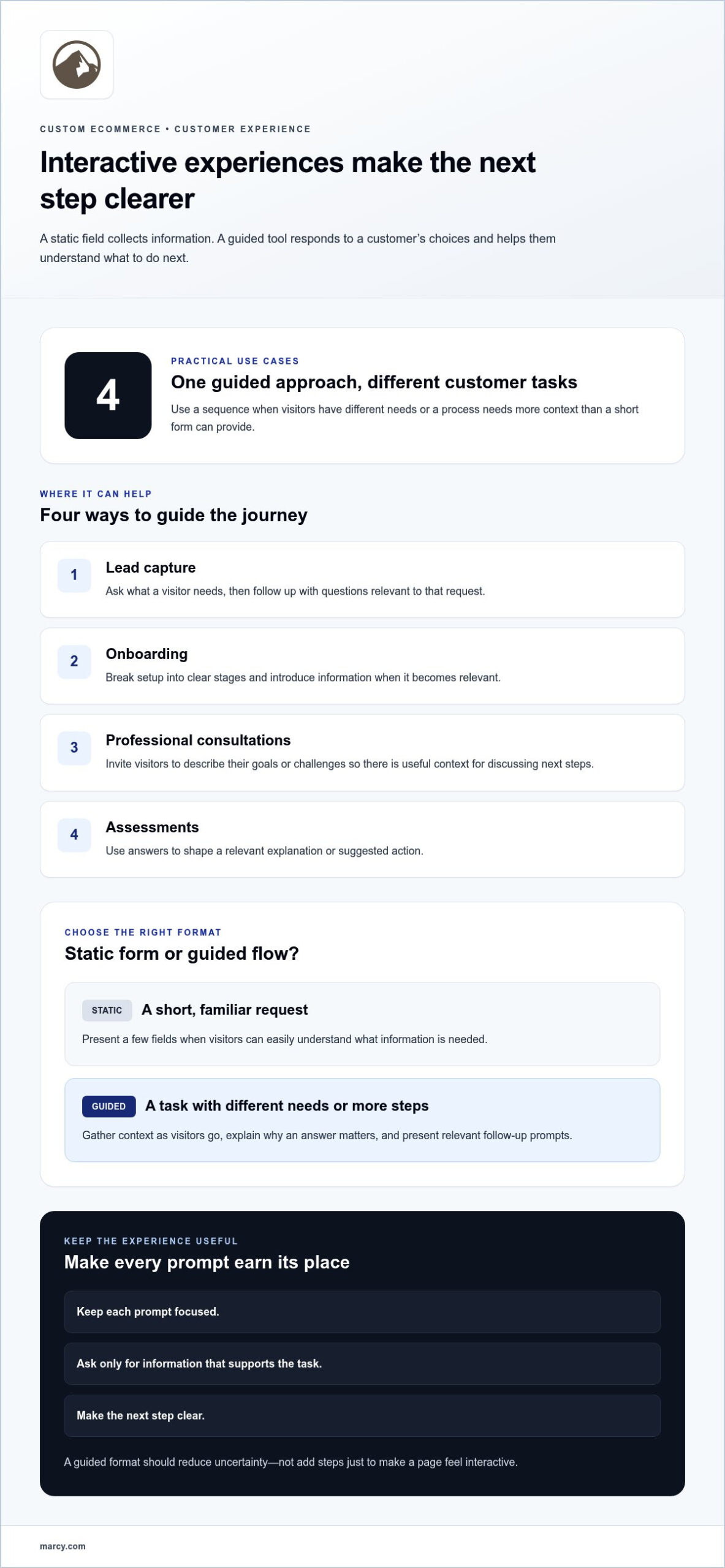
A static field collects information. An interactive tool uses a visitor’s answers to guide what happens next. That difference can determine whether a customer feels they’re filling out a form or getting help with a task.
An interactive ecommerce experience is a guided sequence that responds to a customer’s choices and helps them understand their next step. It might ask one question at a time, explain why an answer matters, or show a relevant follow-up prompt. A static form typically presents the same fields to everyone at once. Neither approach is right for every situation. Choose based on what customers need to share or decide.
When a guided tool is more useful than a static form
A short, familiar request may need only a few fields. When visitors have different needs or face a more involved process, a guided flow can make the task easier to follow. It gathers context as the visitor goes instead of asking everyone to interpret a long list of questions.
- Lead capture: Ask what a visitor needs, then use the response to present relevant follow-up questions. Someone seeking help with a specific service can share details related to that request.
- Onboarding: Break setup into clear stages. Introduce information when it becomes relevant to the customer’s next task instead of displaying every instruction and field at once.
- Professional consultations: Invite visitors to describe their goals or challenges before a conversation. Their responses can give both sides useful context for discussing next steps.
- Assessments: Use a sequence of questions to help someone explain their situation, then provide a relevant explanation or suggested action based on their answers.
Keep each prompt focused. Explain what the visitor should do, ask only for information that supports the task, and make the next step clear. A guided format should reduce uncertainty, not add steps simply to make a page feel interactive.
How personalization can make the buying journey feel relevant
Personalization doesn’t have to require complicated technology. It can be as simple as using a customer’s response to choose the next question, clarify an explanation, or point to an appropriate action. For product discovery, a shopper might choose a use, preference, or requirement and then see information organized around that choice. The experience feels more relevant because it reflects what the customer has already shared.
That relevance can encourage engagement and make it easier for customers to continue. Higher completion can be a design goal, but it isn’t guaranteed. Review where people hesitate, whether questions are clear, and whether each response leads to a useful next step. This helps shape custom ecommerce solutions for small business around real customer needs, rather than adding interactions without a clear purpose.
For a store that needs a cohesive visual and functional experience, custom website design can help align the guided flow with the broader customer journey.
Custom Ecommerce Platform or Ready-Made Builder: How to Compare the Options
Choosing an ecommerce platform and deciding how much to customize your store are related but separate decisions. A platform provides the foundation for managing an online store. Custom design and development shape how the store presents products, guides customers, and supports business tasks. A ready-made builder can still support a tailored experience, while custom development may be appropriate when essential workflows don’t fit a standard setup.
Compare the options by how well they fit your requirements, rather than assuming one approach is right for every business.
| Approach | Flexibility and control | Workflow fit | Implementation consideration |
|---|---|---|---|
| Ready-made builder | Uses a predefined structure with available ways to adjust the storefront. | Can suit common product browsing and ordering needs. | Consider whether its existing structure supports the customer journey you need. |
| Configurable platform | Combines a platform foundation with options to tailor design and functions. | May accommodate more specific customer or operational needs. | Define which configurations or integrations solve a clear business requirement. |
| Custom development | Allows the experience and functionality to be shaped around defined requirements. | Can address workflows that don’t align with standard processes. | Clarify the project scope, priorities, and how the solution may evolve. |
Which questions reveal the right level of customization
Start with your customers. What do they need to browse, compare, understand, and complete before purchasing? Then look at your operations. Which order details, approvals, or handoffs should the store support or simplify? Write down the requirements that directly affect those tasks. Separate them from features that sound appealing but don’t solve a defined problem. This keeps the initial scope focused and makes platform discussions more concrete.
A store with a straightforward product range may need clear categories and a simple purchasing path. A business with specialized order steps may need a closer fit between its storefront and internal workflow. The distinction isn’t business size. It’s the complexity of the customer task and the process behind it.
How to plan for growth without overbuilding
Set a flexible scope. Address essential customer and business needs first, while leaving room to adjust as those needs become clearer. Content management tools can help staff update store information. A web application or integration may be useful when it supports a specific process. Give each component a clear purpose and identify the person or workflow it helps.
AI may also fit when it supports a defined customer or operational need. Consider AI-powered solutions as one possible part of a broader ecommerce plan. Effective custom ecommerce solutions for small business balance current requirements with sensible flexibility, rather than building speculative features before there’s a clear reason to use them.
Plan a Small-Business Ecommerce Journey Around Real Customer Tasks
A useful ecommerce journey starts with what a visitor is trying to accomplish and makes the route through the site easy to understand. Before choosing pages or features, write down the customer’s goal and what they need to see or do to reach it. This keeps the experience grounded in real tasks instead of adding interactions simply because they’re available.
Use this sequence to shape and refine the journey:
- Identify the task. Describe the visitor’s goal in plain language, such as finding the right category or checking whether an item suits their needs.
- Map friction. Note where a visitor might encounter unclear labels, missing information, or too many choices at once.
- Choose the interaction. Decide whether a clear page, comparison layout, or guided sequence best supports the task.
- Review the experience. Follow the path from the visitor’s first question to the point where they know what to do next.
Map the journey from first question to next action
Consider the questions a shopper might have as they move through your store. Can they tell which category fits their need? Are product options and relevant details easy to compare? Is it clear how to move from reviewing an item to the next step? These questions help define what each page should accomplish and where customers may need more context.
Sketch the journey before development. At each stage, note the visitor’s goal, the information that supports it, and the action that follows. A category page might lead to a product detail page. A comparison might help a customer select an option. A product review might lead to continuing through the purchase process. Keep the path focused. If visitors can understand the information on a page, a static layout may be enough. Add guidance when the next useful step depends on a choice or detail the visitor provides.
Make the experience usable across devices and abilities
Review the journey on a phone as well as a larger screen. Check that headings, instructions, product details, and controls remain easy to understand without cramped layouts or unnecessary scrolling. Clear labels and consistent page patterns help visitors recognize where they are and what to do next.
Consider accessibility throughout the journey, not as a final polish. Use descriptive text, logical content order, and controls that are understandable to people using different ways to navigate. Marcy Design’s mobile-responsive website design can align the site’s layout with the tasks customers need to complete. Review the full path for unclear wording, hard-to-find actions, or information that gets lost on smaller screens.
Give your store a focused starting point. Plan your website design around customer tasks with Marcy Design.
How Marcy Design Builds Custom Ecommerce Solutions Around Business Goals
A successful ecommerce project starts with a business goal, not a list of features. Marcy Design works with businesses to connect their products, customer needs, and day-to-day workflows to a practical online experience. Based in Columbus, Marcy Design brings over 38 years in business and over 230 awards to its work with businesses and organizations in the city and beyond.
Bring design, development, and marketing into one conversation
Design, development, and marketing decisions influence one another. Product organization affects how customers explore a store. Content on product and service pages helps visitors understand their options. The technical structure needs to support the intended experience and the workflows behind it. Considering these needs together creates a more cohesive online presence than treating each decision as a separate task.
Marcy Design’s ecommerce solutions, website design, web development, and programming can be shaped around a business’s goals and customer journey. Its flexible approach allows solutions to be packaged for a business’s needs and adjusted as those needs change. Relevant digital marketing services can connect the store with broader marketing priorities. AI-powered solutions can also be considered when they address a defined customer or operational need, rather than being added simply because the technology is available.
Marcy Design is committed to ADA compliance and accessibility. Include that focus in planning alongside the content, navigation, and interactions customers rely on. The goal is a coherent online experience guided by business requirements and the needs of the people using the site.
Ready to shape an online store around your business goals? Start a conversation about your website design with Marcy Design.
Start with a focused conversation about your online store
Before discussing implementation, outline what you sell, what customers need to accomplish, and which business workflows the store should support. Note where shoppers need clearer information, which tasks take extra effort, and what the next step should be. These details give the project a useful starting point and help distinguish essential requirements from features that can wait.
Marcy Design takes a collaborative, flexible approach, aligning design and development with business goals. A focused conversation can clarify the right scope for custom ecommerce solutions for small business, whether the priority is improving product discovery, supporting a specific process, or connecting the store with wider marketing needs. Bring your priorities and questions to map a practical direction for the customer journey and the business behind it.
Turn Your Ecommerce Priorities Into a Practical Next Step
Your next move doesn’t need to be a full rebuild or a long list of new features. Choose one customer task that matters to your business, then define what a clearer, more useful experience would look like. That gives you a focused starting point for exploring custom ecommerce solutions for small business and deciding what to address now and what can wait.
Bring that priority, your business goals, and the workflow behind it into the conversation. Marcy Design can connect the right design, development, ecommerce, and marketing considerations into a direction shaped around your needs. The aim is a store that can evolve with your business while making the customer journey more purposeful.
Contact Marcy Design to discuss your ecommerce goals and take the next step with confidence.
Frequently Asked Questions
What is a custom ecommerce solution for a small business?
It’s an online store planned around a business’s specific needs, from how products are organized to how staff maintain the catalog. For example, a shop with seasonal items might need a straightforward way to update featured categories as inventory changes. Custom ecommerce solutions for small business can address practical requirements like this through tailored design or development, while using established tools for the parts that already work well.
Is a custom ecommerce website better than using a website builder?
It depends on what your store needs to do. A builder may fit if your team can manage the catalog and daily store tasks within its setup. If staff repeatedly rely on manual workarounds or important business steps fall outside the site, consider whether a tailored approach could address those gaps. List the current friction points first, then compare them with what the existing setup can handle.
Can a small business add interactive tools to its ecommerce website?
Yes. Interactive features can support tasks beyond choosing products. A store might add a searchable directory for customers looking for a particular type of resource or a structured feedback prompt after a purchase. Start by naming the task and deciding what a useful result looks like for the visitor. Keep the interaction optional when customers can complete the same task another way, and explain its purpose before they begin.
How can an ecommerce website guide customers through product selection?
Make product information consistent and easy to scan. Use the same names for comparable attributes across listings, and organize categories using terms customers recognize. If shoppers need to distinguish between options, put relevant details close together rather than making them search across separate pages. Customer questions and support requests can reveal which attributes deserve more prominence. Avoid filters or selection steps that don’t help customers decide.
What should a small business include in an ecommerce website?
Plan for both customers and the staff who maintain the store. Alongside clear catalog information, consider how to answer common questions, explain what happens after an order, and make business contact details easy to find. Staff may also need clear processes for updating product information and reviewing orders. Prioritize content and functions that address actual customer questions or recurring team tasks, then expand as new needs emerge.
Can custom ecommerce solutions support lead capture and onboarding?
They can support both when the information collected has a clear purpose and a defined next step. Before building a process, decide who reviews submitted information, where it should go, and how the business will use it. For onboarding, outline what a new customer needs to know at each stage and who owns any follow-up. This helps prevent disconnected forms or instructions that leave customers unsure what happens after they respond.
How does an ecommerce agency help a small business plan an online store?
An agency can help turn business priorities into an organized project brief. Prepare by identifying who will maintain the store, listing the tasks they handle, gathering existing product and brand materials, and noting any systems the site needs to work alongside. These details help clarify scope and guide design and development decisions. Marcy Design works with businesses and organizations in Columbus and beyond to connect website and ecommerce planning with practical business goals.