
 614.224.6226
What makes a website perform well? It’s not just a high speed score. It’s whether visitors can quickly find what they need and complete the next step. Slow pages can drive people away, while technical reports can make it hard to know which fix matters most. Effective website performance optimization starts with the visitor’s experience, not a score in isolation.
Interactive features can make a website more useful. A guided lead capture form, onboarding flow, professional consultation request, or assessment can help people take the next step more easily than a basic set of static fields. But each feature adds complexity, and a sluggish or unresponsive experience can undermine its value. The goal is to make useful interactions feel fast, clear, and dependable.
This guide explains what to measure, including Core Web Vitals, and how to interpret the results in light of your business goals. You’ll learn how to find high-impact fixes, compare interactive and static experiences, and test whether a change actually improved performance. The focus is practical: create faster experiences that help visitors complete important tasks.
Key Takeaways
- Make website performance optimization an ongoing process: choose priority pages, measure them, diagnose bottlenecks, and retest after changes.
- Use lab tests to investigate specific issues and real-user data to understand visitors’ experiences. Each reveals a different part of the picture.
- Choose static forms or guided interactions based on what visitors need to accomplish, and make added complexity earn its place.
- Prioritize fixes by visitor impact, business importance, affected pages, and implementation effort instead of changing everything at once.
- Connect performance decisions to purposeful website design by aligning visitor needs, key tasks, and measurable business goals.
Website performance optimization starts with the visitor’s experience
A website performs well when people can find what they need and complete their next step without unnecessary delay or confusion. That means more than loading quickly. Pages also need to respond promptly to clicks and taps, stay visually stable as they load, and support the task each visitor came to do. One speed score can’t capture all of that or show whether every page works consistently across devices.
Website performance optimization means measuring and improving how quickly, reliably, and smoothly visitors can complete important tasks on your site.
The idea builds on the broader field of Web performance optimization (WPO), but the practical goal is straightforward: use measurements to find friction, then make changes that improve the experience.
What does website performance mean to a visitor?
Visitors experience performance through what they can do. A slow service page can delay a decision. A form that takes too long to respond after a tap can feel broken. If the layout shifts just as someone is about to select a button, they may hit the wrong control or lose their place.
Measured performance and perceived speed are related, but they aren’t identical. A page may show its headline and useful text while a large image continues loading, so the visitor can start reading sooner. Another page may appear quickly but leave its main button unresponsive. The first page can feel faster, even if both need technical investigation.
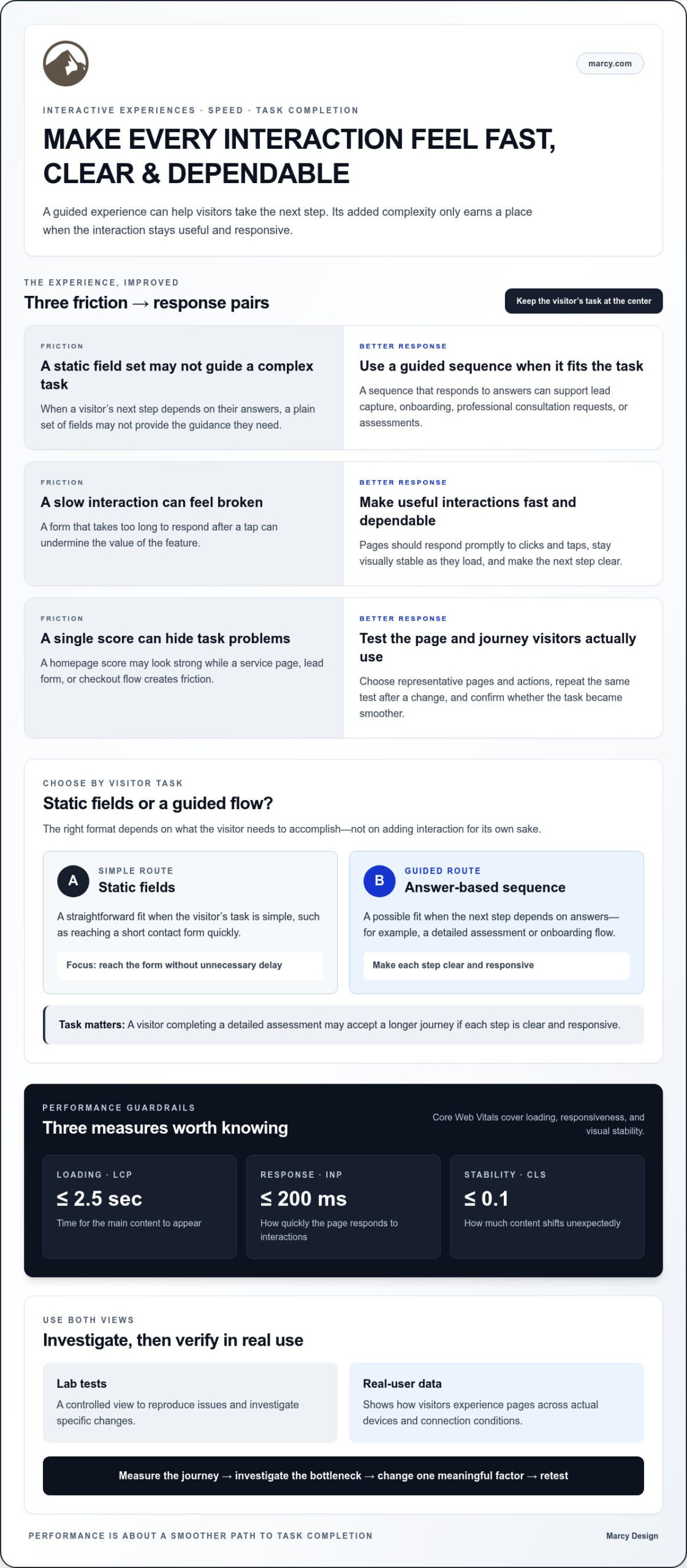
The task matters, too. Someone opening a short contact page expects to reach the form quickly. A visitor completing a detailed assessment may accept a longer journey if each step is clear and responsive. Measure performance in the context of the task, not in isolation.
Which performance measures are worth understanding?
Google’s Core Web Vitals focus on loading, responsiveness, and visual stability:
- Largest Contentful Paint (LCP): How long it takes the main content to appear. A good target is 2.5 seconds or less.
- Interaction to Next Paint (INP): How quickly the page responds to interactions such as taps, clicks, and typing. A good target is 200 milliseconds or less.
- Cumulative Layout Shift (CLS): How much content moves unexpectedly as the page loads. A good target is 0.1 or less.
Lab tests provide a controlled view that can help diagnose issues. Real-user data shows how people experience pages in actual conditions. Neither tells the whole story alone, so use both to guide investigation and confirm improvements. Since screen size and touch interaction affect the experience, include mobile-friendly website design in your review.
How to measure website performance and find the real bottlenecks
Start testing with the pages and actions that matter to your business, not just the homepage. A homepage score can look strong while a service page, lead form, or checkout flow creates friction. Use a repeatable process: choose representative pages, measure them, reproduce the issue, investigate likely causes, prioritize a fix, and test again.
Choose pages and journeys that represent real business activity
Include key landing pages, product or service pages, and the steps visitors take to get in touch or complete a purchase. Test full journeys such as submitting a lead form, moving through onboarding, requesting a professional consultation, or completing an assessment. This reveals where delays interrupt real tasks, not just where a page looks slow in a report.
For each test, record the device, connection conditions, page state, and actions taken. Note whether you tested on a phone or desktop, whether the page was freshly loaded, and which form fields or buttons you used. Consistent conditions make comparisons more meaningful.
Separate symptoms from underlying causes
Google PageSpeed Insights and Lighthouse can highlight areas to investigate. Treat their results as clues, not automatic repair plans. An oversized image may delay important content; a render-blocking resource can hold up the first view; excessive JavaScript may make buttons and forms slow to respond. Confirm which issue affects the visitor’s task before changing the page.
Lab tests provide a controlled way to reproduce problems and compare changes. Real-user data shows how performance varies across visitors’ devices and connection conditions. Use both where available: one helps investigate, while the other can show whether the issue appears in actual use.
A performance score is a diagnostic clue, not the final goal. The goal is a smoother path to task completion. Prioritize issues by visitor impact and business importance, change one meaningful factor at a time, then repeat the same test. Record the measurement and what the visitor can now do more easily. This keeps website performance optimization focused on evidence instead of chasing a score. Google’s practical website performance optimization plan offers further guidance on performance fundamentals.
For a site-wide view, connect these findings to the structure and purpose of your pages. Marcy Design’s website design approach helps align page experiences with visitor needs and business goals.
Interactive experiences versus static forms: balancing engagement and speed
A form can be a simple set of fields, or it can guide visitors through a sequence that responds to their answers. Neither approach is automatically better. A short, familiar request may be easiest to complete on a static form, while a more involved task can benefit from step-by-step guidance. A relevant guided experience can keep visitors engaged and may help them complete a task more readily than a form that presents every field at once. The result depends on the audience and design. Strong website performance optimization considers both interaction quality and how smoothly the experience works.
When a simple static form is the better fit
Keep the experience straightforward when visitors already know what to provide, such as a name and preferred contact details for a basic inquiry. Ask only for information needed for the next step, and leave out scripts or visual elements that don’t support the task. Clear field labels help people understand what to enter; specific error messages show how to correct a mistake without starting over. A simple form works well when the task is simple.
When guided interactions can improve the journey
Guided experiences are useful when the next step depends on a visitor’s needs. A lead capture flow might ask what kind of help someone is seeking, then clarify what information to share. An onboarding process can reveal relevant choices as someone progresses instead of presenting every option at once. For a professional consultation or assessment, follow-up questions can adapt to earlier answers and make the experience more personal. By reducing uncertainty and making the next step clear, this guidance can support engagement and encourage completion.
Before adding interaction, ask whether it meaningfully reduces effort or helps visitors make a decision. Each step, animation, script, and conditional question adds complexity. Keep only what serves the journey, and make sure the experience works smoothly on mobile as well as desktop.
- Purpose: Does the interaction help visitors complete a task or choose a relevant next step?
- Effort: Does each question feel useful, or does it create unnecessary work?
- Complexity: Does the added functionality slow or complicate the experience?
- Measurement: Can you track completion and identify where visitors leave?
Measure the experience rather than assuming a guided version will perform better. Compare completion rates for equivalent tasks, and review where people pause, encounter errors, or abandon the process. Evaluate those outcomes alongside responsiveness and page performance. Interaction quality and performance belong in the same evaluation. The best design makes the visitor’s next step clearer without making the website harder to use.
A practical website performance optimization plan for business sites
Turn test results into a focused improvement plan, not a long list of technical warnings. Prioritize each issue by how much it disrupts visitors, how many important pages it affects, the effort involved, and its connection to business goals. A delay in a lead form or checkout flow may deserve attention before a small score change on a low-traffic page.
Turn performance findings into a focused improvement backlog
Group findings that share a cause. If several pages use the same oversized image or script, addressing that shared issue may improve multiple visitor journeys. Separate user-facing problems, such as a form that responds slowly, from small score fluctuations with little practical effect.
For each priority, record the affected pages, the suspected cause, who will handle the change, and how you’ll judge success. Useful measures might include faster display of key content, smoother form interaction, or improved completion of a business-critical task. This makes website performance optimization manageable and ties technical work to outcomes.
- High priority: Issues that block or disrupt important visitor tasks.
- Next: Shared causes affecting several valuable pages.
- Later: Low-impact issues that don’t meaningfully affect the experience.
Let diagnosis guide the fix. If large images are slowing key content, review their dimensions and delivery. If scripts delay interaction, identify which ones are necessary and whether others can be reduced or deferred. Fonts, caching, and third-party tools may also affect performance, but changing them without evidence can add work or create new problems. Keep elements that serve visitors; optimize or remove those that don’t.
Protect performance as the website evolves
Performance can shift as a site changes. After design updates, new content, plugin changes, or campaign launches, retest representative pages and the journeys they support. Review each new third-party script for its business value and its effect on the visitor experience.
Compare before-and-after results under consistent conditions: use the same device, connection, page state, and steps. Then check that the improvement holds across related pages and that the change hasn’t introduced a problem elsewhere. Track conversion outcomes alongside speed and responsiveness, since a faster page matters most when it also supports the visitor’s goal. For more on connecting site changes to that goal, read about improving website conversion rates.
Build a site around clear priorities and purposeful journeys. Explore website design with Marcy Design to connect user needs, performance, and business goals.
How Marcy Design connects website performance with business goals
Performance matters most when it supports a clear purpose. A website can load quickly and still frustrate visitors if the content is hard to find, the next step is unclear, or an interactive feature creates unnecessary effort. That’s why website performance optimization belongs alongside usability and business goals in the design process. The aim isn’t a score by itself. It’s a website that helps the right visitors move confidently through the tasks that matter.
Make performance decisions part of the design process
Start by understanding what visitors need from each page and what the business needs that page to accomplish. That connection can shape the page structure, content order, calls to action, and choice of interaction. A guided flow may make sense when visitors need help choosing a next step; a direct form may be clearer when the task is simple. Either way, each element should earn its place by making the experience more useful.
Responsive design is part of that equation. A page should adapt to different screen sizes while keeping its content readable and its controls practical to use. A layout that works on a desktop but becomes crowded or awkward on a phone can slow visitors down, even if its technical measurements look good. Marcy Design’s custom website design and mobile web solutions bring user needs, page function, and screen size into the same design process.
During discovery, connect visitor needs and important tasks with measurable priorities. For example, a business might focus on making a key service page easier to use, improving the path to an inquiry, or keeping an essential interaction responsive on mobile. Those priorities give the team a practical basis for evaluating design choices and checking whether changes help.
Move from performance questions to a stronger website
Take a steady approach: measure representative pages, prioritize issues that affect important tasks, make focused improvements, and validate the result. Keep usability and business purpose in view as the website evolves. No single score captures every visitor’s experience, so evaluate technical signals alongside whether people can use the site smoothly.
Marcy Design is a Columbus-based digital agency for businesses seeking a local partner for website design. Its approach centers on aligning user needs with business goals. Good design doesn’t add complexity for its own sake. It gives each page and interaction a clear role.
Explore Marcy Design’s website design services to see how purposeful design can support your website and its visitors.
Make your next website improvement count
Effective website performance optimization isn’t about chasing a perfect score. It’s about measuring the pages and journeys that matter, prioritizing changes that reduce friction, and checking whether those changes help visitors move forward. A fast experience should still feel clear, useful, and responsive, especially when people interact with forms or other guided features.
Keep improving as your site evolves. Test important pages after changes, and weigh performance alongside usability and business goals. Each thoughtful adjustment can make your website easier to use and better aligned with what visitors need to accomplish.
Marcy Design is a Columbus-based digital agency offering custom website design, mobile-optimized web solutions, ecommerce development, and AI integration. Ready to connect your website’s performance with its purpose? Explore Marcy Design’s website design services and take the next step toward a more purposeful website.
Frequently Asked Questions
What is website performance optimization?
Website performance optimization is the process of improving how quickly and reliably a site loads, responds, and stays visually stable so visitors can complete tasks smoothly. It involves more than raising a test score. You might reduce a delay on a service page, make a form respond faster, or prevent content from shifting while someone reads. The right improvements depend on the pages and visitor tasks that matter to your business.
How can I check my website performance?
Start with important pages and visitor journeys, such as a service page followed by an inquiry form. Google PageSpeed Insights and Lighthouse can help identify potential issues and run controlled tests. Compare those findings with real-user data when available, since it reflects experiences across actual devices and connections. Record the page, device, and steps tested, then repeat the same test after a change. Columbus businesses can use this process to focus on the journeys most relevant to their customers.
Do Core Web Vitals affect website performance?
Core Web Vitals measure key parts of the experience: loading, responsiveness, and visual stability. Google’s good-experience targets are an LCP of 2.5 seconds or less, an INP of 200 milliseconds or less, and a CLS of 0.1 or less. These measures help reveal how a page feels to visitors, but they don’t capture every task or page. Use them alongside journey testing and business priorities.
Can interactive website features slow down a website?
Yes. Interactive features can add scripts and other page resources, which may affect loading or responsiveness if they’re poorly optimized or unnecessary. But interactivity can also make a complex task clearer by guiding visitors through relevant choices. Assess both sides: check whether the feature helps people move forward, then test how smoothly it works across devices. Keep the elements that serve a real visitor need and refine those that add friction.
Is a static form better than an interactive form?
Neither format is always better. A short static form often suits a familiar task, such as requesting a callback with basic contact details. A guided form may be more useful when answers shape the next question, as in an assessment or consultation request. Choose based on visitor effort and the purpose of the task, then compare completion and responsiveness. Don’t assume added personalization guarantees more submissions; measure the actual experience.
How often should I optimize website performance?
Review performance regularly and retest after changes that could affect important pages, such as a design update, new content, plugin change, or campaign launch. There’s no single schedule that fits every site. Monitor key visitor journeys and investigate when real-user data or testing reveals a problem. For a Columbus business, focus reviews on the pages and tasks that support its customers, then prioritize fixes by impact and effort.