
 614.224.6226
A full redesign isn’t the only way to modernize outdated business website experiences. Often, the smarter move is to keep what works and improve the parts that make visitors hesitate, get lost, or leave without taking action.
If your site looks dated or feels difficult to update, it’s natural to wonder whether a major overhaul is worth the cost and disruption. Start with a clear plan. Identify the pages and tasks that need attention first, then choose improvements tied to specific business goals.
Look beyond appearances. Clearer navigation, mobile-friendly design, and useful content can help visitors find the next step. You’ll also learn when an interactive experience may be more useful than a basic static form, with examples for lead capture, onboarding, consultations, and assessments.
Shape a more helpful website around real visitor needs, then review whether the changes are doing their job. Modernization doesn’t have to mean starting over. It means making purposeful improvements that move your business forward.
Key Takeaways
- To modernize outdated business website experiences, start by finding where visitors encounter friction rather than assuming you need a complete rebuild.
- Prioritize pages that support inquiries or sales, and connect each improvement to a clear business goal and visitor task.
- Compare static forms with interactive tools to decide whether a more guided experience suits your visitors’ needs.
- Use a step-by-step roadmap that moves from discovery and priority fixes to implementation and review.
- Align design and development decisions with visitor needs so modernization is a strategic investment, not just a visual refresh.
How to tell when an outdated business website is holding visitors back
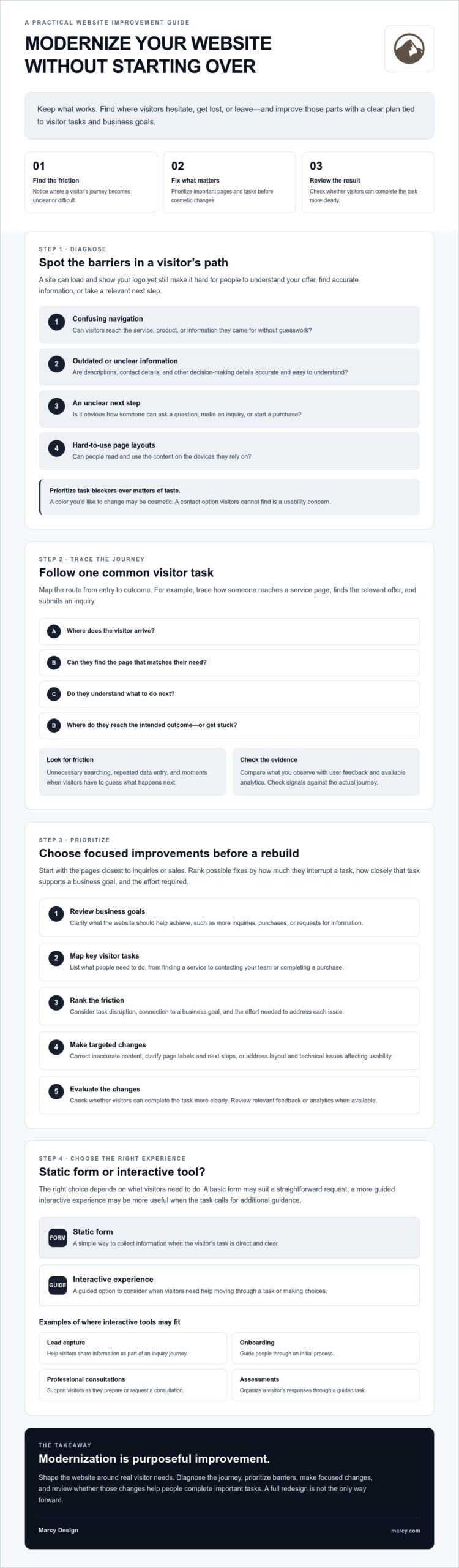
A website can load and display your logo yet still make it hard for prospective customers to get what they need. If visitors can’t quickly understand what you offer, find accurate information, or take a relevant next step, the site may be creating friction even though it technically works.
Look beyond whether the design feels old. Unclear navigation can hide important services. Dated content can leave people unsure whether an offer or detail is still current. A crowded layout can make key information difficult to scan, especially on a phone. Before you modernize outdated business website content, identify which problems affect visitor tasks and business goals, and which are simply matters of taste.
Which website warning signs deserve attention first?
Start with the obstacles closest to an inquiry, purchase, or contact. Can a first-time visitor tell what your business does? Can they find the page that matches their need and understand what to do next? If not, investigate the journey before investing in a visual refresh.
Use this checklist to connect symptoms to visitor needs:
- Confusing navigation: Can visitors reach the service, product, or information they came for without guesswork?
- Outdated information: Are descriptions, contact details, and other decision-making details accurate and clear?
- Unclear calls to action: Is the next step obvious, such as asking a question or starting a purchase?
- Hard-to-use layouts: Can people read and use page content on the devices they rely on? Responsive web design describes an approach where layouts adapt to different screen sizes.
Prioritize issues that block a task or weaken confidence. A color choice you’d like to update may be cosmetic; a contact option visitors can’t find is a usability concern.
How can you tell whether the issue is the design or the journey?
Map one common visitor path from entry to outcome. For example, trace how someone lands on a service page, finds the relevant offer, and submits an inquiry. Note each page, click, and decision. Look for unnecessary searching, repeated data entry, or moments when the visitor has to guess what happens next.
Compare your observations with available evidence. User feedback may reveal that a label is confusing, while analytics may show where visitors leave or which pages they use. Neither signal explains the cause on its own, so check them against the actual journey. If people reach the right page but struggle to understand it, the content or layout may need work. If they can’t find the page, navigation or page structure may be the deeper issue.
This diagnosis helps you target the right fix. A focused change to content, navigation, or a specific page may solve the problem without rebuilding the entire site.
What to modernize on a business website before rebuilding it
You don’t need to replace every page to make your website more useful. A practical plan to modernize outdated business website content and features starts with pages closest to inquiries or sales, then focuses on the barriers that stop visitors from completing important tasks.
Use this five-step process to decide what to address first:
- 1. Review your goals. Clarify what the website should help the business achieve, such as more inquiries, purchases, or requests for information.
- 2. Map key visitor tasks. List what people need to do, from finding a service to contacting your team or completing a purchase. Trace the pages and steps involved.
- 3. Prioritize friction. Rank issues by how much they interrupt task completion, how closely the task supports a business goal, and the effort required to fix them.
- 4. Make focused improvements. Correct inaccurate content, clarify page labels and calls to action, or address layout and technical issues where they affect usability.
- 5. Evaluate the changes. Check whether visitors can complete the task more clearly, and review relevant feedback or analytics when available.
For a broader overview of redesign considerations, including slow loading and search visibility, consult the website redesign guide from Forbes Advisor. Use it as context, then set priorities based on your visitors and objectives.
How do you prioritize website improvements?
Start with high-value journeys, not a list of every detail you’d like to change. If the goal is to generate inquiries, inspect the service page and contact path. For ecommerce, review how shoppers find products and move toward purchase. Separate quick fixes, such as clarifying outdated copy, from deeper design or development work that needs planning.
Which technical and content foundations should you review?
Check key pages on a phone as well as a desktop. Is the text easy to scan? Are buttons and forms straightforward to use? Review whether pages load smoothly, the content reflects current offerings, and basic accessibility needs, such as readable text and clear labels, are considered.
Analytics can help show which pages people visit and where they leave, but the data available depends on how tracking is set up and what it measures. Treat analytics as one source of evidence alongside customer feedback and hands-on testing. A particular platform, score, or technical change isn’t automatically right for every business. If you need help assessing design priorities, explore Marcy Design’s website design services.
Interactive website tools vs. static forms: which helps visitors act?
A static form presents fields for visitors to fill in and submit. An interactive tool responds to their answers, perhaps by showing a relevant follow-up question or guiding them through a sequence. One collects information in a fixed format; the other can shape the experience around a visitor’s needs.
Neither option suits every task. Use this comparison to decide what may work best for your visitors and your team:
| Consideration | Static form | Interactive experience |
|---|---|---|
| Setup | Often simpler for a basic inquiry or contact request. | Needs planning for questions, responses, and user paths. |
| Personalization | Asks the same fields of every visitor. | Can adapt follow-up questions to earlier answers. |
| Engagement | Direct and familiar, with a fixed set of fields. | Can make a multi-step task feel more guided and relevant. |
| Accessibility | Can be easy to use when labels and instructions are clear. | Needs careful design so every step remains understandable and usable. |
| Maintenance | Usually has fewer paths to review as details change. | Questions and branching paths need review as services or processes change. |
For broader context on planning clear, useful pages, see Forbes Advisor’s small business website design best practices. Whatever format you choose, make the purpose and next step clear.
When is a simple static form the right choice?
A short contact form is often enough when someone simply needs to ask a question or request information. Ask only for details that support the next step, and explain what happens after submission. Extra screens or branching questions can add effort without making a straightforward request more useful.
Where can guided interactive experiences make the journey clearer?
Guided tools can help when visitors have different needs or benefit from support along the way. For lead capture, follow-up questions can reflect what a person says they’re looking for. During onboarding, a sequence can help new customers provide essential information in a clear order. For consultations or assessments, focused questions can help visitors organize their needs and understand what comes next.
Relevant questions and easy-to-follow steps can make an interactive experience feel more useful, but they don’t guarantee that more visitors will complete the process. Interaction alone won’t fix a confusing journey. Keep the experience accessible, explain why you’re asking for information, and avoid collecting details that don’t serve the visitor or the business.
Takeaway: Choose the simplest experience that helps visitors complete their intended task.
A practical roadmap to modernize an outdated business website
Keep modernization focused by setting a business goal and a visitor task before changing a page. For example, if the goal is to support more inquiries, define the task as helping a prospective customer understand a service and submit a request. Improve one high-value journey, review what happens, and use what you learn before extending changes across the site.
Work through these five stages:
- Discovery: Gather current page content, brand assets, common customer questions, and available performance data. Document essential features, integrations, and content that must remain available.
- Priority fixes: Choose a page or journey closely tied to an important business goal. Address barriers that make its task unclear or difficult before polishing lower-priority details.
- Guided journeys: Decide whether visitors need a direct route or extra guidance. A simple inquiry may need only a clear page and form; a more involved task may benefit from steps that explain what to provide and what comes next.
- Implementation: Test changes on one high-value journey first. Check the experience on mobile, confirm links and forms work, and make sure essential content and integrations remain available.
- Review: Compare the updated journey with the original goal, then refine it using observations, feedback, and relevant performance evidence.
If mobile use is a priority, review key tasks on a phone rather than assuming a desktop layout will translate well. Check that text is readable, controls are easy to use, and visitors can complete the task without unnecessary effort.
What should you prepare before changing the website?
Make a simple project inventory: what content and functions exist, what should stay, and what needs attention. Identify who approves updated content and who will maintain the site after launch. This helps prevent useful material or important functionality from being overlooked and gives the team a plan for ongoing updates.
How can you review whether modernization is working?
Choose a small set of indicators that match the goal and task. For an inquiry journey, review whether visitors can find the contact step and whether submitted requests are being recorded. For a purchase path, examine whether shoppers can move through the intended steps. Use available analytics carefully: setup and data quality vary, so pair measurements with hands-on checks and visitor feedback.
Review observations over a period that makes sense for your site and activity. If the journey still creates confusion, refine it. Don’t add features simply because they’re available. For help planning a focused website improvement, explore Marcy Design’s website design services.
How Marcy Design can help modernize your business website
Modernization works best when design decisions support a clear business goal and make real visitor tasks easier. Marcy Design is a Columbus, Ohio-based agency offering website design and mobile-responsive web solutions. If you’re looking to modernize outdated business website experiences, start by considering what your site needs to accomplish, what visitors need to do, and which journeys deserve attention first.
That gives a project a practical starting point. Rather than treating the work as a visual refresh alone, identify which pages and functions already serve visitors, where friction appears, and what should be improved. A priority journey might help a prospective customer understand a service and submit an inquiry, or help a shopper find and purchase a product.
What should you look for in a modernization partner?
Look for a team that can connect business objectives with visitor needs, design decisions, and implementation. Ask how it will identify priority pages, preserve useful content, and keep essential site functions available as changes are made. Clear answers help you understand the proposed scope and how the work relates to your goals.
Review Marcy Design’s web design approach as a next step in considering how design can support a more useful website journey.
How can a modernization project support long-term growth?
A well-planned website can adapt as your business and customer needs change. Mobile usability helps visitors complete tasks on the devices they use. Relevant interactive experiences can guide people through lead capture, onboarding, consultations, or assessments when a sequence of questions genuinely helps them. A simple form may still be better when the task is straightforward.
Technology should serve a defined need, not drive the project by itself. AI integration, for example, is worth considering when it addresses a specific visitor or business requirement. A partner should be able to explain the purpose of a proposed feature and how you’ll assess whether it’s useful.
Marcy Design’s website design and development capabilities can support a project shaped around your objectives, priority journeys, and the content and functionality your site needs to retain. To take the next step, discuss your website goals with Marcy Design.
Make your next website improvement count
A successful refresh isn’t measured by how different your site looks. Start by identifying where visitors get stuck, which tasks matter most to your business, and what changes can make those tasks clearer. You can modernize outdated business website experiences without treating a full rebuild as the default: prioritize important journeys, make focused updates, and review how well they work.
Choose forms or interactive tools based on what visitors need to do. A straightforward request may call for a simple form, while a more involved process can benefit from relevant guidance. In either case, keep the experience clear, useful, and easy to follow.
Marcy Design is a Columbus-based website design and development agency offering custom website design, mobile-responsive web solutions, ecommerce development, and AI integration where it fits a defined need. If you’re ready to plan improvements around your business goals and visitor needs, discuss your website modernization goals with Marcy Design.
Start with one meaningful journey. A focused first step can put your website on a clearer path forward.
Frequently Asked Questions
How do I modernize an outdated business website?
To modernize outdated business website experiences, begin with the tasks visitors need to complete and the goals the site should support. Review key journeys, such as finding a service or submitting an inquiry, then fix barriers that make those steps confusing. Update inaccurate content, improve mobile usability, and test focused changes before applying them more broadly. Use visitor feedback and available analytics to guide what you refine next.
Does an outdated website need a complete redesign?
No. A complete redesign may be appropriate if the site’s structure, design, or essential functions prevent visitors from completing important tasks, but age alone isn’t a reason to rebuild. First identify what still works and where people encounter friction. You may be able to improve specific pages, navigation, content, or forms instead. Compare the scale of the problem with the scope of the proposed work before deciding.
What should I update first on my business website?
Start with pages and journeys tied closely to inquiries or sales. Check whether visitors can understand your offer, find relevant information, and take the next step without guesswork. Correct inaccurate or unclear content, then address usability barriers in navigation, layouts, or forms. Rank potential changes by their impact on task completion, relevance to business goals, and effort involved, not by visual preference alone.
Are interactive forms better than static forms for lead generation?
Not in every situation. A short static form can be the clearest choice when someone simply needs to contact your business. An interactive form can adapt follow-up questions to a visitor’s answers, which may make a more involved inquiry feel more relevant and guided. Choose based on the task: keep simple requests simple, and use extra steps only when they help visitors explain their needs or understand what happens next.
Can interactive tools improve website form completion rates?
They may help when questions are relevant, the sequence is easy to follow, and each step gives visitors a clear reason to continue. For example, a guided lead form might ask follow-up questions based on the service a person is interested in. Interaction alone doesn’t guarantee more completions. Keep the experience accessible, ask only for useful information, and review feedback and available performance data to see how it works for your audience.
How can a business website guide visitors without overwhelming them?
Give each page a clear purpose and make the next step easy to recognize. Use familiar labels, concise instructions, and only the information needed for the task at hand. For a straightforward inquiry, a clear contact option may be enough. For a more involved process, break the journey into manageable steps and explain what visitors should expect. Remove features or questions that add effort without helping people make progress.
How do I modernize a website without losing useful content?
Before making changes, inventory existing pages, content, and essential website functions. Mark what is accurate and valuable, what needs revision, and what can be retired. Document integrations and features that must remain available, and decide who will approve and maintain updated content. Businesses in Columbus can explore support from Marcy Design, a Columbus-based agency offering custom website design, mobile-responsive web solutions, ecommerce development, and AI integration where relevant.