
 614.224.6226
What if the website that still “works” is making it harder for customers to take the next step? If you’re wondering how to convince my boss we need a new website, focus your case on the barriers visitors face and the business goals those barriers affect, not just on a dated design.
It’s reasonable for leadership to question a significant investment, especially when the site is online and teams have different ideas about what should change. An evidence-led proposal can move the discussion from personal preferences to customer needs, business impact, and practical priorities. You don’t need to promise dramatic results. Show where the current experience creates friction and explain how a focused improvement could address it.
This article walks through the process: connect website issues to business goals, gather useful evidence, and define realistic measures and ownership. It also explains when a guided interactive experience may serve visitors better than a static form, whether they’re sharing details, starting onboarding, requesting a professional consultation, or completing an assessment. The result is a grounded proposal your team can evaluate and act on.
Key Takeaways
- To show how to convince my boss we need a new website, connect specific website friction to business goals and evidence rather than design preferences.
- Compare static forms with guided interactive experiences to identify where personalization could make important customer tasks easier.
- Evaluate targeted updates, a full rebuild, and delaying action against the same agreed business criteria.
- Shape your proposal around the problem, evidence, user needs, recommended scope, and decision you’re asking leadership to make.
- Turn approval into a practical plan with clear priorities, measures, responsibilities, and user journeys.
How to show your boss the current website is holding business goals back
A website request is stronger when it’s grounded in a business case, not a personal preference about colors, layouts, or trends. A useful business case explains how a problem affects the organization and what decision or investment could address it. For a website, the core idea is simple: link a specific user barrier to a business outcome.
That’s the practical starting point for how to convince my boss we need a new website. Don’t stop at saying the site feels old. Show where a customer, prospect, or employee encounters difficulty, then connect that barrier to a priority such as qualified inquiries, sales support, service efficiency, or customer confidence.
Which website problems matter to leadership?
Group issues by the work they disrupt. A contact path that’s hard to find can make it harder to submit an inquiry. Confusing product or service information can leave prospects without answers sales teams need to provide. Outdated details may create uncertainty, while unclear instructions can lead customers to contact staff for help the site could provide.
Look for recurring examples in customer conversations, sales calls, and support requests. If prospects regularly ask for information that should be easy to find, note the question and where they got stuck. One person’s opinion that the homepage looks dated is weak evidence by itself. A repeated barrier reported by customers or staff points to a specific experience the business can investigate.
How to connect website friction to business goals
Review available analytics alongside what your teams hear. Check whether visitors reach important pages, start or complete key forms, or leave a journey before finishing. Ask sales which website gaps make it harder to qualify or support leads, and ask service teams which questions come up repeatedly. Analytics can show patterns, but not always why visitors behave a certain way, so distinguish observations from assumptions.
Next, map each issue to a priority. Incomplete inquiries may affect lead quality. Repeated requests for basic information may add to staff workload. An unclear onboarding path may make the customer experience more difficult. If the business impact isn’t clear yet, state what evidence is missing and how you’ll collect it. That makes the proposal more credible.
For a broader view of how website decisions can support organizational goals, explore this guide to strategic website design. Keep the discussion concrete: identify the user barrier, summarize what you know, and connect it to an outcome leadership already cares about. For a Columbus organization, that means evaluating the site against the needs of its customers and the goals of the business, not against design trends alone.
Explain why a guided interactive website can outperform static pages
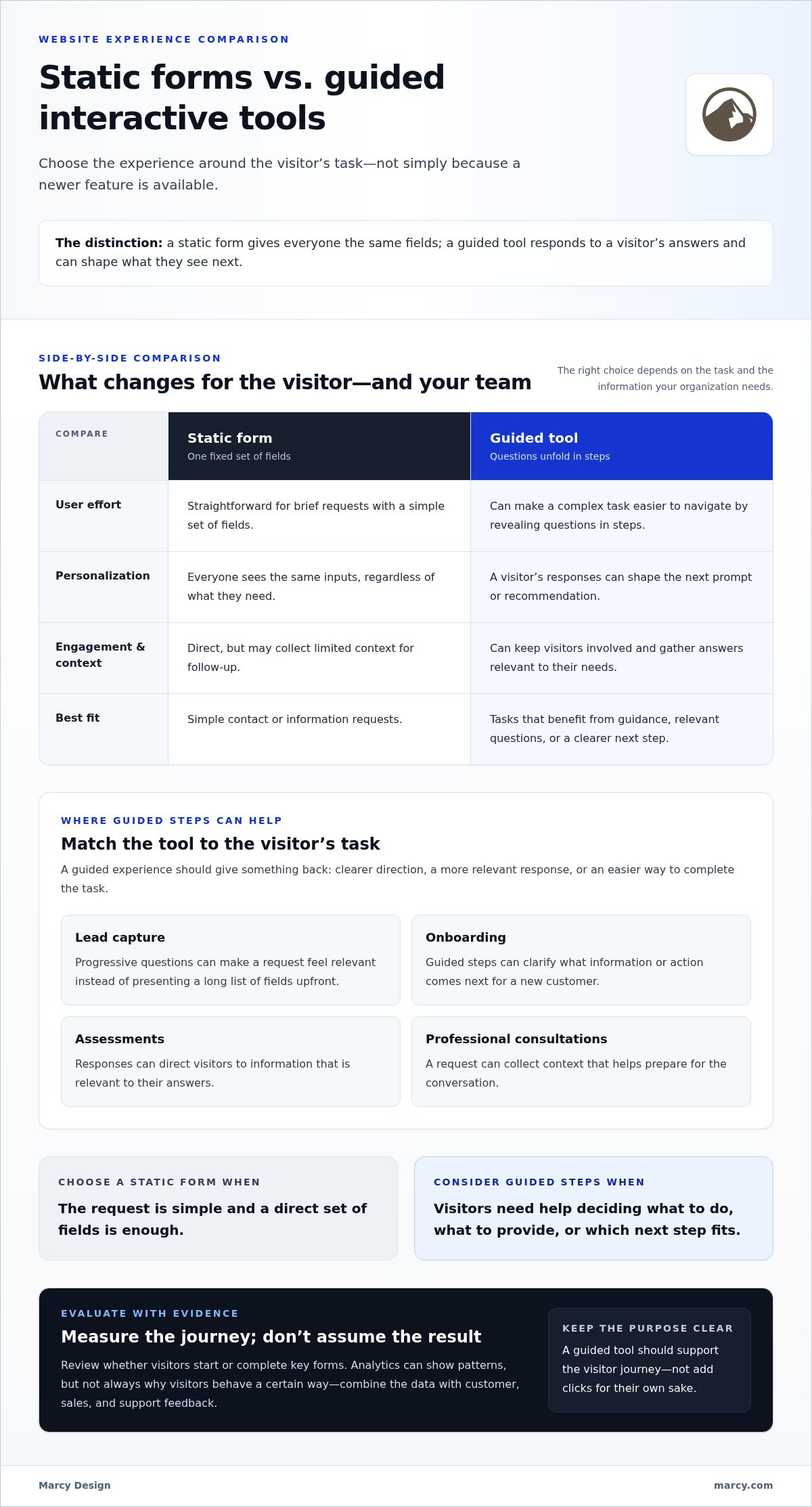
A static form gives every visitor the same fields, regardless of what they need. An interactive tool responds to a person’s answers, guiding them through relevant steps and, where useful, shaping what they see next. This can make the experience feel more personal and help the business collect context that’s useful for follow-up.
Interactive isn’t automatically better. A simple form may be the right choice for a straightforward request, such as sending a message. A guided experience is more useful when visitors need help deciding what to do, which information to provide, or what next step fits their situation. The goal is to make the task clearer and more engaging, not to add clicks for their own sake.
When does a guided website experience make sense?
Start with the visitor’s task. For lead capture, a few progressive questions can make a request feel relevant instead of presenting a long list of fields upfront. During onboarding, guided steps can help a new customer understand what information or action comes next. An assessment can use a visitor’s responses to direct them to relevant information. A professional consultation request can collect context that helps prepare for the conversation.
In each case, the interaction should give something back to the user: clearer direction, a more relevant response, or an easier way to complete the task. Consider how it fits into the broader structure, content and user experience of the site. A tool should support the visitor journey, not feel like a disconnected feature.
How to compare interactive tools with traditional forms
Use a simple comparison to decide whether a guided tool addresses a real user need. The right choice depends on the task and the information your organization needs.
What to compare
Static form
Guided tool
User effort
One fixed set of fields; easy for brief requests.
Questions unfold in steps; can make a complex task easier to navigate.
Personalization
Everyone sees the same inputs.
Responses can shape the next prompt or recommendation.
Engagement and information
Direct, but may collect limited context.
Can keep visitors involved and capture answers relevant to their needs.
Best fit
Simple contact or information requests.
Lead qualification, onboarding, consultations, or assessments that benefit from guidance.
When explaining how to convince my boss we need a new website, frame completion as something to measure, not a guaranteed result. Agree on what success would look like, then review how users respond to the chosen experience. Thoughtful website design services can connect a tool’s flow to the broader experience, keeping each step clear and purposeful.
Address the biggest objection: why replace a site that still works?
“The website still works” is a fair concern. A site can load and display information while making important tasks difficult or failing to reflect how the business serves customers today. Functional is not the same as effective for today’s customers and goals. Make the case for change with documented gaps, not a promise that a new design will automatically improve results.
What evidence suggests the current website needs more than minor updates?
Review important tasks across key pages, devices, and customer groups. Can visitors find current service information, understand what to do next, and complete an inquiry on mobile? Does the site support the business’s current services, sales process, and brand positioning? Record specific examples, such as a recurring customer question or a step employees often need to explain manually.
Look for patterns instead of treating one frustrating visit as proof. Note what happened, who encountered the issue, and which task was affected. If analytics or customer feedback don’t establish the business impact, say so. A credible proposal separates verified problems from questions that still need investigation.
How to present alternatives without overselling a rebuild
Compare three options using the same criteria: whether each addresses the documented issue, supports current needs, and can be managed without avoidable disruption.
- Targeted improvements: Useful when problems are limited and the underlying structure supports the changes. Small fixes may clarify a page or repair a confusing step, but won’t necessarily resolve broader navigation or content issues.
- A broader rebuild: Worth evaluating when friction appears across important journeys or the site no longer reflects the business. It creates an opportunity to rethink structure and experience, while requiring clear scope, ownership, and launch planning.
- Deferring action: Avoids immediate change, but leaves known issues in place. State what the team will monitor and when it should revisit the decision.
If mobile usability is part of the evidence, check whether essential tasks are clear and workable on smaller screens. Mobile-responsive website design can be part of targeted improvements or a wider project, depending on what the review shows.
Address disruption directly. Prioritize essential journeys, name the people responsible for content, approvals, and testing, and set a review point to assess progress against agreed measures. That makes how to convince my boss we need a new website a balanced decision, not an all-or-nothing pitch. Recommend the smallest scope that resolves the documented problem, and be clear about what it won’t fix.
Build a website proposal your boss can evaluate and approve
A strong proposal makes the decision clear. Lead with the business problem, show the evidence, explain what users need, recommend a focused scope, and state exactly what approval you’re requesting. This order helps leadership weigh the value and trade-offs without getting lost in design preferences or a long feature list.
What should a website business case include?
Keep the proposal tied to the organization’s goals and the experience you want to improve. Cover these points:
- Business objective: Name the priority the website should support, such as qualified inquiries, easier customer tasks, or more efficient service.
- Evidence and user need: Summarize what analytics, customer feedback, or staff observations show. Separate confirmed patterns from assumptions.
- Recommended scope: Identify essential changes first. Describe later enhancements separately, including guided interactions only where they help visitors complete a real task.
- Measures and assumptions: Choose indicators tied to the problem, such as qualified inquiries, task completion, or fewer recurring questions. Note dependencies, such as content or stakeholder input, and who will own them.
- Decision requested: Specify whether you’re seeking approval to explore a defined scope, begin a phased release, or move forward with a broader project.
Make the case easy to picture with a simple before-and-after journey. For example, show how a visitor currently struggles to find information or choose a next step, then describe how a clearer page or guided interaction could help. Treat improvement as a hypothesis to evaluate, not a guaranteed outcome.
How to make the proposal easy to review
Put a short summary first, then arrange evidence and supporting detail in the same order as your recommendation. Identify the stakeholders who need to contribute or approve, and explain when the team will review progress. A pilot or phased release can make the decision easier to evaluate: start with an important user journey, assess it against agreed measures, and use what you learn to guide later work.
Keep the scope disciplined. Essential improvements should address the documented problem. Optional features can wait until there’s a clear user need and a way to evaluate them. This turns how to convince my boss we need a new website into a practical approval conversation, with priorities and success measures the team can share. Explore strategic web design to see how website work can connect to business goals.
When you’re ready to move from an internal case to a focused project, custom website design is a practical next step.
Turn approval into a practical website plan with the right partner
Leadership approval is the start of the work, not the finish line. Turn the decision into a shared plan so business goals, customer needs, and project scope stay aligned from planning through launch.
What happens after leadership says yes?
Bring decision-makers and the people closest to customers or day-to-day website tasks together. Agree on what the site needs to accomplish and whom it must serve. Then map the essential journeys, such as finding key information, making an inquiry, or completing a purchase. Prioritize the pages and functions that support those journeys before adding secondary enhancements.
Make ownership clear. Identify who will guide decisions, provide or approve content, and review the experience. Set a practical review approach using measures tied to the approved goals, relevant analytics, user feedback, and stakeholder input. After launch, use what you learn to refine the experience rather than assuming every decision was right from day one.
How Marcy Design can support the next step
Keep the scope tied to the evidence behind your proposal. If a static form handles a straightforward request, it may be the right fit. If visitors need help choosing a path or sharing relevant details, a guided interaction could make that task clearer. Include interactive features when they serve a real user need, and agree on how the team will assess their usefulness.
Marcy Design creates custom websites and mobile-optimized web solutions shaped around an organization’s goals and audience. A project can translate approved priorities into a practical website direction, from essential pages and user journeys to the features that best serve visitors. Bring the business objective, the evidence you gathered, and the outcomes leadership wants the site to support.
You’ve built the case for change. Explore professional website design with Marcy Design to discuss a strategic website project for your organization.
Turn your website case into a confident next step
A strong website proposal starts with evidence, not a design preference. Connect repeated customer friction to a business goal, then compare targeted fixes, a broader rebuild, and waiting against the same priorities. Keep the recommended scope focused, define how you’ll measure progress, and include guided interactions only when they make a real task easier for visitors.
That’s how to convince my boss we need a new website: make the decision practical, measurable, and grounded in what customers and the organization need. Once leadership is aligned, clear ownership and a thoughtful review plan can carry the project from approval to launch.
Marcy Design is a Columbus-based agency specializing in professional website design and mobile-optimized web solutions. Its website and ecommerce expertise is supported by AI-powered digital solutions, bringing strategic options together around your approved goals. Ready to move forward? Explore Marcy Design’s website design services and take the next step.
Frequently Asked Questions
How do I convince my boss to approve a new website?
Show how specific website problems affect business priorities, then present a focused solution. Gather examples from analytics, customer feedback, sales conversations, or support requests. Separate confirmed evidence from assumptions, and explain what the site should help customers do more easily. A practical approach to how to convince my boss we need a new website is to request a clear decision on scope, ownership, and measures, rather than asking leadership to approve a vague redesign.
What are the signs a business needs a new website?
Repeated difficulty completing important tasks is a stronger sign than an outdated visual style alone. Look for visitors struggling to find information, submit inquiries, or use key pages on mobile. Other indicators include outdated content, journeys that no longer reflect current services, and staff repeatedly explaining or working around website limitations. Consider how often these issues appear and whom they affect before deciding whether targeted fixes or broader changes are needed.
How do I prove a new website will improve business results?
You can’t prove future results with certainty, but you can make the proposal testable. Record a baseline using measures tied to the problem, such as qualified inquiries, completion of a key task, or recurring questions to staff. Explain how the recommended change is expected to help, then review analytics and user feedback after launch. Be transparent about missing information, and treat desired improvements as outcomes to evaluate, not guaranteed results.
Should we redesign our website or make smaller updates?
Choose based on how widely the problems appear. If a few specific pages or tasks need attention and the site structure still supports current needs, targeted updates may be enough. If issues appear across important journeys, the structure no longer fits the business, or routine changes are difficult to manage, consider a broader redesign. Compare both options against the same goals, user needs, flexibility, and ongoing maintenance requirements.
Are interactive website tools better than standard forms?
Interactive tools are useful when visitors need guidance or a more tailored next step; standard forms often work well for simple requests. A guided lead-capture flow can ask relevant questions in sequence, while an onboarding or assessment tool can adapt prompts to a person’s answers. The experience should reduce uncertainty and collect useful context, not add needless steps. Review completion and user feedback to learn whether the interactive approach helps.
What should I include in a website proposal to leadership?
Start with the business objective and the user problem the website needs to solve. Add supporting evidence, the proposed scope, essential pages or journeys, and any optional enhancements listed separately. Include assumptions, stakeholders, dependencies, and measures that will show whether the work is helping. End by stating the specific decision you’re requesting, such as approval to plan a phased project or proceed with a defined scope.
How can I make a website project easier for my boss to approve?
Keep the request focused and show a manageable path from approval to review. Prioritize essential improvements, identify who will provide content and make decisions, and explain how the team will assess progress using agreed measures and feedback. A phased approach can help leadership evaluate the work in stages. For Columbus organizations, Marcy Design offers professional website design and mobile-optimized web solutions shaped around business goals.