
 614.224.6226
A platform migration is an operating-model change, not just a new storefront. The right ecommerce platform migration services should account for the products, customer records, orders, integrations, and shopping journeys your business relies on, while creating room to improve the experience.
It’s reasonable to worry about what could go wrong. A rushed or poorly scoped move can disrupt sales, complicate familiar workflows, and weaken search visibility. The decision is not simply which platform to choose. It’s how to plan the transition around your business goals and the experience customers expect.
This guide explains how to compare migration plans, define scope and ownership, and protect essential store data and customer-facing functionality. You’ll also learn how to plan a more useful, personalized shopping experience, from guided product discovery to a smoother path to purchase. The goal is a transition that supports your team behind the scenes and helps customers move forward.
Key Takeaways
- Effective ecommerce platform migration services plan for workflows, integrations, and customer experiences, not just record transfers.
- Use discovery, scope definition, data mapping, implementation, testing, and launch review to bring structure to the transition.
- Choose a phased or consolidated migration approach based on your store’s complexity, dependencies, and operational needs.
- Build a launch checklist that tests essential data and real customer journeys, including lead capture, onboarding, consultations, and assessments.
- Use guided discovery to shape a transition around your goals. Interactive questions can make planning more personal and engaging than a static inquiry form.
Ecommerce Platform Migration Services: What the Project Really Involves
An ecommerce platform migration is the coordinated transition of a store’s data, workflows, integrations, and customer-facing experience to a new platform. It’s a business project, not simply a matter of transferring records. Because E-commerce includes the buying and selling experience, a sound plan considers how customers find products, make decisions, and complete purchases, as well as how your team manages the store.
Migration and redesign are related, but they aren’t the same. Migration moves store operations to a different platform. Redesign changes the site’s look, layout, or usability. A transition can include both, such as moving product details while simplifying navigation. But a new visual design alone won’t address gaps in data, integrations, or workflows. Define the goals separately so the scope reflects what your business needs.
What can an ecommerce platform migration include?
Scope may include product information, customer records, order history, site content, and connections to other business systems. Requirements depend on the platforms involved and how your store operates. Start by listing the data and workflows your team relies on, then decide what to transfer as-is and what to revise. Product descriptions, for example, may move unchanged while category navigation or the path to checkout is improved.
For search visibility, include current page URLs in the inventory. Identify pages whose addresses will change and plan how customers and search engines will reach their new locations. Also list the integrations that support daily operations, such as the systems that share product, order, or customer information. This makes dependencies easier to spot before implementation begins.
When does a platform transition make business sense?
A platform change is worth considering when the current setup creates operational friction, no longer supports business needs, or makes it difficult to deliver the customer experience you want. Start with a specific problem, such as a workflow that’s hard to manage or a storefront that can’t support a planned improvement. A new platform should address that problem, not simply follow a trend.
Then consider what the next experience should make easier for customers and staff. A guided product discovery flow, for instance, can adapt questions to a shopper’s needs, while a static page presents the same information to everyone. The same approach can inform lead capture, onboarding, professional consultations, or assessments. Step-by-step interactions can make the experience more relevant and engaging than a basic form. For future-facing store ideas, consider how AI-powered digital solutions could support your broader business goals.
With ecommerce platform migration services, the central question is not only what data can move. It’s whether the new store can support essential workflows and customer journeys, and make the improvements your business needs next.
How Ecommerce Migration Planning Protects Data and Customer Journeys
A clear process gives your team a shared view of what’s moving, what needs to keep working, and how everyone will confirm the new setup is ready. Migration validation is the process of checking transferred information and essential customer workflows against agreed project requirements. That means reviewing records and testing real tasks, not relying on a storefront that merely looks complete.
What should discovery establish before migration work begins?
Discovery turns business needs into a practical plan. Before implementation, document the goals for the change, the current platform’s dependencies, customer touchpoints, and operational constraints. Map how work happens today, from updating product information to managing orders and supporting customers. Then decide what to preserve, simplify, or improve instead of carrying every existing process forward by default.
Make the inventory specific. For each data type, note where it lives, how your team uses it, and what information must be available in the new store. For workflows, record who performs each task and which systems are involved. This helps distinguish essential requirements from habits that can be reconsidered during the transition.
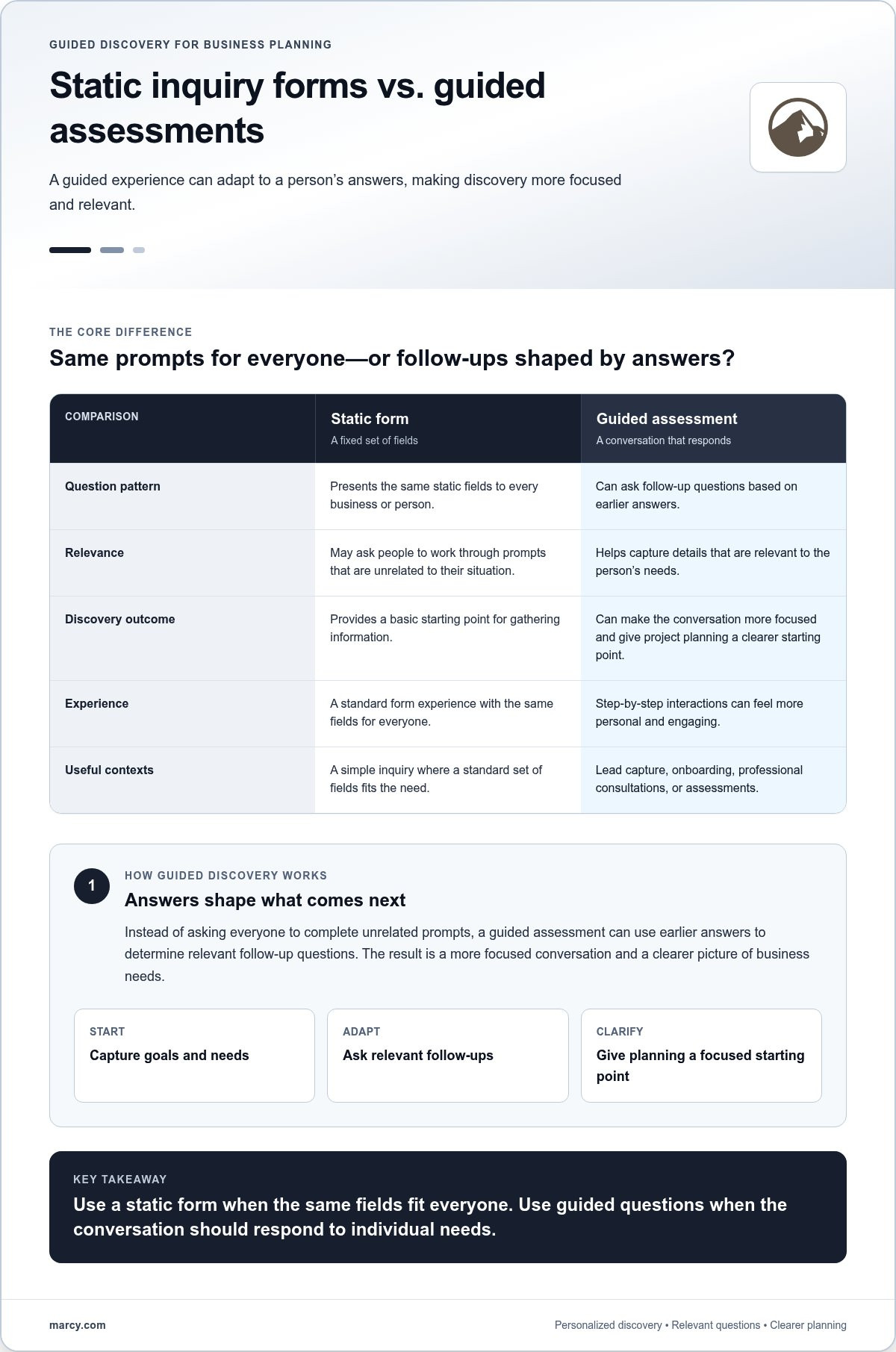
A guided assessment can make discovery more useful than a generic form with the same static fields for every business. Follow-up questions can respond to earlier answers, helping teams capture relevant details without asking everyone to work through unrelated prompts. That makes the conversation more focused and gives project planning a clearer starting point.
How should teams test migrated data and workflows?
Use the agreed scope as the test plan. Review representative product, customer, and order records to see whether important information transferred as intended. Check fields your team needs to use, not just whether a record appears in the new platform. Then test tasks customers and staff rely on, such as finding a product, completing a purchase, or managing an order, along with the connected systems included in the project.
Plan the work in deliberate stages:
- Discovery: Set business goals and inventory platform dependencies, customer touchpoints, and operating constraints.
- Scope: Agree on what data, workflows, content, and integrations the transition includes.
- Mapping: Document how current information and processes correspond to the new setup.
- Implementation: Configure the planned transition and bring the agreed elements into the new environment.
- Testing: Compare selected records with requirements and try key customer and staff workflows.
- Launch review: Review outstanding issues, responsibilities, and readiness before proceeding.
Give each issue an owner and a clear next step. Record what failed, assign a fix, and repeat the relevant check before approving the next stage. For example, if an order record is missing information your team needs, document the gap, correct the mapping, and test another representative record. This creates a visible path from discovery to launch review instead of leaving data questions and workflow gaps until the last moment.
Well-planned ecommerce platform migration services align data checks with the customer and operational tasks the new store must support. For a transition that also calls for a tailored storefront experience, explore custom website design as part of the planning conversation.
Comparing Ecommerce Migration Approaches: Match Scope to Business Complexity
There isn’t one migration approach that suits every store. The right plan depends on how many systems and workflows are involved, what customers need to do during the transition, and how ready your team is to support the change. Compare the options against your operations, not just the amount of data being moved.
| Consideration | Phased migration | More consolidated transition |
|---|---|---|
| Dependencies | Useful when integrations, data types, or workflows need to be handled in a deliberate sequence. | May suit a simpler setup with fewer dependencies to coordinate. |
| Testing needs | Allows teams to review parts of the experience as work progresses, then use those findings to guide later stages. | Concentrates validation around a coordinated transition, so agreed requirements and checks need to be clear. |
| Operational coordination | Requires teams to coordinate across stages and keep track of what is changing at each point. | Requires teams to prepare together for a more unified change across the agreed scope. |
Use these approaches as planning models, not fixed rules. Consider the integrations and data types involved, the complexity of store workflows, who can review and approve work internally, and how customers may be affected. These factors help determine how work should be grouped and where extra coordination is needed.
When is a phased ecommerce migration a better fit?
A phased approach can help teams manage dependencies and review outcomes progressively. For example, a new lead-capture flow or customer onboarding journey could be tested as a defined part of the project before it’s introduced more broadly. The sequence should reflect actual business operations and project scope, not an assumed schedule. Each stage needs clear ownership and agreed checks before the next begins.
When might a more consolidated transition suit the project?
A coordinated transition may fit when the scope is simpler, workflows are less interdependent, and the team is ready to review the new experience together. That doesn’t mean skipping validation. Teams still need to check the agreed data, customer tasks, and connected systems. If workflows have many dependencies or internal reviewers aren’t ready, the project may need more staged coordination.
Discovery can shape the approach, too. A static intake form asks every business the same questions, which can leave important context out or burden people with irrelevant fields. A guided, interactive assessment can adapt follow-up questions to a store’s answers, making the discussion more personal and focused. That can help people stay engaged and complete the information needed for useful planning.
As you define the destination experience alongside the migration approach, explore ecommerce website development services for a related perspective on planning the storefront.
Ecommerce Platform Migration Checklist: Prepare for Launch and Beyond
A launch checklist turns agreed requirements into practical checks. It helps your team confirm that important information is present, customer tasks work as expected, and everyone knows who reviews issues and approves readiness. Keep the checklist tied to your project scope, so it’s clear what must be tested before launch and what needs follow-up afterward.
What should be tested before an ecommerce migration goes live?
Walk through the store as a customer and as a member of your team. Check browsing and product selection, then test any steps where customers share information or need guidance. For interactive flows, confirm that prompts are easy to understand, follow-up questions make sense, and each answer leads to a useful next step. A static form presents the same fields to everyone; a guided experience can tailor the path to a person’s responses, making the process more relevant and engaging.
Include real customer and business scenarios in your checks:
- Lead capture: Confirm customers can submit their details and understand what happens next.
- Onboarding: Test whether new customers can follow the intended steps without confusing or irrelevant prompts.
- Professional consultations: Check that the questions gather useful context and guide people toward the next step.
- Assessments: Make sure responses lead to relevant follow-up information or actions.
Also check the details that are easy to overlook: links between pages, mobile layouts, key page addresses, and the systems connected to the store. Have the people who use each workflow review it, document issues, and confirm fixes. A shared checklist makes responsibilities visible and keeps a small problem from being mistaken for a completed test.
What deserves attention after the platform transition?
Launch is a milestone, not the end of the review. Revisit the migration requirements agreed during planning, observe customer feedback, and check that store workflows continue to serve the team. Pay particular attention to whether lead capture, onboarding, consultations, and assessments work as intended in real use.
Measure outcomes against goals chosen before launch. For a guided flow, track how many people start and complete it, then compare those results with a relevant static alternative where possible. This can show whether personalization is helping customers move forward, without assuming it will raise completion rates. Use feedback and observed results to prioritize refinements, clarify confusing prompts, or adjust a journey that isn’t guiding people effectively.
Strong ecommerce platform migration services include a clear view of what success means after launch, not just a transfer plan. If you’re shaping the destination experience alongside your checklist, plan your ecommerce website design around the customer and team tasks it needs to support.
Choosing Ecommerce Platform Migration Services in Columbus: Your Next Steps
A productive migration discussion starts with your business, not a generic platform checklist. Before exploring ecommerce platform migration services, capture what the new setup needs to support and what the current store makes difficult. That gives the project conversation a useful foundation.
What information makes an initial migration discussion more productive?
Gather a few essentials first:
- Business goals: Note what you want the transition to improve, such as easier store management or a more helpful shopping experience.
- Current setup: Identify your existing platform, major workflows, essential integrations, and known dependencies.
- Important information: List the product, customer, order, and content data the business relies on.
- Customer journeys: Bring examples of steps that should remain familiar, as well as points you’d like to simplify or improve.
This preparation doesn’t need to be a technical specification. It’s a way to make discovery more relevant. A static inquiry form asks everyone the same questions, while a guided conversation can adapt to your answers, explore priorities, and clarify details that matter to your store. The result is a more personal, focused starting point than a one-size-fits-all questionnaire.
How can a migration support a stronger ecommerce experience?
Use the platform decision to consider both the customer experience and the work your team handles every day. For customers, that may mean making product discovery and shopping easier on mobile. For your team, it may mean supporting essential store workflows more clearly. The right priorities depend on your business, so connect each proposed change to a need you’ve identified.
Think beyond the product page, too. A guided lead-capture flow can ask relevant follow-up questions instead of presenting every visitor with the same static fields. Onboarding can help new customers understand what to do next; a consultation or assessment can collect useful context before a conversation or recommendation. These experiences can make interactions more personal and engaging. Define what success should look like, then review those outcomes after launch rather than assuming a new feature will automatically improve them.
Marcy Design is a Columbus-based digital agency offering ecommerce development and tailored digital solutions. Bring your goals, workflows, and customer journeys into a project discussion, then explore custom website design services for a business-focused destination experience.
Make Your Next Ecommerce Move With Confidence
A platform transition works best when it starts with clear business goals. Define what your store needs to support, map the data and customer journeys that matter, and choose a project approach that fits your workflows and dependencies. Then validate the information and key tasks against agreed requirements before and after launch.
The right ecommerce platform migration services should help you plan beyond the transfer itself. Consider how the destination experience can make shopping easier on mobile, support your team’s operations, and create more relevant customer interactions. Guided experiences can adapt to what people need instead of presenting everyone with the same static fields.
Marcy Design is a Columbus-based digital agency with a history dating to circa 1986, bringing ecommerce development, custom web solutions, AI-powered solutions, and mobile-responsive web design together to support business-focused digital experiences.
Ready to define what your transition should accomplish? Discuss your ecommerce platform plans with Marcy Design and take the next step toward a store experience built around your goals.
Frequently Asked Questions
What do ecommerce platform migration services typically include?
Ecommerce platform migration services typically cover planning and moving agreed store information and workflows to a new platform. Depending on the project, that may include product details, customer records, order history, site content, and integrations with other business systems. The work also involves defining what the new storefront must support and testing important tasks. Scope varies with the platforms involved and how the store operates, so begin with clear business requirements.
How do I choose ecommerce platform migration services for my business?
Choose a migration plan that starts with your goals, store operations, customer journeys, and essential data, rather than treating migration as a simple transfer. Compare how the scope addresses integrations, testing, launch responsibilities, and the experience you want customers to have. For Columbus businesses, Marcy Design brings ecommerce development and custom web solutions together with local agency experience. A focused discovery discussion can help shape a plan around your business.
Can an ecommerce platform migration preserve customer data and order history?
Customer data and order history can be included in a migration plan, but accurate transfer depends on the agreed scope, how records are mapped between platforms, and how results are checked. Identify which information your team needs, then review representative records in the new environment against those requirements. Include customer and order details in validation rather than assuming a successful platform change means every record is complete and usable.
How long does an ecommerce platform migration take?
There isn’t one fixed duration for an ecommerce platform migration. The work depends on the store’s data, workflows, integrations, source and destination platforms, and the amount of testing and review required. A store with a straightforward scope may need a different plan from one with interdependent systems and custom processes. Discovery helps clarify the work involved and establish a project plan based on actual requirements, without relying on a generic timeline.
Will migrating ecommerce platforms affect my customers?
A platform transition can change what customers see or how they complete tasks, so plan around the journeys they rely on. Test activities such as browsing products, selecting an item, submitting information, and completing a purchase in the new environment. Identify launch roles and review steps in advance, and check customer feedback after the change. Careful planning and validation help teams prepare for customer-facing changes, but they shouldn’t be treated as a guarantee that no issues will arise.
Should I redesign my ecommerce store during a platform migration?
Redesigning during migration can make sense if the current store’s layout or customer experience is part of the problem you want to solve. Migration and redesign are separate areas of work, though their scope can overlap. Decide what should stay familiar, what needs improvement, and what the new platform must support. Keeping those goals distinct helps you plan data and workflow changes alongside design decisions, rather than assuming a new platform automatically requires a complete visual overhaul.
How can interactive tools improve an ecommerce migration?
Interactive tools can make discovery and customer journeys more tailored than static forms or pages. A guided assessment can adapt follow-up questions to someone’s answers, while a basic form presents the same fields to everyone. For a store, interactive lead capture, onboarding, professional consultations, or assessments can provide clearer prompts and relevant next steps. During planning, use these examples to identify which experiences to preserve, improve, and test on the new platform.